 OpenAI
 Perplexity
Running a WooCommerce store is exciting, but increasing sales often feels like a moving target. Competition is fierce, customer expectations are rising, and even a small flaw in your strategy can hurt conversions. To truly increase WooCommerce sales, you need more than good products.
In this guide, we’ll share eleven actionable WooCommerce sales tips designed to help you boost revenue, improve conversion rates, and build sustainable growth. From optimizing product pages to running smart promotions, these tactics will help you grow your WooCommerce store sales efficiently and effectively.
Why Optimize WooCommerce to Increase Sales?
WooCommerce gives you everything you need to start selling online, but success depends on how well your store is optimized. Without the right setup, even the best products can struggle to attract attention or convert visitors.
Optimization helps you uncover weak spots in your store that silently reduce conversions. By fine-tuning these elements, you can improve WooCommerce conversion rates and encourage repeat purchases.
Optimization is an ongoing process and not a one-time fix. Each improvement, no matter how small, compounds over time to boost WooCommerce revenue and strengthen customer trust.
11 Ways to Increase WooCommerce Sales
1. Set up an SMTP System
One of the most overlooked ways to increase WooCommerce sales is ensuring your store’s emails actually reach customers. Every email—order confirmations, shipping updates, password resets, and promotional messages—helps maintain trust and guide customers through the buying journey.
Yet, by default, WooCommerce uses PHP mail to send these emails, which is highly unreliable. Many web hosts block PHP mail due to spam concerns, so critical messages often end up in the junk folder or never arrive at all.
When customers don’t receive order confirmations or shipping updates, they start questioning your store’s reliability. Missed cart recovery emails mean lost sales opportunities. Therefore, an SMTP plugin, such as Post SMTP, is vital.
SMTP connects your WooCommerce store to a dedicated email service—such as Gmail API, SendGrid, Resend, or Amazon SES. Instead of relying on your web host’s built-in mail function, it uses authenticated mail servers with proper DNS records (SPF, DKIM, and DMARC). This ensures your emails are verified, trusted, and delivered directly to the inbox rather than flagged as spam.
Setting up an SMTP system is one of the best things you can do for your WooCommerce store because it improves both deliverability and the customer experience.
Consistent and trustworthy communication strengthens your brand credibility, reduces refund-related confusion, and creates a smoother post-purchase experience—all of which directly boost WooCommerce revenue.
The good news is that setting it up is simple. Post SMTP makes the process beginner-friendly.
Once installed, you can connect your store to a mailer of your choice, run a test email, and immediately see delivery improvements.
2. Optimize for Local Search Results
If your WooCommerce store has a brick-and-mortar shop, a pickup location, or serves a specific city, optimizing for local search is a powerful way to increase WooCommerce sales.
Even if you sell purely online, targeting local keywords (like “gourmet coffee beans in “a specific city) can draw in a highly motivated customer base. People often search for products with local intent right before buying to get faster delivery.
Local Search Engine Optimization (SEO) focuses on getting your business to appear in map results and local pack listings when a customer searches for a product “near me.” These are high-intent searches. For example, 46% of all Google searches have local intent, and a massive 28% of those local searches result in a purchase.
To boost WooCommerce revenue from local shoppers, start by setting up and optimizing your Google Business Profile (GBP). Ensure your Name, Address, and Phone number (NAP) are consistent across all online listings, including your WooCommerce contact page.
Furthermore, use location-specific keywords on your product and category pages to signal to search engines that you serve a particular area.
Moreover, encourage your local customers to leave online reviews. Positive reviews are a key factor in local ranking. A strong, consistent local presence helps you connect with nearby customers who are ready to buy, leading to quick and high-value conversions.
3. Redefine Checkout Experience
A complex or confusing checkout process is one of the biggest reasons for lost sales in e-commerce. This complexity, often called friction, increases the shopping cart abandonment rate.
When users feel confused or frustrated, they are unlikely to complete their purchase. Globally, the average cart abandonment rate across all industries is a staggering 70.22%, meaning that over 7 out of 10 shoppers leave without buying the items they added to their cart. This represents billions in lost revenue annually.
A leading cause of this abandonment is a checkout process that is too long or complicated. Nearly one in five (18%) US online shoppers have abandoned a purchase due to a tricky or overly long checkout experience.
Every extra field or confusing step creates a barrier, turning an eager buyer into a frustrated drop-off. For customers, a confusing checkout equals a lack of trust and an easy exit.
Key Strategies to Streamline Checkout and Boost Sales
To turn more browsers into buyers, you must focus on reducing checkout friction and creating a seamless path to purchase.
- Minimize Form Fields: Only ask for the bare minimum of essential information, such as name, address, and payment details. Research shows that an ideal checkout flow can be as short as eight form fields.
- Offer Guest Checkout: Always offer a Guest Checkout option for speed and convenience, and then suggest optional account creation after the purchase is complete. Approximately 25% of shoppers abandon their cart because a site requires account creation before purchase.
- Provide Multiple Payment Options: Shoppers have different preferences. Catering to this diversity by offering various methods—like major credit/debit cards, digital wallets, and BNPL solutions—is critical.
- Ensure Mobile Optimization: With the majority of online shopping now happening on phones, a responsive, fast-loading, and easy-to-navigate mobile checkout is a must.
- Be Transparent About Costs: Nothing kills a sale faster than a surprise. Extra costs that are too high, especially shipping fees, are the number one reason shoppers abandon their carts, cited by nearly 39% of US online shoppers. Clearly display all costs, including taxes and shipping, upfront to build trust and prevent last-minute shock.
- Implement Trust Signals: Security concerns are another key friction point, leading 19% of shoppers to abandon their orders. Use security badges (like SSL certificates and payment provider logos) to reassure customers that their personal and payment data is safe.
- Use Autofill and One-Click Options: Implement browser Autofill and one-click checkout to speed up the process for returning customers.
4. Incorporate Appropriate Keywords
Keywords are the words and phrases people type into a search engine like Google or an e-commerce platform like Amazon to find your product. Using the right keywords helps search engines understand what your product is and show it to the interested shoppers.
You need to use a mix of keyword types to be successful.
- Short-Tail Keywords: These are broad, general terms, usually one or two words, like “running shoes” or “coffee maker.”
- Pro: They have a very high search volume, indicating that many people search for them.
- Con: They are very competitive and have a low conversion rate because the shopper is often just browsing, not ready to buy.
- Long-Tail Keywords: These are longer, more specific phrases, typically three or more words, like “waterproof running shoes for women” or “small single-serve coffee maker for office.”
- Pro: They are less competitive and have a higher conversion rate because the shopper knows exactly what they want and is closer to buying. A high percentage of all Google searches are long-tail keywords, meaning made up of three or more words.
Where to Use Keywords?
You should place your keywords strategically across your product pages.
- Product Title (H1 Tag): This is the most important place. Your title should be descriptive, clear, and include your most valuable primary keywords.
The best practice is to keep your title under 50–65 characters so it shows up fully in search results and must include the targeted keyword, preferably at the beginning of the title.
- Product Description: Use your main keywords, synonyms, and related long-tail keywords naturally throughout the description.
87% of customers feel product content is the most important factor when deciding to buy an item online. Hence, use short paragraphs and bullet points to make the description easier to scan and read.
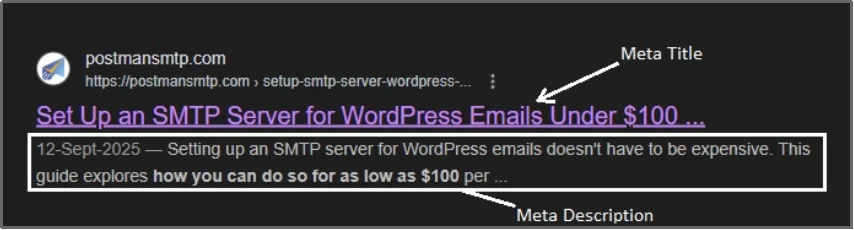
- Meta Tags: This includes the page’s SEO title and meta description. These snippets help shoppers decide whether to click on your link from the search results page.
Meta titles and meta descriptions are the title and a tiny description of the webpage you see on the Search Engine Result Pages (SERPS) of a search engine. Here’s an example:
- Image Alt Text: This is the text you add to your product images. It helps search engines understand what the image is about.
Image SEO is a significant and vital part of a successful SEO strategy. Especially when you are working on a visual-focused project, like running an eCommerce store.
You can use any SEO plugin, such as Yoast SEO, AIOSEO, RankMath, etc., to successfully add alt texts to images.
5. Improve Your Store’s Performance For Search Engines
A slow website or one that looks broken on a phone will severely hurt your online store. Search engines like Google now prioritize user experience when ranking your store. Therefore, optimizing for speed and mobile use is essential for boosting revenue.
Prioritize Mobile-First Indexing
The vast majority of people browse the web on their smartphones. Because of this shift, Google uses the mobile version of your website as the main standard for indexing and ranking. This is called Mobile-First Indexing (MFI).
Over 64% of all global web traffic comes from mobile devices, highlighting the need for optimization. If your mobile site is slow, hard to read, or hides important content that the desktop site has, you will lose rankings. Ensure your website uses a responsive design so that the content and layout adjust seamlessly to any screen size.
Focus on Website Speed
Every second your WooCommerce store takes to load, you lose sales. Slow speeds lead to higher bounce rates and lower conversion rates. In fact, a one-second delay in mobile load time can result in a 20% drop in conversion rates.
Other studies show that a mere 0.1-second improvement in load time can lead to an 8.4% increase in conversions for e-commerce stores. Therefore, to increase sales, you must make your pages lightning-fast. Use tools like Google’s PageSpeed Insights to see what is slowing you down.
As a general guideline, here’s what you can do to improve your WooCommerce speed right away.
- Compress Images: Large product images are a major speed killer. Compress them without losing too much quality.
- Use Caching: Implement caching to temporarily store a version of your pages so they load faster for returning visitors.
- Minimize Code: Reduce and combine your website’s CSS and JavaScript files to make them load more efficiently.
6. Use the Power of User Generated Content (UGC)
One of the most effective ways to increase WooCommerce sales is by leveraging content created by your customers, known as User-Generated Content (UGC).
UGC includes product reviews, photos, videos, and social media posts from real people who have used your products. This content is highly valuable because it serves as social proof and builds trust more effectively than traditional marketing.
Customers trust their peers, not just brands. When potential buyers see real people enjoying a product, it removes doubt and encourages them to buy.
Consumers find UGC 9.8x more helpful than influencer marketing. And E-commerce stores that use UGC see an 18% increase in revenue.
To effectively use UGC, focus on reviews and visual content.
- Prioritize Customer Reviews: Ensure your WooCommerce store actively collects and prominently displays product reviews and star ratings. These are critical pieces of information for shoppers. Display reviews directly on the product page, and consider using rich snippets to show star ratings in Google search results. This makes your link stand out and improves your Click-Through Rate (CTR)
- Integrate Visual Content: Encourage customers to share photos and videos of your products in use. Create a branded hashtag on social media (like Instagram or TikTok) and feature the best customer content on your product pages or a dedicated gallery page.
7. Implement Loyalty and Referral Programs
Loyalty and referral programs are powerful strategies to increase WooCommerce sales and encourage sustainable, long-term growth. It costs far less to keep an existing customer than to acquire a new one. These programs focus on rewarding repeat business and encourage customers to bring new shoppers to your store.
Focusing on existing customers is one of the quickest ways to boost WooCommerce revenue. Loyal customers spend more, shop more often, and act as free brand advocates. Increasing customer retention rates by just 5% can increase profits by 25% to 95%.
Moreover, it has been studied that repeat customers are more valuable than a new one. They spend 67% more on average than first-time customers.
Tips for Programs to Grow WooCommerce Store Sales
- Start a Loyalty Program: This program rewards customers for every purchase they make. You can use a points system where customers earn points for money spent, which can then be redeemed for discounts or free products later. Moreover, you can offer tiered rewards, like a “VIP” status, for the highest-spending customers. This makes them feel special and encourages them to reach the next spending level.
- Launch a Referral Program: It encourages existing, happy customers to refer friends, family, or followers to your store. The most effective setup is a two-sided reward. For example, offer the existing customer a 10% off coupon for a successful referral, and give the new customer a 10% discount on their first purchase.
8. Use Schema Markup for Products
Adding Schema Markup to your WooCommerce products is a powerful way to make your listings stand out on search engines. It directly helps improve WooCommerce conversion rates. Schema Markup is not visible on your website, but it is a special code that you add to your HTML to help search engines like Google better understand the content on your page.
When search engines read the Schema code, they can display enhanced search results called rich snippets. For product pages, these rich snippets typically include key information right on the search results page:
- Star Ratings and Reviews: Showing a product’s average rating (e.g., 4.5 out of 5 stars).
- Price: Displaying the current price.
- Availability (Stock): Shows if the item is “In Stock” or “Out of Stock.”
Showing this crucial information before a shopper even clicks dramatically improves your link’s appearance.
When a shopper sees the price, stock status, and a 5-star rating right away, they are much more likely to click. This brings highly qualified traffic to your store, making the visitors you get more likely to purchase, thus helping to boost WooCommerce revenue.
In fact, rich snippets can increase your search results’ Click-Through Rate (CTR) by up to 30%.
While adding raw code can be complex, many modern WooCommerce themes and SEO (Search Engine Optimization) plugins (like Yoast or Rank Math) automatically add the necessary Product Schema Markup for you. You just need to ensure all your product fields—like price, Stock Keeping Unit (SKU), and rating—are filled out correctly in your WooCommerce dashboard.
9. Utilize Colors Theory
The colors you use on your WooCommerce store are powerful psychological tools that influence how visitors feel and whether they choose to buy. This is called Color Theory in marketing, and it can directly impact your WooCommerce conversion rates.
The goal is to use colors to guide the customer’s eye, create trust, and trigger specific actions.
One of the most important colors is the one used for your Call-to-Action (CTA) buttons. The color of this button should stand out clearly from the rest of your page, a technique known as the “isolation effect.”
If your website is mostly blue and white, a bright, contrasting color like orange or green for the “Buy Now” button can increase its visibility and click rate.
In fact, a Performable changed a key button from blue to red in 2011, which resulted in a 21% increase in conversions.
Beyond CTA buttons, different colors evoke specific emotions that can either build or hurt trust.
Blue is often associated with trust, security, and professionalism, which is why banks and tech companies often use it. Green is frequently linked to nature, health, and often signifies growth or “go” (like a traffic light), making it a great choice for CTA buttons. Yellow can convey optimism and attention, but too much can be overwhelming.
By carefully choosing colors that align with your brand’s values, you create a more positive shopping experience, which helps to boost WooCommerce revenue.
10. Maximize Order Value with Strategic Product Offers
A highly effective way to boost WooCommerce revenue is to increase the average value of every order, known as Average Order Value (AOV). This involves making smart product recommendations at key moments when the customer is already in a buying mindset.
You can do this by showing relevant, higher-value items (upsells) or related accessories (cross-sells) on the most important pages of your store.
The Psychology of High-Intent Offers
Major retail giants, including Amazon, use this method constantly because the data proves it works.
When a customer has committed to a purchase, they are far more receptive to adding another small item.
This psychological principle is why you see gum, candy, or magazines placed near the checkout counters at physical stores. They leverage the moment of purchase intent. By introducing the right product suggestions at the right time, you can effectively increase WooCommerce sales without attracting new visitors.
A report suggests that product recommendations, such as upsells and cross-sells, account for an average of 10% to 30% of e-commerce site revenue.
Strategic Placement for Optimal Results
To truly improve WooCommerce conversion rates, these offers must be placed strategically at three high-intent locations. Here’s where to place them.
- On the Cart Page: When the customer reviews their cart, suggest a slightly upgraded version of an item they already added (upsell) or a frequently bought-together accessory (cross-sell). For example, if they added a camera, suggest a better model or a necessary memory card.
- On the Checkout Page: This is the final moment before payment. Keep recommendations small and highly relevant here like low-cost, impulse-buy items, such as a one-click add-on for a product warranty or a gift-wrapping service.
- On the Thank You/Order Confirmation Page: Even after the purchase is complete, you can still maximize the order value. You can offer a limited-time, post-purchase discount on a related item. Because they have already completed the transaction, the customer feels positive and is often open to a quick, valuable second purchase.
By leveraging powerful page-building tools within WooCommerce, you can customize these pages to feature compelling product grids, display limited-time offers using countdown timers, and provide exclusive discount coupons only visible at this stage. This level of customization ensures that the offers are always relevant, maximizing the chance of getting a second, impulse item added to the order.
11. Leverage Scarcity and Urgency Tactics
To convert customers who are simply browsing, you need to motivate them to act immediately.
Scarcity and Urgency are powerful psychological tactics that trigger the Fear Of Missing Out (FOMO), directly helping to increase WooCommerce sales. These tactics encourage shoppers to complete their purchase now, rather than leaving the site and forgetting about your product.
Scarcity is based on the idea that the product is limited in quantity. When customers believe an item is about to sell out, they feel a pressing need to buy it. This increases the product’s perceived value.
For example, you can display real-time low stock notifications on your product pages, such as “Only 3 left in stock!” or “Selling fast! 10 people have this in their cart.”
On the other hand, we have urgency. It is based on a limited time window, meaning the offer, discount, or deal is about to expire.
For instance, use a countdown timer for sales events (e.g., “Sale ends in 4 hours!”) or offer limited-time free shipping. This sets a clear deadline, forcing the shopper to make a decision. You can make it even more effective by implementing flash sales.
By combining limited inventory alerts with time-bound discounts, you create compelling reasons for shoppers to click the “Buy Now” button, significantly improving your overall conversion rates and helping you to grow WooCommerce store sales.
Send Transactional Emails That Get Delivered Successfully!
You now have eleven specific, actionable strategies designed to permanently increase WooCommerce sales and boost WooCommerce revenue. Running a successful online store isn’t about making minor, consistent improvements across the entire customer journey.
Remember that optimization is an ongoing process, not a one-time fix. Start by tackling the easiest areas first. Setting up a reliable SMTP system (Simple Mail Transfer Protocol) to ensure email deliverability is a quick win that immediately builds trust.
Next, focus on fixing your high-friction areas, such as simplifying your checkout process to reduce cart abandonment drastically.
By consistently applying these WooCommerce sales tips, you can shift your store from struggling to profitable. The key is to start testing and measuring the results today. Every improvement you make to speed, trust, and clarity will compound over time, leading to sustainable growth and higher conversion rates.
Get Post SMTP now and free yourself of worrying about deliverability, so you can focus on the other ten strategies to increase your WooCommerce sales radically.