 OpenAI
 Perplexity
It’s pretty frustrating when you install a WordPress plugin specifically for handling emails on your site, and the emails just won’t deliver.
You set everything up, your customer places an order, but the confirmation email never arrives. Or a user tries to reset their password and gets no email at all.
Customers expect an email as soon as they place an order. Just think how scammy it would seem if a customer were to place an order, the amount is charged and deducted from their account, yet there is no confirmation email.
It can happen with many plugins, including all that send transactional emails for any reason; MailPoet is no exception.
The good news is, the solution is pretty straightforward. With three steps, you can quickly get MailPoet back on track and ensure your customers actually receive the necessary emails.
Before jumping right into it, let’s take a moment to understand the service.
What is MailPoet?
MailPoet is a WordPress plugin designed to send both newsletters and transactional emails, such as order confirmations, password reset links, and account notifications, directly from your WordPress dashboard.
What makes it appealing is the simplicity. Instead of relying on third-party platforms, you can control email inside WordPress. It integrates with your existing site, allowing you to design emails with a drag-and-drop editor.
MailPoet has two modes for sending emails. One is their dedicated service, and the other is using WordPress’ default email system. The next section will explore where the problem occurs.
Why MailPoet Emails Fail to Send
As we learned, MailPoet has two modes of sending emails.
The first one is through their dedicated service called MailPoet Sending Service (MSS), and the other one is using the WordPress default mailer, which is the wp_mail() function.
There can be issues with either one you choose. Here’s how.
Using MailPoet Sending Service (MSS)
MailPoet actively monitors the quality of emails being sent through its system, MSS.
If your emails trigger too many spam complaints or generate a high number of bounces, the service may temporarily suspend your account. This is part of their anti-spam policy to ensure only high-value content reaches inboxes.
For example, using a free email address such as Gmail or Yahoo as your “From” address can increase the likelihood of emails being flagged.
The same applies if your content looks suspicious, includes blacklisted links, or comes from a role-based address like info@domain.com; in these cases, MailPoet will block or pause sending to protect overall deliverability.
Using WordPress’s Mail Sender
However, if you go with the WordPress default mailer, authentication protocols can hinder the deliverability.
To comply with modern email security rules, all email servers must adhere to specific security protocols that enable receiving servers to evaluate the authenticity of incoming emails.
Here are the common security protocols that the default mailer lacks but are necessary for higher deliverability rates:
- DKIM: Stands for DomainKey Identified Mailer. It attaches a cryptographic signature to your emails, proving that they were not altered in transit. Without it, receiving servers cannot verify that the message truly came from your domain.
- SPF: Sender Policy Framework validates whether the sending server is authorized to send emails for your domain. Without SPF, your emails may appear to be spoofed, leading providers to reject or filter them.
- DMARC: Domain-based Message Authentication, Reporting, and Conformance tells receiving servers how to handle unauthenticated emails. Without DMARC, your domain has no policy in place, which makes it easier for providers to block questionable messages.
The absence of these protocols is a critical weakness. Even if your content is legitimate and your list is engaged. Emails sent without authentication can fail to make it into inboxes.
This technical limitation explains why MailPoet, like other WordPress plugins relying on wp_mail(), often struggles with consistent deliverability, causing critical messages, such as order confirmations or password resets, to never reach your customers.
Let’s jump into the solutions!
Fix MailPoet Not Sending Emails Issue: 3 Easy Steps
As we learned, if the authentication protocols are in check, emails can easily reach the intended inbox.
The easiest way to do so is to replace the default mailer with a third-party, reliable one that handles the authentication protocols correctly. Let’s do it in three easy steps.
Step 1. Install Post SMTP
First, we must install Post SMTP, the best SMTP plugin for WordPress.
Navigate to your admin dashboard → Plugins → Add Plugin → Search for Post SMTP using the Search Plugins bar.
Install and activate.
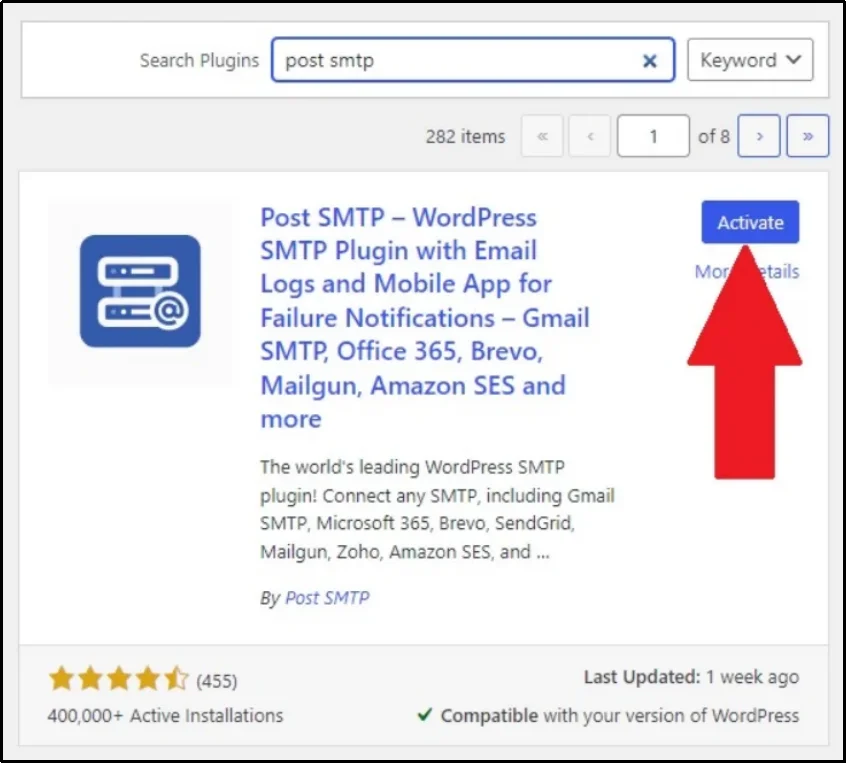
Post SMTP is a freemium plugin, offering adequate features in the free version. However, for advanced features, consider premium plans that fit your requirements. Check out the prices and features.
Later in this article, we will explore what you can do with Post SMTP Premium. Before that, let’s jump into the second step for fixing this issue.
Step 2. Set Up a Reliable Third-Party Mailer
Post SMTP replaces WordPress’s default mailer with a third-party mailer of your choice. This ensures every plugin or theme that relies on wp_mail() function to send emails, uses your newly set third-party mail instead.
Although it sounds complicated, it’s actually fairly easy with Post SMTP.
Navigate to the plugin’s settings and click “Setup the wizard.”
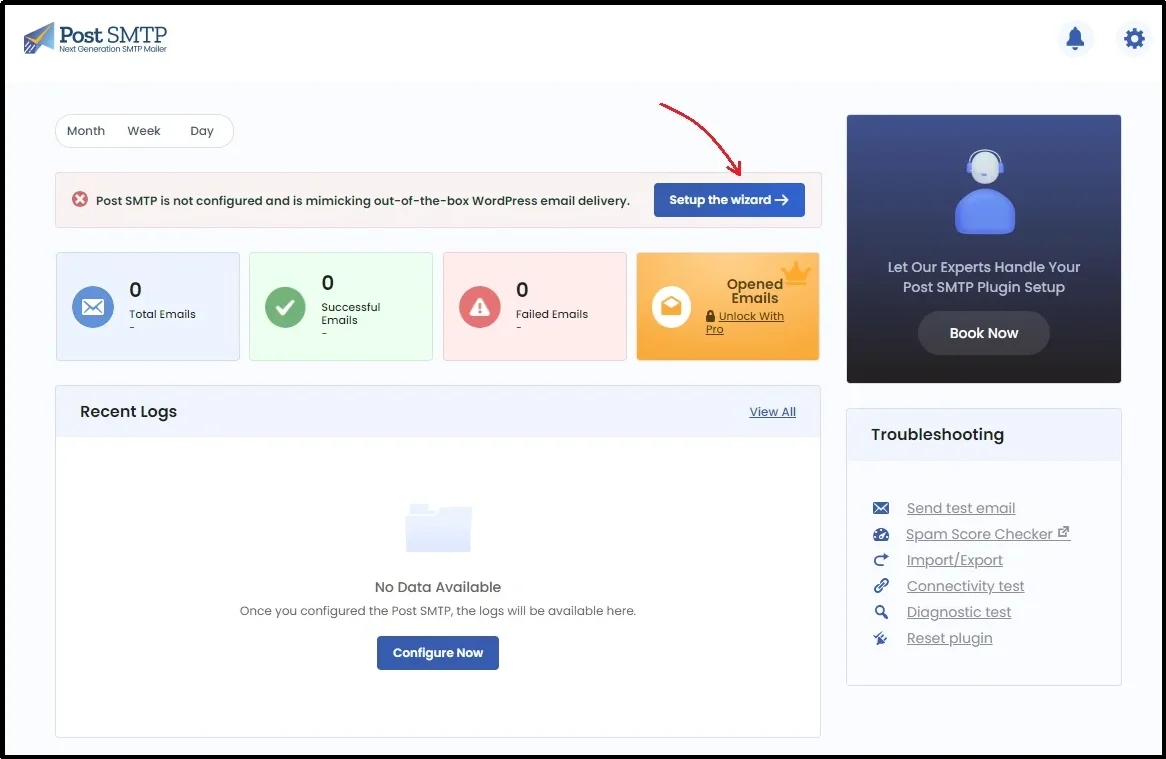
You will see this screen, allowing you to choose your favorite mailer to replace the wp_mail() function with.
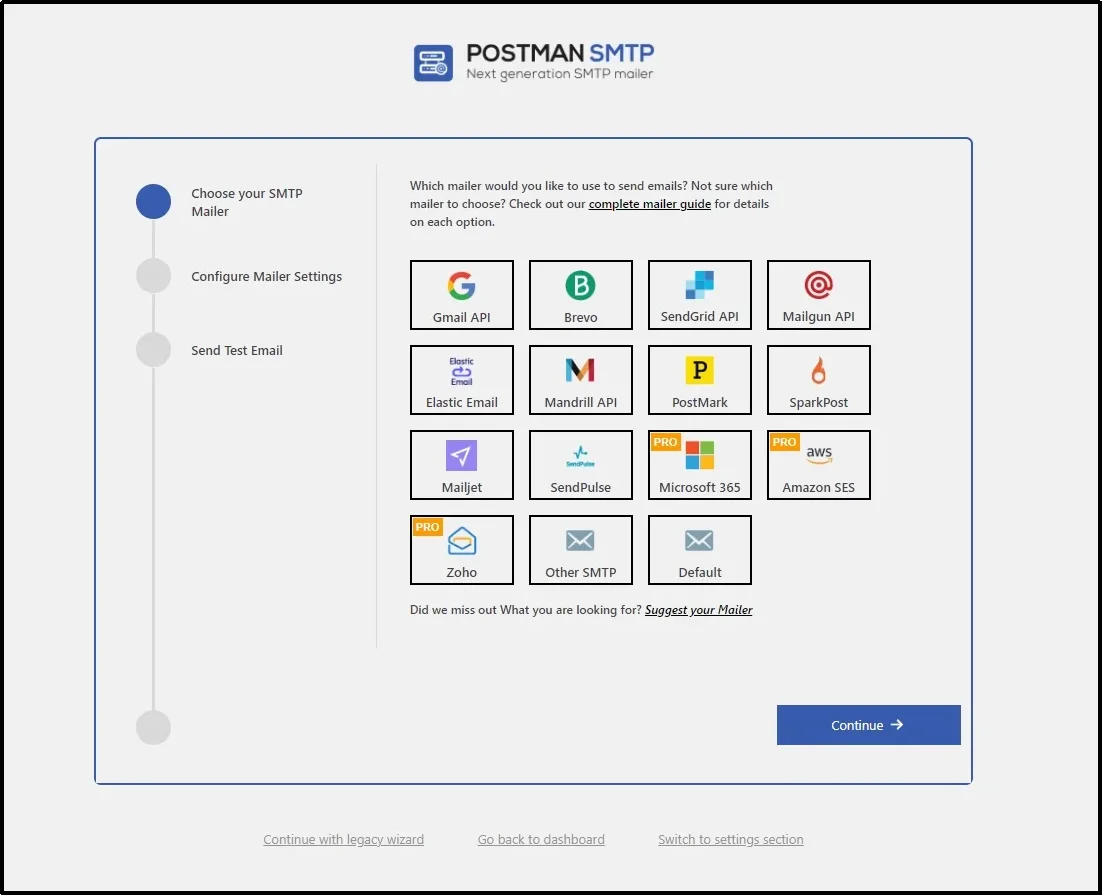
Choose the mailer of your choice. Get their API keys, enter them in the plugin, and there you go!
The exact steps differ depending on your choice of the mailer. Documentation for every mailer is available here; simply use the search bar to find the mailer you wish to use.
Afterward, you can send the test message to ensure the email delivers. If it does so, you will see this success message as shown in the image.
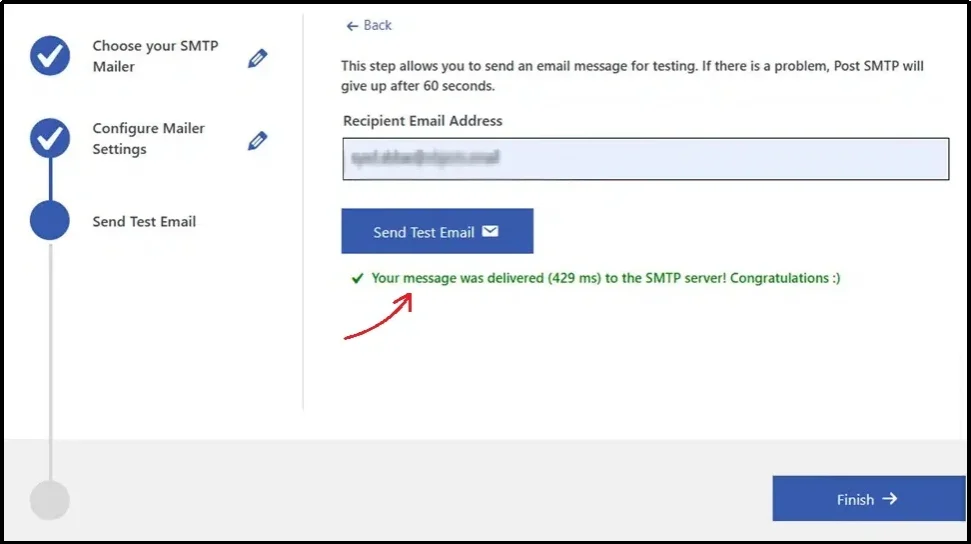
If the message was successful, we can proceed to the next step.
Step 3. Force From Email
Every email has two important identifiers: the From Name and the From Address.
The From Name is the label that appears in your recipient’s inbox, showing who the message is from, while the From Address is the actual email address tied to your domain.
For example, an email might appear as “Sarah from MyStore” with the address hello@mystore.com. Both of these elements play a key role in how recipients recognize and trust your messages.
The problem occurs when different plugins or themes on your site use different From Names or From Addresses. This inconsistency can confuse mail servers and even trigger spam filters, leading to delivery failures.
By forcing all plugins and themes to use a single From Name and From Address, you create uniformity across every email sent from your site.
Here’s how to do it with Post SMTP, navigating to the Post SMTP’s settings → Email Settings → Message tab → Type the from name and from address in the respective input boxes and check the “Prevent themes and plugins from changing this” box.
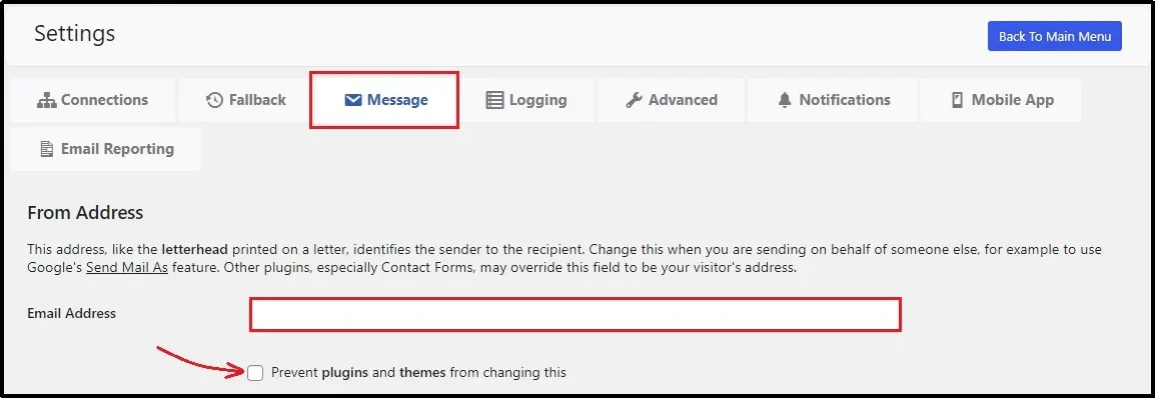
That’s how you can force every email on your site to have a consistent From name and address.
Now head back to MailPoet and send the emails freely, with peace of mind that almost every one you send will hit the intended inbox.
Do Much More With Post SMTP Pro!
Fixing MailPoet email delivery with Post SMTP is just the beginning. If you want to take your email reliability and management even further, Post SMTP Pro unlocks a range of advanced features designed for professionals and growing businesses.
With Secondary SMTP Connection, you don’t need to worry about a mailer failing to send email because you can easily set up a backup mailer that automatically resends the failed messages.
The Pro plan also gives you access to all Pro mailers (Microsoft 365, Zoho, and Amazon SES), allowing integration with top-tier email services. Combined with a dedicated mobile app, you get instant failure notifications, full email logs, and even the option to resend failed messages on the go.
To track performance, the Email Reporting and Tracking feature provides detailed health reports and open tracking data, so you can measure how well your emails are performing.
Finally, with priority support, you can be confident that any issues will be resolved quickly.
Final Thoughts
Email deliverability issues can be particularly discouraging when your customers never receive their order confirmations, password resets, or other important transactional emails.
With MailPoet, these problems usually stem from either strict anti-spam policies or the limitations of WordPress’s default mailer. These challenges can be fixed by using Post SMTP.
By installing the plugin, setting up a reliable third-party mailer, and unifying your From Name and From Address, you give your emails the best chance of reaching customers’ inboxes consistently.
Pair that with the extra features in Post SMTP Pro, and you have a complete solution for handling WordPress email delivery with confidence.If you want complete peace of mind and more control over your WordPress email delivery, Post SMTP Pro is well worth considering. Save up to 80% now by switching to the lifetime offer, where you only have to pay once! Check it out here.