Ninja Forms SMTP
Achieve 99.99% Email Delivery Success Rate For Sites With Ninja Forms

Trusted by 400K +
website owners

4.7/5 stars on
wordpress.org

14-day money back
guarantee

Did you know?
A majority of marketers—84%—use form submissions to capture leads.
Post SMTP improves your email deliverability for more effective conversions.
5-Minute Setup & Zero-Code Implementation

Install Plugin
Download and install Post SMTP from the WordPress plugin directory or upload directly to your site.
Connect SMTP Mailer
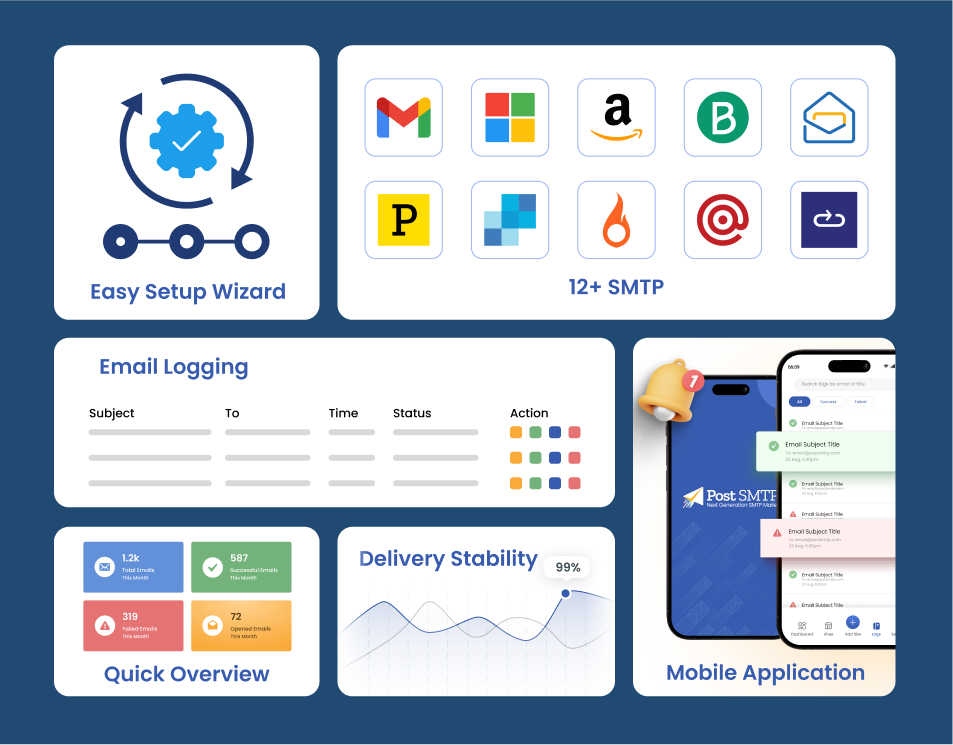
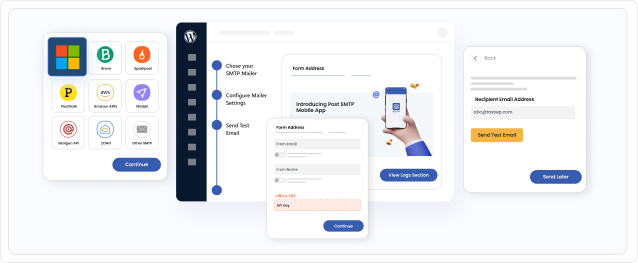
Upon plugin activation, run the Quick Wizard to set up SMTP through a choice of 15+ integrations or a custom server.


Send Test Email
Inside Post SMTP, you have the ability to check your setup. Just a test email to verify if everything’s fine.
Monitor Logs Easily
See delivery status, timestamps, and recipient info of all the transactional emails sent by Post SMTP.


Get Instant Alerts
Receive real-time alerts of delivery failures on email, SMS, Slack, Teams, or through push notifications.
Our Post SMTP Plugin has Featured on







Post SMTP Mobile App
Monitor Emails On The Go
68% of small businesses use mobile apps to run their operations. That’s why Post SMTP created a dedicated mobile app that puts you in full control. Monitor email delivery, access detailed logs, instantly resend failed emails, and manage multiple sites—all from your phone, anytime and anywhere.


SMTP Features for Ninja Forms Users
Up to 800% more opens and clicks on your transactional emails

15+ SMTP Mailers
Unlock reliable inbox placement for your WordPress emails. Post SMTP integrates with a powerful lineup of SMTP mailers, including One-Click Google SMTP, Microsoft 365, Amazon SES, Zoho, Brevo, Resend, Maileroo, and many others. Turn every email into a high-deliverability touchpoint.
Connect Custom SMTP
Every web admin has a plan. In some cases, webmasters prefer to use their own mail server. Post SMTP facilitates this by allowing you to connect to your mailing server through the “Other SMTP” option. Simply enter the correct credentials to establish the connection, then test the setup to ensure successful email dispatch.

Backup Mailer
It is always good to have an alternative. With the Backup Mailer feature enabled, your emails will automatically reroute through a secondary SMTP if the main one encounters issues, preventing any missed messages. Don’t forget to enable failure alerts to track issues and keep your emails flowing without a hitch.

Insightful Dashboard
Keep an eye on the data points that matter to you the most. With Post SMTP, you have a comprehensive and easy-to-use interface to monitor your emails. Track delivery success, inspect detailed logs, identify failures, and analyze critical statistics through a seamless dashboard experience.

Detailed Email Logs
Capture detailed information on every WordPress email sent—status, timestamp, subject, sender, recipient, and error messages. Filter to find failed emails and view complete transcripts for troubleshooting purposes. Export or remove logs as necessary to maintain clean records.

Auto Retry
Sometimes, things have a way of not working. With the Auto Retry feature, you can specify the number of attempts Post SMTP will make to resend a message. Additionally, every failed attempt is logged for your review and analysis later.
MainWP for Post SMTP
Manage SMTP Across Multiple Sites
MainWP extends Post SMTP’s powerful email management across all your WordPress sites with unmatched ease. Sync and configure SMTP settings for multiple sites from a single dashboard. Receive instant email failure alerts via email, SMS, push notifications, or Slack. Track all your emails in one place and resend failed messages quickly, ensuring seamless and reliable email delivery everywhere.

3 Business Benefits You Unlock With Post SMTP

Higher Engagement
When site visitors receive timely confirmations, updates, or responses without delays, they feel valued and are more likely to return, submit additional forms, or complete purchases, directly increasing session times and repeat visits.

Continuous Growth
Continuous business growth with Post SMTP starts from something simple: your emails actually arrive. You lose fewer customers to friction and confusion. Post SMTP gives you the confidence to build a scalable business with timely updates.
Timely Support
Post SMTP has a dedicated team of WordPress and SMTP experts who can assist you in solving any email delivery problem with your website or online shop. Just open a support ticket whenever something goes wrong.
Don’t Just Take Our Word for It
See What Other WordPress Users Have To Say

Great Plugin. Glad I tried something New!
I have previously used the other top 2 SMTP plugins for mail, but I found support not always there, and making things work can be a pain. These guys have been great. The documentation is excellent, and when I did have a question, they answered IMMEDIATELY with a confirmation that they were on it and my issue was resolved in no time at all, which is great as my clients are typically email dependent businesses (aren’t we all).
Highly recommend this plugin.
AARU.CA

Post SMTP is very reliable and easy to use
I manage over 150 websites and I can trust Post SMTP to not only get email from the websites where it needs to go, but also send me notifications when something isn’t working. I use it in conjunction with SMTP2go.com as the server. This is a very reliable combination to deliver consistent quality.
Suzi Wilson

I have been using the plugin for many years and no Complaints
I have been using the plugin for many years on multiple websites and it has worked flawlessly. The free version has very powerful features like secure Google API integration for SMTP only access and email logging which helps greatly when troubleshooting email issues. The support is also great and timely!
Petrus4

SMTP like a boss
I discovered this plugin while looking for an alternative to Fluent SMTP, which conflicts with the checkout of a WooCommerce site I manage.
In addition to solving the problem, it opened up a world of amazing features and an unmatched level of control. The notification through an alternative channel when an email delivery fails is also gold.
Clearly the dev knows his stuff. I am considering purchasing a Pro license.
masvil

Great Customer Service
I had a very hard problem to diagnose, but Aqib Khan had the skill and tenacity to stick with it until the problem was solve. Hats off to him and the Support Team
Michael Seip

Prompt, friendly and accurate.
We have been using the Post SMTP plugin from WP Experts for some time on our website making sure our email messages and notifications get to where they are supposed to! A couple of days ago I needed to locate a copy of an invoice – Aqib’s response to my call for help was prompt, friendly and accurate. Definitely a recommendation!
outdoorsqueensland
FAQs
Still have a question? Check out our frequently asked questions on the right or contact us directly.
WordPress SMTP Plugin That Simply Works
With 10+ SMTP integrations on one-click, a dedicated mobile app and dozens of features, Post SMTP ensures your WordPress site sends emails without fail.