



























If you’ve been waiting for even more options to send WordPress emails reliably, we’ve got some exciting news for you. With the release of Post SMTP v3.5.0, we’re welcoming a brand-new email service provider, Emailit, to our growing list of supported mailers.
But that’s not all—this update also brings PHP 8+ compatibility, UI enhancements, and a round of important bug fixes that make Post SMTP more stable and dependable than ever.
Let’s dive into what’s new in this release.
Meet Emailit: The Newest Post SMTP Mailer
Post SMTP already supports 15+ popular SMTP mailers, and with v3.5.0, we’re thrilled to add Emailit to the mix.
Why Emailit SMTP?
Emailit is a modern email delivery platform built to make transactional email reliable and hassle-free. Whether it’s password resets, order notifications, form alerts, or client messages—Emailit is designed to send your messages fast (≈ 6 seconds to inbox on average).
- Simple Setup: Use either SMTP credentials or their API—both are supported out of the box.
- Scalable Sending: For high-volume sites, Emailit supports dedicated IPs ($300/year) to help you preserve sending reputation.
- Reliable Delivery: All sending domains must be verified with SPF and DKIM, and invalid addresses are suppressed automatically.
- Cost-effective Pricing: Emailit starts as low as $1 per 10,000 emails, making it attractive for sites that don’t need a high-volume plan.
And with Post SMTP, integrating Emailit means you get all of these perks inside your WordPress dashboard—no messy setup, minimal friction, and more control over your email pipeline.
How to Set Up Emailit with Post SMTP
Getting started with Emailit inside Post SMTP is quick and simple:
- Create an Emailit account and generate your SMTP credentials or API key.
- Verify your sending domain in Emailit for authenticated delivery.
- In WordPress, go to Post SMTP → Dashboard → Setup Wizard and select Emailit as your mailer.
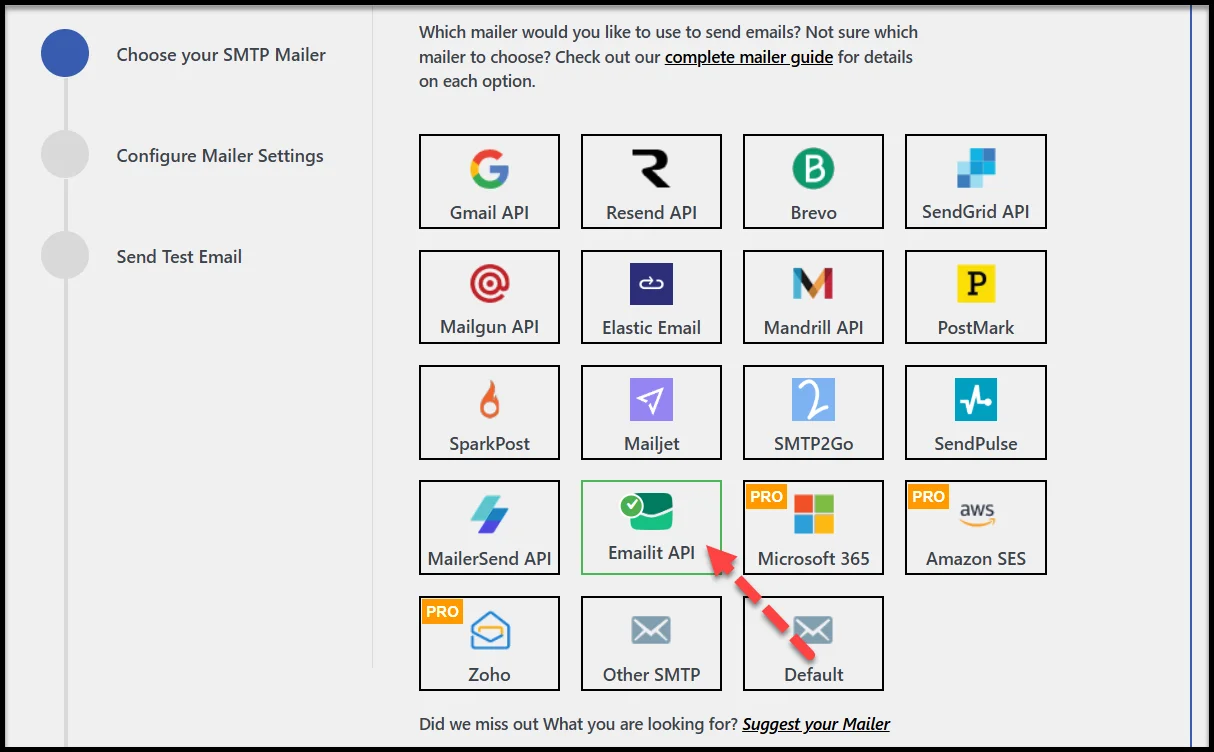
- Enter your From Email, From Name, and paste in your Emailit credentials.
- Send a test email to confirm everything is working.
And that’s it—your WordPress site is ready to send emails with Emailit through Post SMTP.
👉 Full step-by-step instructions are available in our Emailit setup documentation.
Other Improvements in Post SMTP v3.5.0
While Emailit integration takes the spotlight, this release also focuses on refining the plugin with enhancements and fixes that enhance performance across the board.
Here’s a quick look at what else is new in v3.5.0.
🔧 Tweaks
- The Test Email button in the wizard now disables while sending, preventing accidental duplicates.
- Gmail’s scope has been refined for improved compatibility and security.
⚡ Improvements
- Post SMTP is now fully compatible with PHP 8+, delivering faster performance and future-ready support.
- The dashboard widget has been refreshed for a cleaner, more modern look.
🛠️ Fixes
- We fixed the fallback mailer so it works as expected.
- SendGrid attachments now send properly.
- Resending emails to multiple recipients has been restored.
- Several PHP warnings and errors have been cleaned up, including the getFromEmailAddress() bug.
These updates polish the plugin, so you can count on Post SMTP to handle your WordPress emails with less friction and fewer interruptions.
Update to Post SMTP v3.5.0 Today
The launch of Post SMTP v3.5.0 marks another big step forward in making WordPress email delivery easier, faster, and more reliable. With Emailit integration, PHP 8+ support, and fixes to common issues, this release is designed to give you more control and confidence over your site’s communication.
If you rely on WordPress emails for your business—or simply want peace of mind knowing your messages are actually reaching inboxes—this is the update you don’t want to skip.
👉 Head to your WordPress dashboard and update to Post SMTP v3.5.0 today.
Your users, clients, and customers will thank you for it.