 OpenAI
 Perplexity
At Post SMTP, we’re always working to give our users a more powerful, reliable, and flexible email experience. And if you’re already using Maileroo SMTP to send emails, you’re going to love this update! 😀
With the release of Post SMTP v3.6.0, we’re introducing Maileroo as our newest supported mailer, giving you yet another trusted option for sending WordPress emails securely and efficiently.
But that’s not all—this version also brings improvements to the Setup Wizard, a new Notify button on the dashboard, and smarter email log views for better visibility and control.
Let’s take a closer look at everything packed inside this release.
Meet Maileroo SMTP Email Service
The highlight of this update is the addition of Maileroo, a modern transactional email delivery service designed for developers, businesses, and WordPress site owners who want reliable, fast, and authenticated email sending.
Email deliverability is critical for every WordPress site, from order receipts and password resets to form submissions and client notifications. Maileroo brings enterprise-grade email delivery to WordPress users through Post SMTP, ensuring your messages reach the inbox on time, every time.
Why Maileroo?
Here’s why Maileroo is an excellent addition to the Post SMTP mailer list:
- Optimized for Deliverability: Maileroo offers strong authentication with SPF, DKIM, and DMARC support, giving your emails a better chance of landing in inboxes instead of spam folders.
- Fast Delivery Speed: Emails are delivered in seconds, which is especially valuable for WooCommerce stores, membership sites, and contact form notifications.
- API and SMTP Options: You can connect via API for better performance or stick with traditional SMTP credentials; both are supported.
- Real-Time Email Tracking: Maileroo provides detailed logs and statistics, helping you monitor every message that leaves your website.
- Free SMTP Server: You get up to 3,000 free emails monthly, with no hidden fees or commitments—even no credit card is needed.
- Affordable for All Sizes: Whether you’re running a small blog or managing multiple client sites, Maileroo’s pricing is designed to stay budget-friendly.
By integrating Maileroo into Post SMTP, you can now choose it directly from the Setup Wizard, connect your credentials, and start sending emails in just a few minutes, no complex setup required.
How to Set Up Maileroo in Post SMTP
Getting started with Maileroo is quick and straightforward:
- Create a Maileroo account and verify your sending domain.
- Generate your API key or SMTP credentials from the Maileroo dashboard.
- In your WordPress admin, go to Post SMTP → Dashboard → Setup Wizard.
- Select Maileroo as your mailer, then enter your credentials.
- Click Send Test Email to confirm your configuration.
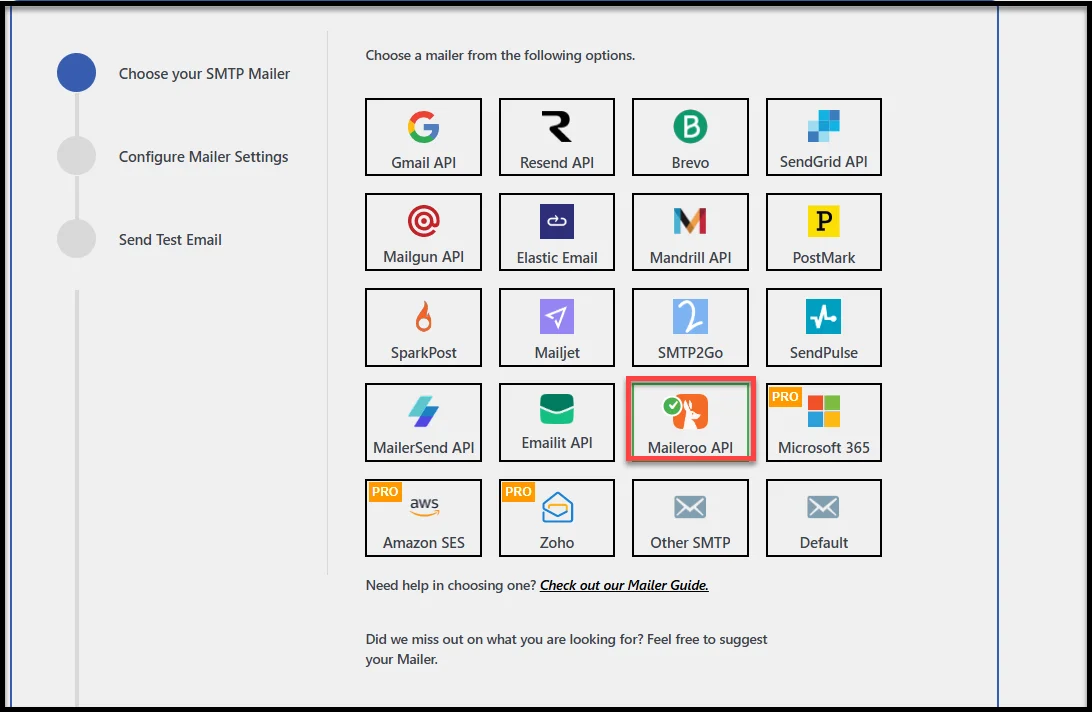
That’s it, your site is now connected to Maileroo and ready to send authenticated WordPress emails securely.
👉 For more details, check out our detailed step-by-step documentation on Maileroo SMTP Integration.
Other Improvements in Post SMTP v3.6.0
While Maileroo integration is the star of this release, we’ve also added the following refinements to make your day-to-day experience with Post SMTP even better.
- Enhanced Setup Wizard – Clearer, more user-friendly guidance to help you configure or switch mailers quickly and accurately.
- New “Notify” Button – Stay informed about plugin updates and alerts directly from your WordPress dashboard.
- Improved Email Logs – Multiple recipients now appear in a cleaner, more organized format for easier viewing.
- General Fixes & Enhancements – Minor bugs resolved and performance polished for faster, more reliable email delivery.
Update to Post SMTP v3.6.0 Today
With Maileroo integration, a smoother Setup Wizard, and subtle but meaningful interface tweaks, Post SMTP v3.6.0 continues our mission to make WordPress email delivery effortless, reliable, and transparent.
If your website depends on transactional or marketing emails, this is an update worth installing right away. You’ll gain access to a powerful new mailer and a cleaner, faster way to manage your email sending.
👉 Head to your WordPress dashboard and update to Post SMTP v3.6.0 today.
Your users, customers, and subscribers will thank you for every message that lands exactly where it should—in their inbox.