 OpenAI
 Perplexity
If you’ve been looking for more reliable ways to send WordPress emails, we’ve got exciting news for you. With the release of Post SMTP v3.8.0, we’re adding Sweego Mailer as a new free email service provider to our growing list of 15+ supported SMTP mailers.
However, this is not the only addition to this update; it also introduces a powerful Send Test Notification option that allows you to easily check that your email failure alert setup is functioning properly.
Let’s take a quick look at what’s new in this release.
What’s New in Post SMTP v3.8.0
- Swego SMTP Mailer
- Send Test Notification Feature
Let’s discuss each one in detail:
Sweego Mailer Integration (New Free SMTP Mailer)
Post SMTP already supports 15+ popular SMTP mailers, and with v3.8.0, we’re excited to welcome Sweego Mailer to the lineup, available completely free.
Why Sweego Mailer?
Sweego is a transactional email delivery service designed to make WordPress email sending simple, secure, and dependable. It’s well-suited for common transactional emails such as password resets, order confirmations, form submissions, and customer notifications. Sweego works seamlessly with your email workflows without requiring complex server configuration.
What makes Sweego a great choice:
- Simple Setup: Connect using API or SMTP credentials without complex server configuration.
- Authenticated Delivery: Sweego provides you with CNAME DNS records that you must add to your domain’s DNS provider to verify your domain
- Reliable Performance: Optimised for transactional emails that need fast and consistent inbox delivery.
- Free to Start: Free plan offers up to 100 transactional emails per day with flexible plans suitable for small sites, blogs, and growing businesses.
And with Post SMTP, integrating Sweego means you get all of this inside your WordPress dashboard, no technical headaches, just straightforward email delivery you can count on.
How to Set Up Sweego with Post SMTP
Getting started with Sweego inside Post SMTP is quick and simple:
- Create a Sweego account and log in to your dashboard.
- Verify your sending domain by adding the DNS records Sweego provides to your domain manager (e.g., Cloudflare, cPanel, Namecheap).
- Generate the SMTP credentials (API Key and Key ID) on the Sweego dashboard.
- Now, log in to your WordPress and go to Post SMTP → Dashboard → Setup Wizard and select Sweego as your mailer.
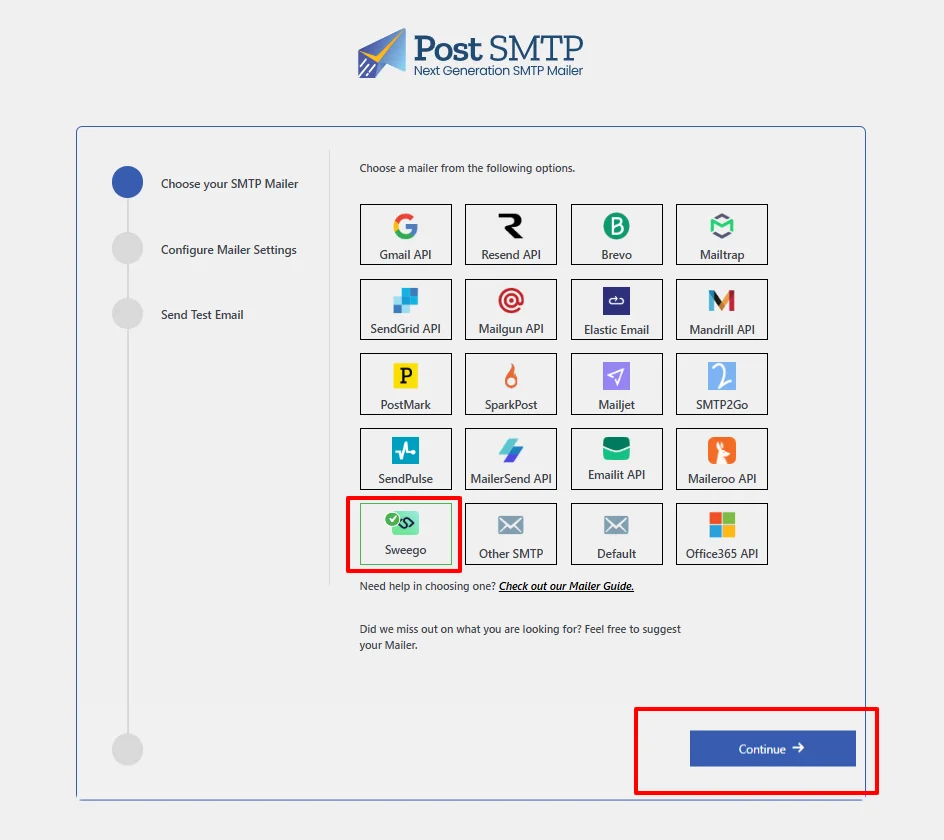
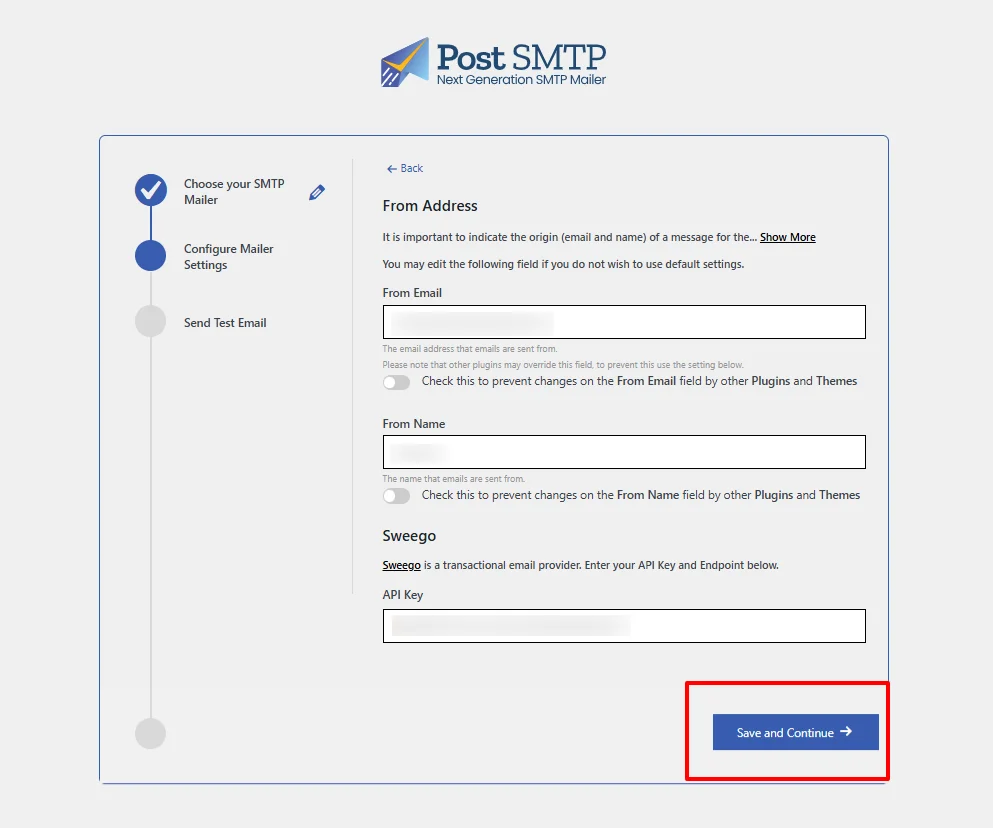
- Enter your From Email, From Name, and paste in your Sweego credentials. Click Save and Continue.
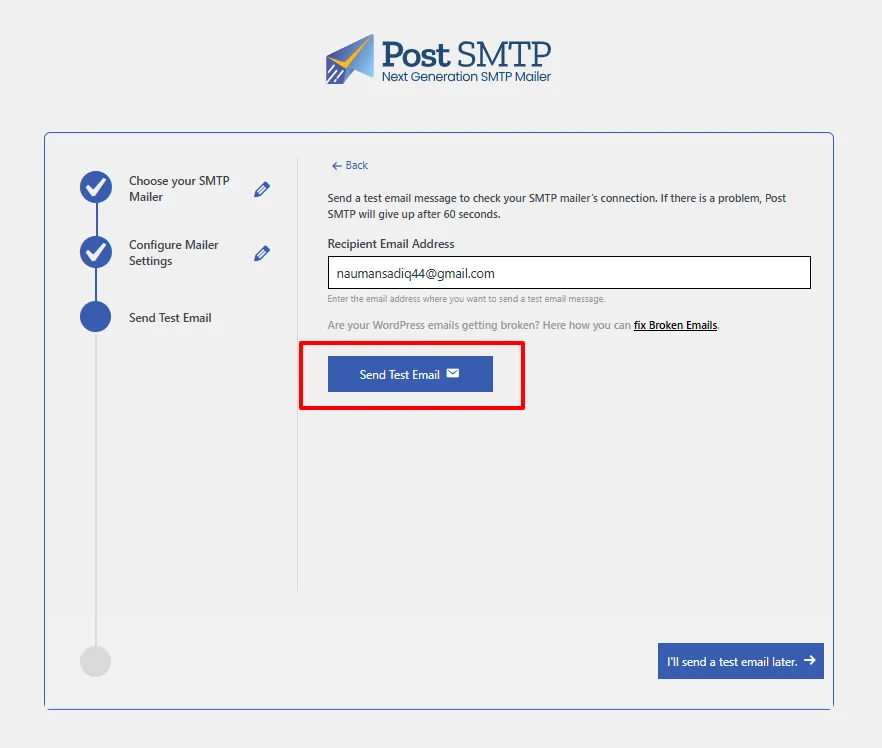
- Send a test email to confirm everything is working.
And that’s it, your WordPress site is ready to send emails with Sweego through Post SMTP.
Full step-by-step instructions are available in our Sweego setup documentation.
Send Test Notification (Available in Free & Pro)
Post SMTP email failure alerts now include a Send Test Notification feature, available in both the Free and Pro versions, making it easy to validate alert integrations before going live.
You can test notifications across the following supported channels:
- Slack – Team communication alerts
- Twilio – SMS notifications
- Microsoft Teams – Workspace alerts
- Webhooks – Custom integrations
- Pushover – Mobile push notifications
How Send Test Notification Works
Instead of guessing whether failure alerts are configured correctly, Send Test Notification lets you send a real-time test email failure alert and confirm delivery instantly.
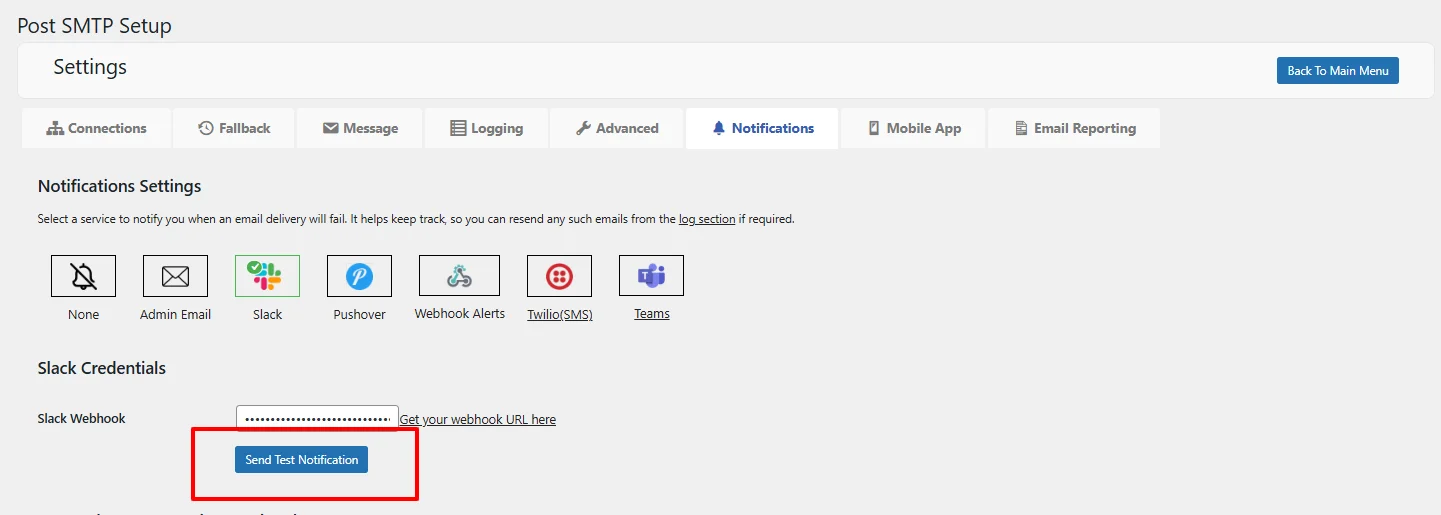
- Add Your Connection Credentials: Configure your preferred alert service inside Post SMTP. If you need help connecting, refer to our detailed guides for each alert platform.
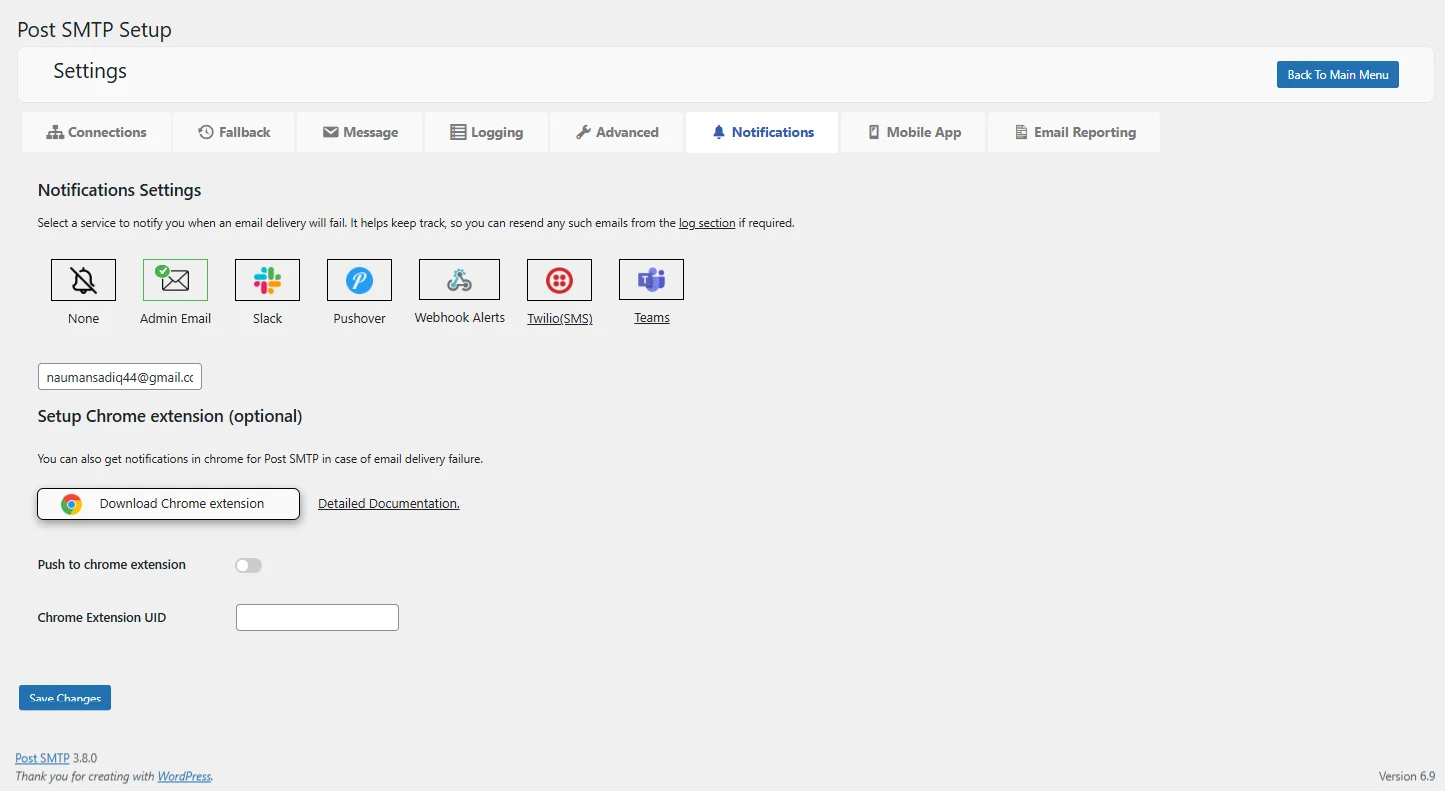
- Send a Test Notification: Once your email alert option is connected, the Send Test Notification button becomes active. Click it, and a test message will be sent straight to the channel or the app of your choice.
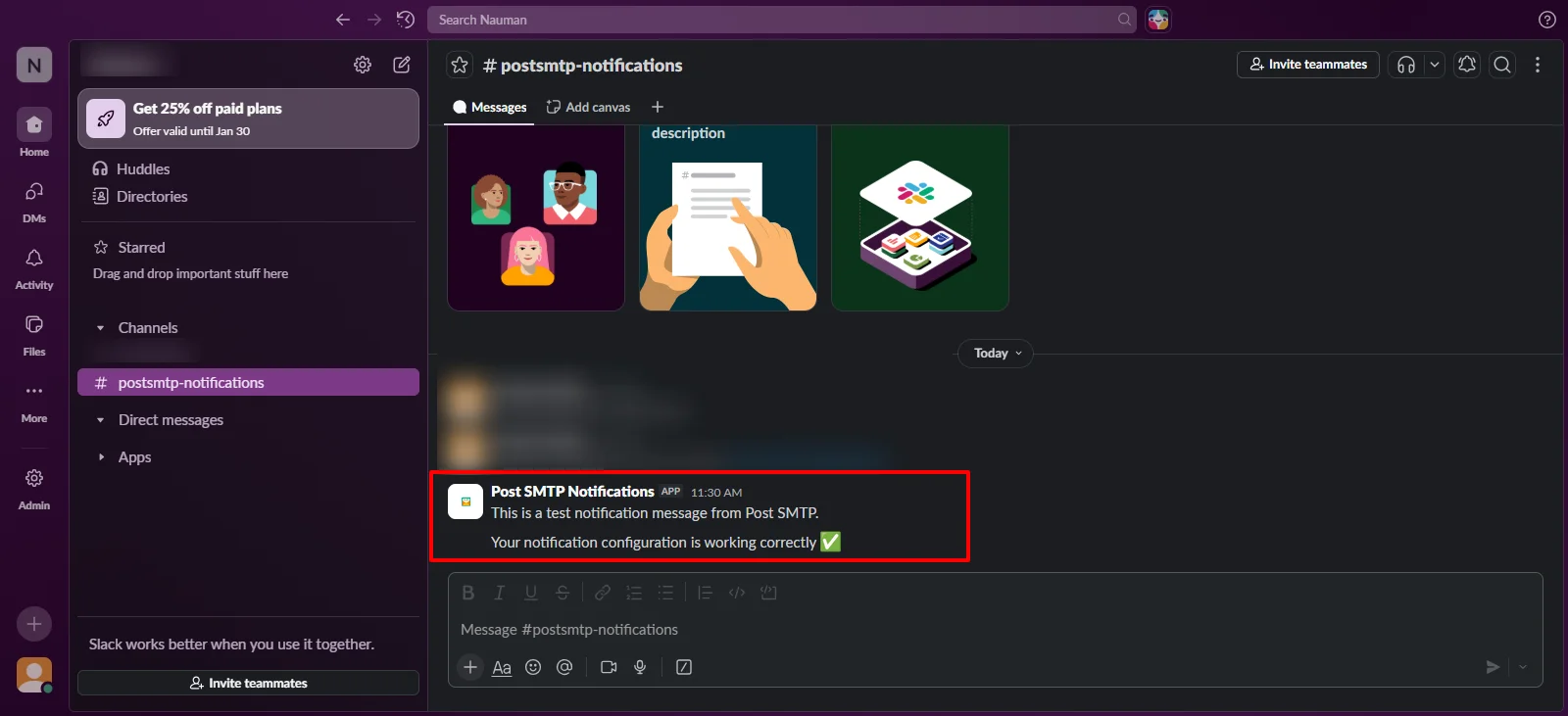
- Check Successful Delivery: In case you have received your test email failure alert in your chosen platform, your integration is properly configured and is all set.
Why This Matters
This feature eliminates uncertainty from email failure alert setup by letting you validate integrations before they’re used in production. It ensures your alert channels are stable, secure, and ready when an actual issue occurs.
Update to Post SMTP v3.8.0 Today
The launch of Post SMTP v3.8.0 marks another step forward in making WordPress email delivery simpler and more dependable. With Sweego Mailer integration and the new Send Test Notification feature, this release is designed to give you more control and peace of mind over your site’s communication.
Log in to your WordPress dashboard and update your Post SMTP plugin to the latest version 3.8.0 today.
If your business depends on reliable email delivery and timely alerts, this update delivers practical improvements you’ll appreciate.