 OpenAI
 Perplexity
If you are a Resend SMTP user and want to connect it to your WordPress site, you are going to love this update!
With Post SMTP v3.4.0, we’re excited to announce Resend SMTP integration as part of our growing family of 15+ mailer options already available in Post SMTP.
For many WordPress users, sending emails reliably has always been a challenge. Emails land in spam, some don’t get delivered at all, and configuring private SMTP servers can feel like a never-ending headache. With this update, we’ve partnered with Resend to make email delivery easier, faster, and more dependable.
Keep reading to learn more about why we chose Rersend.
Why Resend SMTP?
Resend is a modern email delivery service built for developers and businesses that need a robust and flexible way to send transactional emails. Unlike traditional mailers, Resend is API-first, which means it’s designed for speed, reliability, and scalability.
Here are a few reasons why Resend has quickly become a favorite in the email space:
- Used by 400,000+ developers and businesses worldwide for transactional and application-based emails.
- API-driven architecture for faster email processing compared to older SMTP methods.
- Supports transactional emails out of the box — order confirmations, password resets, sign-up emails, and more.
- Done for you, domain verification and authentication (SPF, DKIM, DMARC) to help your emails land in the inbox, not spam.
- Developer-friendly with simple API keys, logs, and dashboards that make troubleshooting easy.
By bringing Resend into Post SMTP, we’re giving WordPress site owners access to these advantages without any complicated setup.
How to Set Up Resend with Post SMTP
Getting started with Resend inside Post SMTP is straightforward and takes just a few minutes:
- Create a Resend account and generate your API key.
- Verify your domain in Resend for authenticated sending.
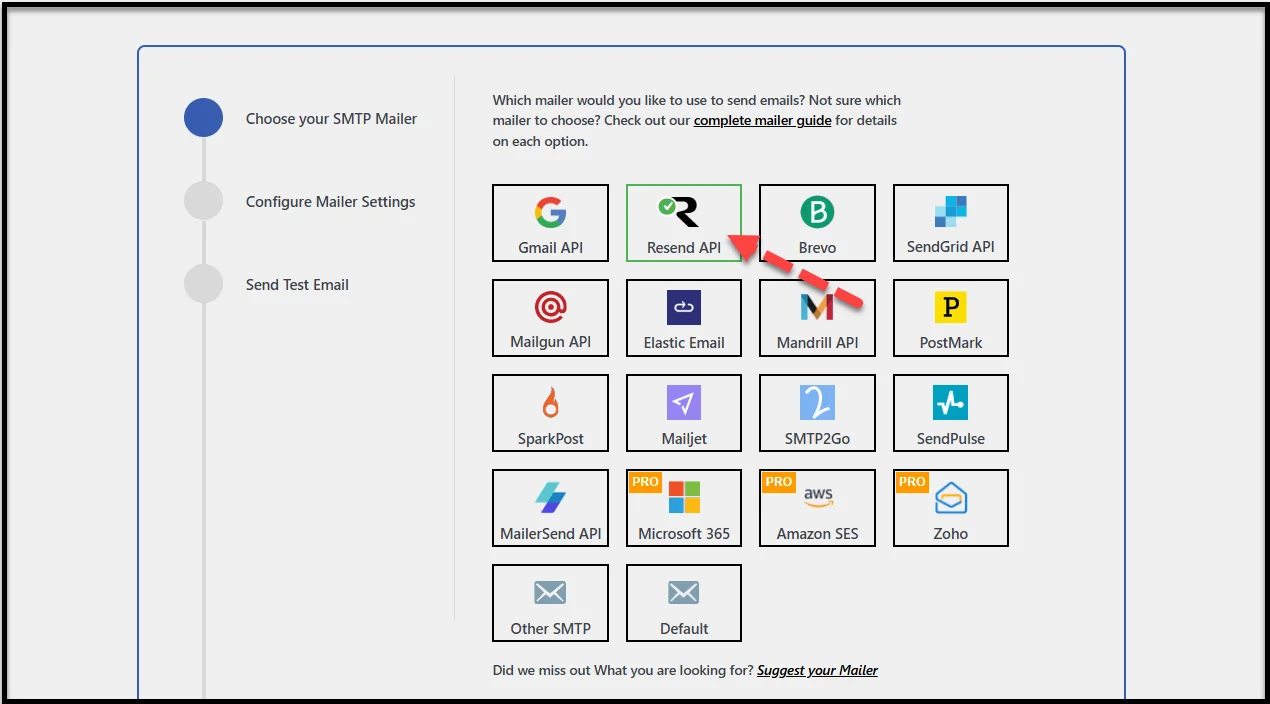
- Open Post SMTP → Setup Wizard and select Resend as your mailer.
- Enter your From Email, From Name, and paste in the API key.
- Send a test email to confirm everything is working.
And that’s it — your WordPress site is now ready to send authenticated emails via Resend.
👉 Need the full tutorial? We’ve documented the entire setup process with screenshots. Check out the complete Resend SMTP documentation here.
What Else Is New in Post SMTP v3.4.0?
While Resend SMTP integration is the star of this release, we’ve also made performance tweaks and under-the-hood improvements, which are as follows:
- Updated the Feedback SDK to the latest version
- Removed unnecessary notices from the Post SMTP Wizard
- Fixed BCC/CC issues with SparkPost
- Fixed Reply-To not working in Gravity Forms with SMTP2GO
These updates make Post SMTP more stable and polished, so you can focus on sending emails without interruptions.
Update to Post SMTP v3.4.0 Today
With Resend SMTP integration, this release makes Post SMTP even more powerful for WordPress email delivery. Whether you run a blog, a WooCommerce store, or a client website, you can now rely on Resend and other 15+ SMTP options available in Post SMTP to handle your emails smoothly and securely.
👉 Head to your WordPress dashboard and update to Post SMTP v3.4.0 today.
Your visitors, customers, and users will appreciate emails that arrive on time — every time.