 OpenAI
 Perplexity
At Post SMTP, we don’t just build tools—we build trust. When our users speak, we listen closely and act fast. That’s exactly what happened recently when a couple of users flagged some issues after updating to a newer version.
Today, we’re excited to announce the release of Post SMTP v3.1.4, where we’ve tackled those problems head-on.
Let’s walk you through what’s been fixed and why it matters to us—and to you.
What Were The Issues, and How This All Started
This release is a direct response to the feedback we received from dedicated users who noticed odd behavior after upgrading from v3.1.3 to the latest version.
To be precise, they have reported two issues:
- “Sent To” Field Missing in Logs
- Queued Emails Incorrectly Marked as Failed
Let’s discuss them in detail:
Issue #1: “Sent To” Field Missing in Logs
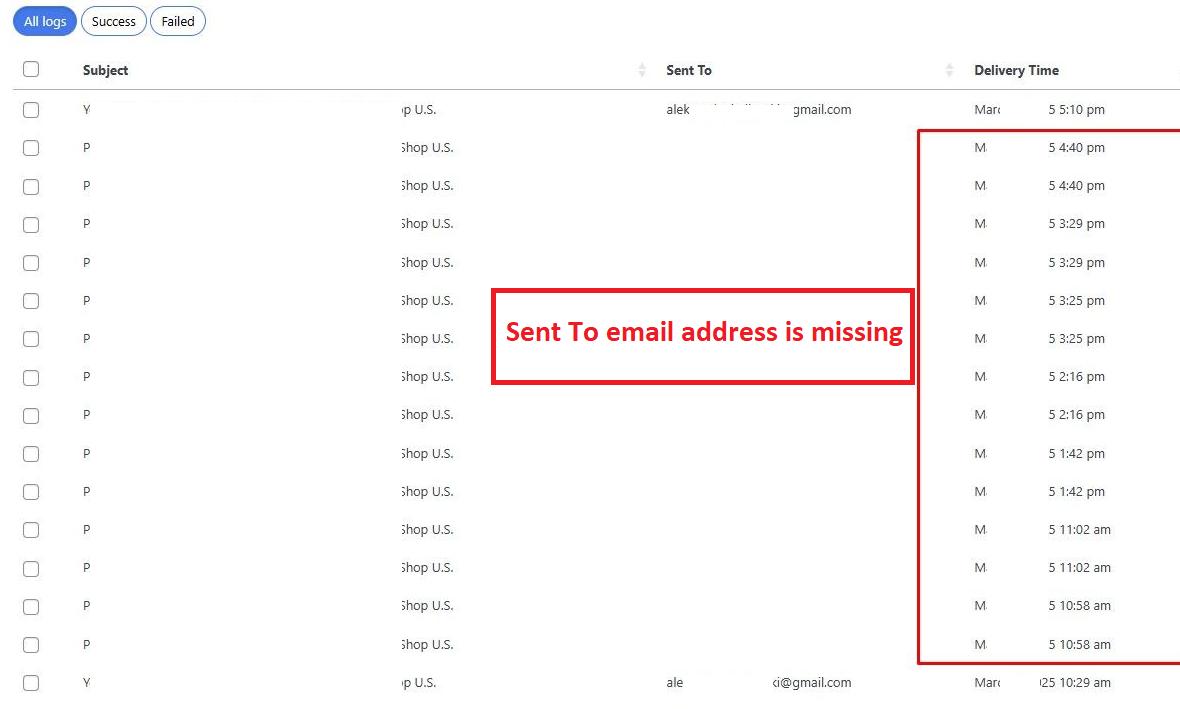
One user pointed out that emails sent programmatically using wp_mail() suddenly stopped displaying the “Sent To” field in the Post SMTP logs. Even though the emails were actually being delivered (and showing as “Success”), the recipient information was missing from the logs screen, making it harder to verify who exactly received the email.
Note: This type of issue occurs very rarely.
Issue #2: Queued Emails Incorrectly Marked as Failed
This issue came from the Post SMTP Pro users, who reported that emails queued for delivery were being flagged as “Failed” in the dashboard’s recent logs screen—even though they were showing “Queued” in the main logs screen.
Both issues caused confusion. And while the functionality behind the scenes was still working to an extent, the logs—the place you go to confirm, verify, and troubleshoot email delivery—were not reliable.
Now, check out how we’ve fixed the issues.
How We Fixed the Issues
After investigating the reports, our development team identified and addressed both problems. Here’s what’s been resolved in the new version:
✅ FIXED #1: We fixed the bug that prevented the “To” field from displaying in the logs. Now, whether your emails are sent manually or programmatically, the recipient details appear correctly in the log entries.

✅ FIXED #2: We also addressed the false “Failed” status being shown for queued emails in the dashboard’s recent logs screen. Logs now reflect the real delivery status, giving you accurate insights.
These changes have been fully implemented in the new v3.1.4 release, available for all users of the free version of Post SMTP.
What You Need To Do —Update to Post SMTP v3.1.4 Now!
If you’ve been affected by either of these issues—or if you simply want the most stable and user-friendly version of Post SMTP—we highly recommend updating to version 3.1.4 today. The fix is live and ready for you.
- If you’re already using Post SMTP, just head to your WordPress dashboard and update the plugin as usual.
- If you’re new to Post SMTP, download the latest version from the WordPress plugin repository.
Once updated, you’ll immediately benefit from the bug fixes and enjoy cleaner, clearer email logs.
💬 We Value Your Feedback. Stay In Touch!
We’re not just fixing bugs—we’re building relationships. Every report/suggestion you send helps us make Post SMTP better for everyone. If something’s off or you’ve got ideas, drop them in our Support Channel or join the discussion in our Facebook Community. Your feedback drives our progress.
Thanks for trusting us with your email delivery—let’s keep improving together.
— The Post SMTP Team