

 OpenAI
 Perplexity
DKIM record. One of the most prominent factors behind email deliverability. But what is it, and why should you care?
Simply put, if you want your emails to land in the recipient’s inbox and not in their spam box, you can’t neglect this authentication protocol.
Oftentimes, we hear this terminology along with its peers, SPF and DMARC.
Without further ado, let’s dive deep into the topic.
What is DKIM?
DKIM, short for Domain Keys Identified Mail, is an email security protocol that helps email servers determine the email’s authenticity. Enabling email servers to accurately place the email where it belongs.
This authentication protocol uses a public key cryptography to sign emails before leaving them for the receiving server. Once the server gets it, it matches the public key published to the domain to verify the authenticity of the email. If the key is matched, it passes the DKIM tests. Otherwise, the email is either rejected or bounced back to the sender.
The final outcome or what to do with the email after failing the protocols depends on DMARC, which allows for allowing, rejecting, or isolating emails that fail authentication protocols, such as DKIM or SPF. Hence, we often see these terminologies lined up.
You can learn more about the three here: What are SPF, DKIM, and DMARC? [Everything You Need to Know].
How Does DKIM Work?
DKIM signs emails using two signatures or keys: a private key and a public key. The private key is stored securely on the server that’s sending the emails using that domain and the public key is stored in domain’s DNS records.
This ensures only the sender can sign the emails, but any receiving server can match it to verify using the publicly available data.
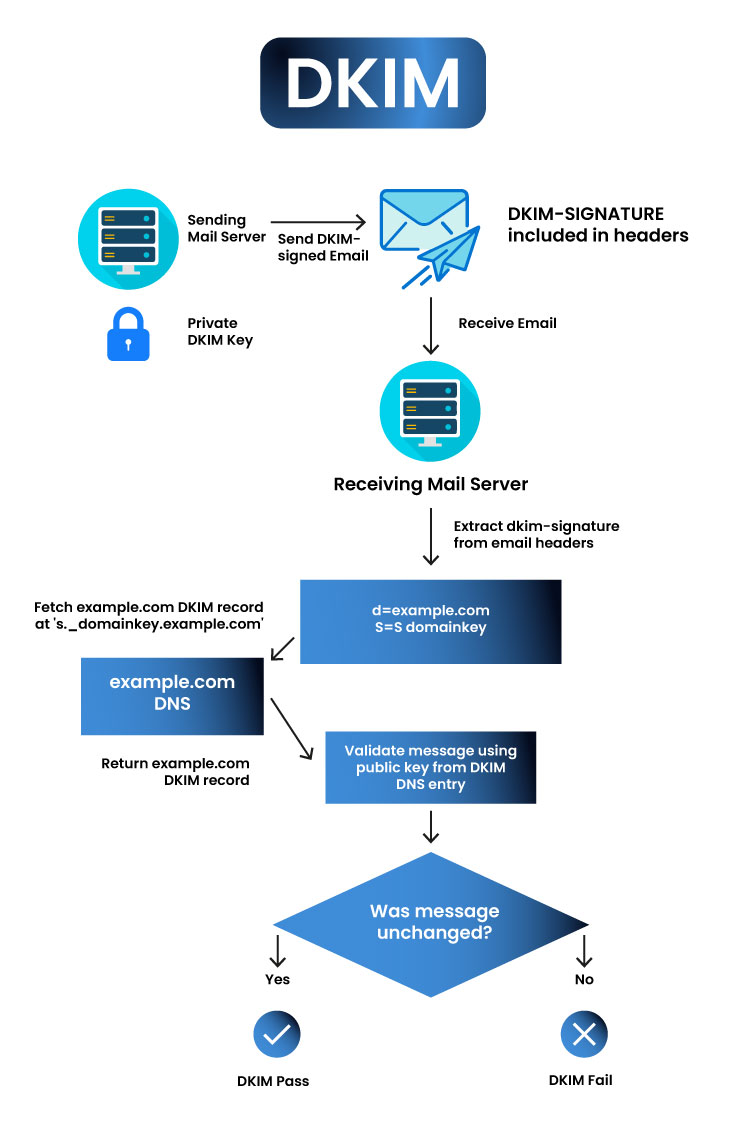
If you use your own email server, you have to take care of generating the keys. However, if you use any service that supports DKIM, they’ll create the key for you.
When you send an email, the server uses the securely stored private key and the contexts of the header to create a hash used to sign the email. The key looks like this:
DKIM-Signature: v=1; a=rsa-sha256; c=relaxed/relaxed; d=example.com; s=selector1;
h=from:to:subject:date:message-id:mime-version:content-type;
bh=X48eUuK4YwB0TbXxJvC5N4YOJH5MmKXbTzvskcC0PXY=;
b=Zg9kV3AwB8GxF6P2G0+YK2dVZ+VXz4pF5Z6+Q0gHwCsmzC9cR/7rAmZC7pQgkP7aK
l1FX9U4EXkU0rE6TfnITG5vdGPu2VvZHxS+zpU8eWcJk45VmlmYQx7XD7+6A==
Let’s understand the key:
- DKIM-Signature: Marks this as the DKIM signature header.
- v=1: Since we only have one version, it will always be one.
- a=rsa-sha256: Algorithm used (RSA with SHA-256 hashing.)
- c=relaxed/relaxed: This implies both the email headers and body are to be canonicalized using the “relaxed” method.
- d=example.com: This is replaced with the sender’s domain name.
- s=selector1: The location of the public key. For example, selector1._domainkey.example.com.
- h=: List of headers included in the signature.
- bh=: This is a hash of the email body, excluding any headers for accurate measurement.
- b=: The actual DKIM signature.
Now, talking about the public key, it also looks somewhat similar. Here’s a precise DKIM example:
v=DKIM1; k=rsa; p=MIIBIjANBgkqhkiG9w0BAQEFAAOCAQ8AMIIBCgKCAQEAwGVvGu5QpEXAMPLEKEYbZVwIDAQAB
To break it down:
- v=DKIM1: The version of DKIM, as discussed, will always be 1.
- k=rsa: Key type (typically RSA)
- p=…: This is the actual public key without line breaks (base64-encoded)
After the email is received, the email server performs a DNS TXT lookup to retrieve the public key and use it to verify against the DKIM signature signed by the sending server.
Well, if it’s just a cryptographic key stored privately and publicly, it breeds another burning question, can you have multiple DKIM records?
And the answer is yes. A domain can actually have multiple DKIM records. Each DKIM record is tied to a unique selector, which means several secret DKIM keys can coexist and sign emails from the same domain. In fact, this setup is often used for multiple email service providers.
Why Are DKIM Records Essential For Emails?
You might be thinking that email is a secure mode of communication anyway, so why do we need such protocols?
Well…there are a number of reasons why DKIM is an excellent option, such as:
- Enhanced security. DKIM’s unique signature helps receiving servers verify the sender’s authenticity. Making it an excellent choice to enhance your email security.
- Enhanced deliverability. Earlier, we discussed email servers allowing emails that pass DKIM checks, enhancing deliverability, and improving return on investment on email campaigns.
- Improved brand reputation. ISPs reward brands that follow standard authentication protocols. If you constantly send emails without bounces and high engagement rates, ISPs will associate legitimacy with your brand, helping with brand reputation.
How To Set Up DKIM Records
As discussed, the process of setting up DKIM records consists of two secret keys, namely public and private keys. Although the process varies for each email service provider, the main aspect is usually the same.
First and foremost, you need to generate a pair of keys and add the public key as a TXT record to your domain’s DNS or domain name systems.
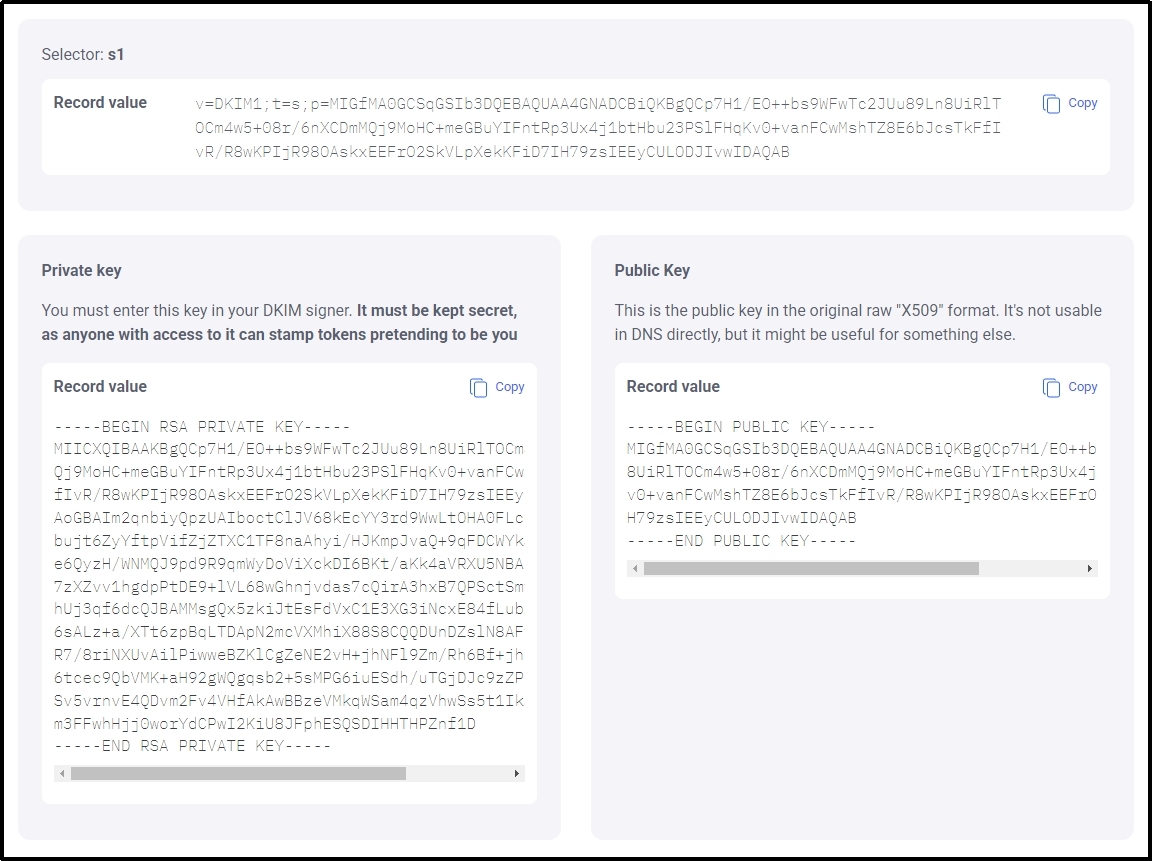
You can create a DKIM record using a DKIM generator, such as EasyDMARC, to make the process easier. Alternatively, most email service providers offer features to generate DKIM records.
Afterward, don’t forget to test the integration with our tool, which is precisely made for testing your email’s health. Just go to Post SMTP’s Domain Health Checker and send an email on the unique string and click “Check Spam Score Now.”
The tool will rate your domain’s health on a scale of 10, making it clear whether your DKIM integration was a success.
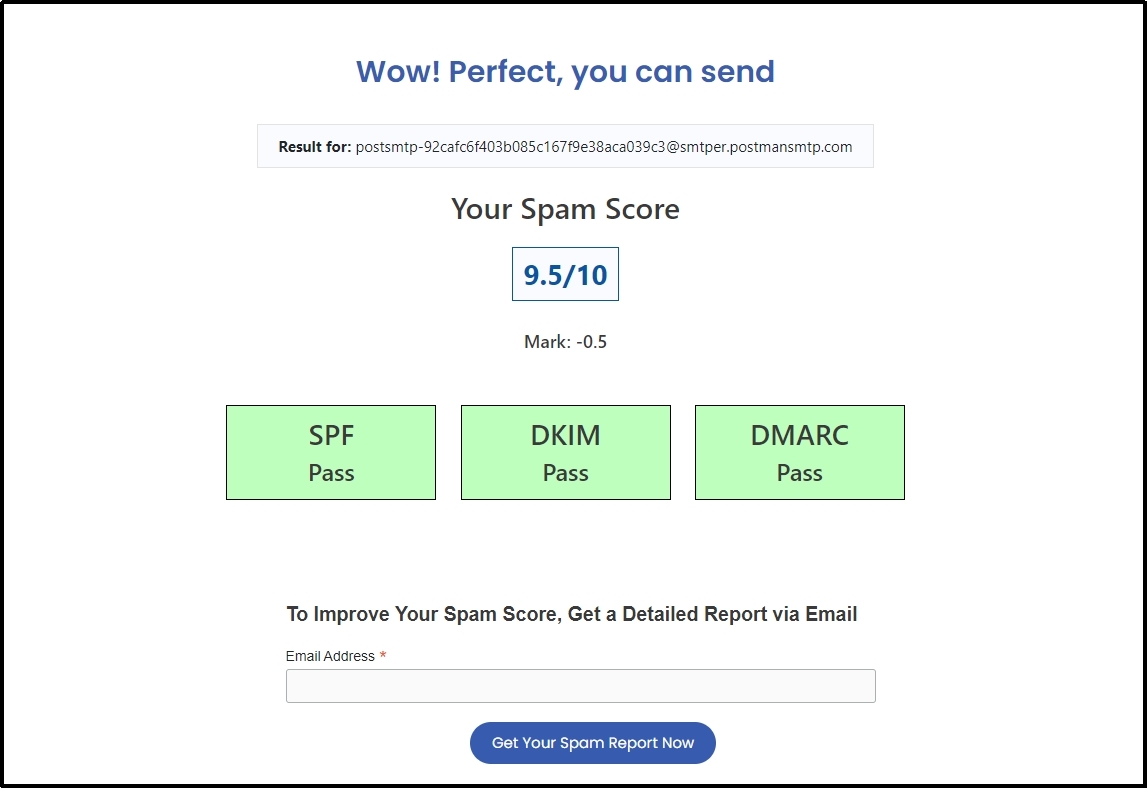
You can also get a detailed report by submitting your email address in the inbox box below.
Common DKIM Errors and How to Fix Them
If the integration wasn’t successful, one of the following could be the culprit:
Error In The String
These strings are super long, as you saw in the example above. In fact, a single DKIM TXT record in DNS can hold up to 255 characters. At a 2048-bit key, it can be even longer, and a simple mistake with one of the letters or numbers can cause the record to collapse. Thus, use a reliable tool when you generate DKIM records.
Signature Alignment Issue
Another problem that may cause the misbehavoir is intervention between the ”From” header domain and the one specified in the DKIM signature. Simply put, if these emails are changed, the DKIM record won’t work.
The solution is simple. The domain owner must ensure there is no difference between the two.
Change In Process For Third-Party Services
As stated earlier, every service provider is unique and may have different procedures for adding text records or specific rules or guidelines. Not following those can result in DMARC failure.
To ensure no such thing occurs, use the specific guidelines given by the email service provider or contact service for an accurate DKIM record setup guide.
Server Communication Issues
Miscommunication of servers can cause not only DKIM but many other email deliverability failures, causing emails to either bounce back or get rejected. Resolution timeouts, ports being blocked, or network connectivity blocking issues can all lead to DKIM records fizzling out.
To combat the issue, ensure that the ports, such as Port 25, Port 587, and Port 53, are working as they should. Check DNS resolver settings and verify server routing to ensure your server can reach external mail servers.
Domain Name System’s Outage
Many cases, such as server downtime or extreme cases such as a DDoS attack, can cause the DNS to shut down temporarily. Depending on the intensity of the cyberattack, the DNS can be down for extended time periods, causing DKIM-related complications.
Enhancing Email Deliverability With Post SMTP
If you are a WordPress owner facing deliverability issues, nothing can solve your problems quicker than using a reliable third-party email service such as Brevo, Microsoft 360, Zoho, etc.
The default WordPress mailer lacks these necessary security protocols, which causes the receiving servers to reject incoming emails. Hence, your emails are pushed into the trash can before they get anywhere near the intended inbox.
And that is made easier with Post SMTP. Using the best SMTP plugin, you can easily connect to any reliable mailer of your choice that supports major authentication protocols, enhancing deliverability effortlessly.
Frequently Asked Questions
What is DKIM, and how does it work?
DKIM (DomainKeys Identified Mail) is a security protocol that prevents email frauds by signing the emails using a cryptographic signature before sending. The receiving server then checks this signature to ensure the email is legitimate and hasn’t been altered in transit.
Do I need a DKIM record?
Of course you do! It is one of the standard authentication protocols that most email servers check before letting an email pass. Therefore, it is imperative to have DKIM intact to ensure better email deliverability.
How can I test if DKIM is working?
You can easily test your DKIM using our free domain health checker. Go to Post SMTP’s tools ⇒ Domain Health Checker and send an email to the unique generated string. Once done, click the “Check Spam Score Now” button to get a complete report about not only DKIM but SPF and DMARC as well.
Can I have two DKIM records?
Yes! A server can have as many DKIM records as the DNS allows. DKIM doesn’t have a built-in limit on the number of records.