























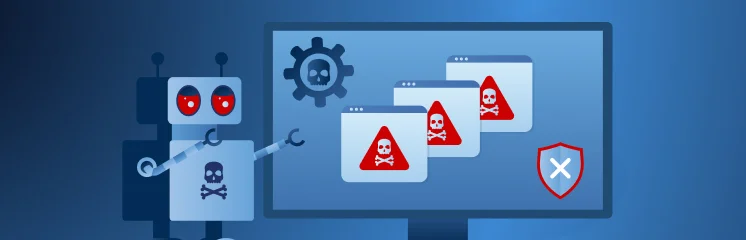


In the past, spotting a phishing email was often easy. Bad grammar, strange logos, and generic greetings were common clues that something was wrong. Today, however, cyber threats are smarter and more personalized.
The rise of Artificial Intelligence (AI) is now fueling incredibly believable phishing attacks. AI tools can quickly create perfectly written emails that look completely legitimate. It is known as “AI phishing”.
This makes it more challenging than ever for people to tell the difference between a real message and a dangerous scam.
Because of this, relying on human eyes to spot a fake is no longer enough. Your organization needs a stronger line of defense. It is a critical, automated process that verifies the sender of an email, ensuring every message received is truly from who it claims to be.
This article will explore AI phishing, its impacts, email authentication, and how email authentication helps protect against phishing. Finally, you will learn to send authenticated emails
What is AI Phishing?
AI Phishing is a type of cyberattack that uses modern AI tools, like Large Language Models (LLMs), to create scams. LLMs can generate human-like text, such as ChatGPT and Gemini. These tools take phishing, which is the act of tricking people into giving up sensitive information, and make it much more dangerous.
In a typical phishing email from the past, you might see bad spelling or generic language.
For suspicious sender identities or fake profile images, tools such as Lenso.ai can help verify whether profile images appear elsewhere online through reverse image search, adding another layer of phishing detection
AI phishing is different because it creates messages that look flawless and sound completely real. Attackers simply feed the AI system information—like data scraped (pulled) from a person’s social media or LinkedIn profile—and the AI generates a personalized attack in seconds.
This means the scam email might:
- Use your boss’s or CEO’s actual writing style and tone.
- Reference a real project or a recent company event to make the message seem urgent and legitimate.
- Be part of a multi-step attack that includes a cloned voice call (vishing) or a fake video meeting (deepfake) to pressure the victim.
As a result, hackers run highly personalized attacks that make it nearly impossible for a human to detect that they are being tricked, which is why AI phishing is a much bigger problem than traditional scams.
Impact of AI Adoption in Phishing Attacks
Cybercriminals are quickly adopting AI tools because these tools make their attacks cheaper, faster, and much more successful. The numbers show a dramatic change in the threat landscape.
It is estimated that over 83% of all phishing emails now use some form of AI-generated content. This rapid adoption is lowering the barrier to entry for criminals. The same study reveals that, by October 2025, security researchers found a staggering 1,265% surge in phishing attacks linked to Generative AI (GenAI) since 2023.
This rapid shift also shows why security teams are exploring Generative AI in cybersecurity to detect smarter phishing patterns and respond faster to emerging threats.
The effectiveness of these attacks is also much higher.
Again, the same source cited academic studies showing that AI-generated phishing emails achieved a 54% click-through rate, compared to just 12% for traditional emails written solely by a human.
AI enables attackers to create 100 or more highly personalized emails per hour. A human attacker might only manage one or two per hour.
This massive increase in speed and scale is a key reason for the surge in successful attacks.
Brightside compared the cost of running these malicious campaigns to traditional ways and found a significant drop. Scammers save approximately 95% in campaign costs by using Large Language Models (LLMs) to generate the emails.
This adoption means that attacks are no longer generic.
AI allows criminals to gather public information—such as data from social media or company websites—to create messages that are perfectly tailored, making them nearly indistinguishable from legitimate communications.
What is Email Authentication?
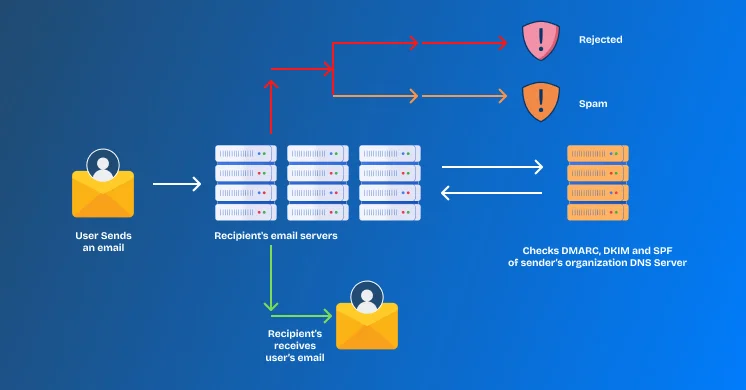
Email authentication is simply a digital way to prove that an email message is truly from the person or company it claims to be from. When an email is sent, these authentication protocols run a background check, like a security office at the airport.
When an authenticated email arrives, the recipient’s mail server automatically asks: “Is this sending server allowed to use this company’s name?”
If the answer is no, the email is either rejected or sent straight to the spam folder, blocking the phishing attempt before a human ever sees it.
Email authentication relies on three main standards that work together to create a robust defense system:
- SPF
- DKIM
- DMARC
SPF
SPF (Sender Policy Framework) is like a guest list for your email domain. It’s a list stored in your website’s DNS (Domain Name System) records. DNS transforms website names into digital addresses.
The SPF record tells the world which mail servers are allowed to send email from your company’s domain name (e.g., @yourcompany.com). If an email arrives from a server not on your approved list, it fails the SPF check.
It immediately stops spoofing, where criminals fake your address. If a phisher tries to send an email from you, the receiving server checks your guest list (SPF) and rejects it because the phisher’s server isn’t on it.
DKIM
DKIM (DomainKeys Identified Mail) is a digital seal or tamper-proof stamp on every email you send. It ensures the message has not been altered while traveling from the sender to the recipient.
When an email leaves your server, DKIM attaches a unique, encrypted digital signature to the email’s header. The receiving server then uses a public key (a special code found in your DNS records) to check if the signature is valid.
If a criminal intercepts an email and tries to change the subject line or replace a link with a malicious one, the digital signature breaks. The receiving server instantly detects that the email has been tampered with and marks it as suspicious or spam.
DMARC
DMARC (short for Domain-based Message Authentication, Reporting, and Conformance) is the enforcement policy that works on SPF and DKIM. It is a rulebook that tells receiving servers exactly what to do if an email fails either the SPF or the DKIM check.
You can set your DMARC policy to one of three modes:
- p=none: Monitor and report (do nothing to the email).
- p=quarantine: Send the failing email to the recipient’s spam folder.
- p=reject: Block the failing email completely before it reaches the recipient.
It gives you, the domain owner, complete control. It guarantees that if a phishing email fails the authentication checks, it is appropriately handled.
History of Email Security and the Advent of Email Authentication Protocols
To understand why authentication protocols were created, we need to look back at the early days of email. Email was built on a simple technical standard called SMTP (Simple Mail Transfer Protocol). While effective for sending messages, it was built on trust rather than verification.
However, back in the early 1980s, verification wasn’t a major problem, since email was used only by universities and trusted corporations. It wasn’t until the early 1990s, when the internet became accessible to the common people, that the exploitation started.
In the beginning, sending an email was much like sending a letter without needing to show ID at the post office. When you sent an email, the sender’s address (the “From” address) was just text that could be easily typed in and changed.
This lack of control is called “spoofing”.
Spoofing allowed anyone to send an email while pretending to be someone else—your CEO, your bank, or a government agency—with zero verification.
The internet quickly became flooded with junk and fraudulent emails. It became clear that humans alone could not filter out these scams, and the original email system could not tell a real sender from a fake one. In response to this growing security crisis, the industry began developing automated, digital solutions to restore trust.
Hence, the first major solution, SPF, was proposed in the early 2000s to verify the sending server. This was quickly followed by DKIM, which handled the message’s integrity. Finally, in 2012, DMARC was introduced to enforce the rules and provide feedback, completing the robust system we rely on today.
Why Email Authentication is Necessary Than Ever
The history of email security teaches us that cyber attackers always stay a step ahead of human eyes.
This is the core reason why technical solutions like SPF, DKIM, and DMARC were invented in the first place.
These protocols have always been the primary security against spoofing and other email fraud.
With the adoption of AI in cybercrimes, the fight to “spot” spoofed email is unwinnable. In the past, a training session could teach employees to spot bad grammar or fuzzy logos in a scam email.
Today, that training is useless. AI has completely removed those obvious clues.
We are all aware that tools like Large Language Models (LLMs) can generate perfect, grammatically correct emails in seconds. The emails look 100% legitimate.
Earlier, there was a personalization problem. Now, AI gathers public data to customize the email, making it look like it’s from a person the victim knows, referencing real projects, and using a perfect tone of voice.
If an email looks perfect, even the most security-aware employee cannot tell a real message apart. In the fight against AI phishing, relying on the naked eye is almost impossible and is a recipe for disaster.
Machines Must Fight Machines
This is why we must rely on machines to fight machines. Email authentication protocols are automated systems that do not care whether the email is well-written or personalized.
The SPF, DKIM, and DMARC checks happen before the email ever hits a user’s inbox:
- If a phisher uses a foreign, unapproved server, SPF will spot it and reject the email instantly.
- If a phisher tries to alter a legitimate email, DKIM’s digital signature will break, and the system will discard it.
As discussed earlier, the machine simply checks whether the sender is allowed to send an email from the domain. By enforcing authentication, you block the attack at the technical level, making the sophistication of the AI-generated content completely irrelevant.
How to Send Authenticated Emails That Land in the Inbox?
You know that email authentication is critical for security and for ensuring your important messages avoid the spam folder. But how do you actually implement SPF, DKIM, and DMARC on your WordPress site?
For that, Post SMTP is the answer. It makes the complicated problem easier than ever!
Post SMTP is the leading WordPress plugin designed to solve email deliverability and authentication problems.
WordPress, by default, sends emails using a basic, unreliable method called PHP mail.
This method often fails authentication checks and sends your important emails straight to the spam folder.
Post SMTP completely bypasses this faulty default system.
Post SMTP works by connecting your WordPress site to a reliable third-party Mail Service Provider, such as Google API, Microsoft, Zoho, Maileroo, Amazon SES, and many more.
These MSPs are professional email companies that have already set up all the complex infrastructure needed to authenticate emails correctly.
When any email is triggered on your WordPress site (like a password reset or an order receipt), Post SMTP intercepts it before the default system can send it. Then we route that email to your chosen third-party MSP. The MSP handles the hard work. They are the authorized sender, so their servers automatically apply the correct DKIM digital signature and pass the SPF check.
The email is sent from a known, trusted source with a valid digital seal, hence it directly lands in the inbox rather than the spam folder.
There’s More to Post SMTP!
The argument proved that email authentication is a mandatory security layer against the rising threat of AI Phishing.
While Post SMTP is the critical tool for achieving perfect SPF, DKIM, and DMARC compliance, its capabilities go far beyond simple setup.
Post SMTP is a complete email solution designed to give you total control and visibility over every message sent from your WordPress site. Here are a few essential features of the plugin.
- Email Log and Audit: Every email sent, failed, or successfully delivered is logged and tracked. This gives you a clear audit trail to investigate any email issues immediately.
- Security Check and Testing: The built-in testing tool instantly verifies your authentication setup (including SPF and DKIM) to ensure your emails will pass security checks everywhere.
- Connection to All Major Mailers: It connects seamlessly with all major third-party Mail Service Providers (MSPs), giving you the flexibility to choose the best service for your needs (like SendGrid, Amazon SES, and more).
- Advanced Fallback Settings: If your primary mailer goes down, Post SMTP can automatically switch to a backup sender. This ensures your critical business emails—like order confirmations or password resets—never fail to send.
Don’t leave your email security up to chance or hope that your employees can spot a perfect AI-generated scam. Install Post SMTP now, connect it to your trusted Mail Service Provider, and let your email reach the intended inbox!