





















Elementor Forms SMTP
Stop Losing Leads. Fix Elementor Forms Email Notifications Today
Post SMTP connects Elementor Forms to a trusted SMTP mailer so your notifications reach inboxes, every time.

Trusted by 400K +
website owners

4.7/5 stars on
wordpress.org

14-day money back
guarantee

Your Elementor Forms may be silently failing
Elementor Forms relies on WordPress’s default PHP mailer — a method most hosting providers block outright. No error. No warning. Just missed leads.
5-Minute Setup & Zero-Code Implementation

Install the Plugin
Head to the official WordPress plugin repo. Search for “Post SMTP”. Install, and activate it to begin setup.
Connect Your SMTP Mailer
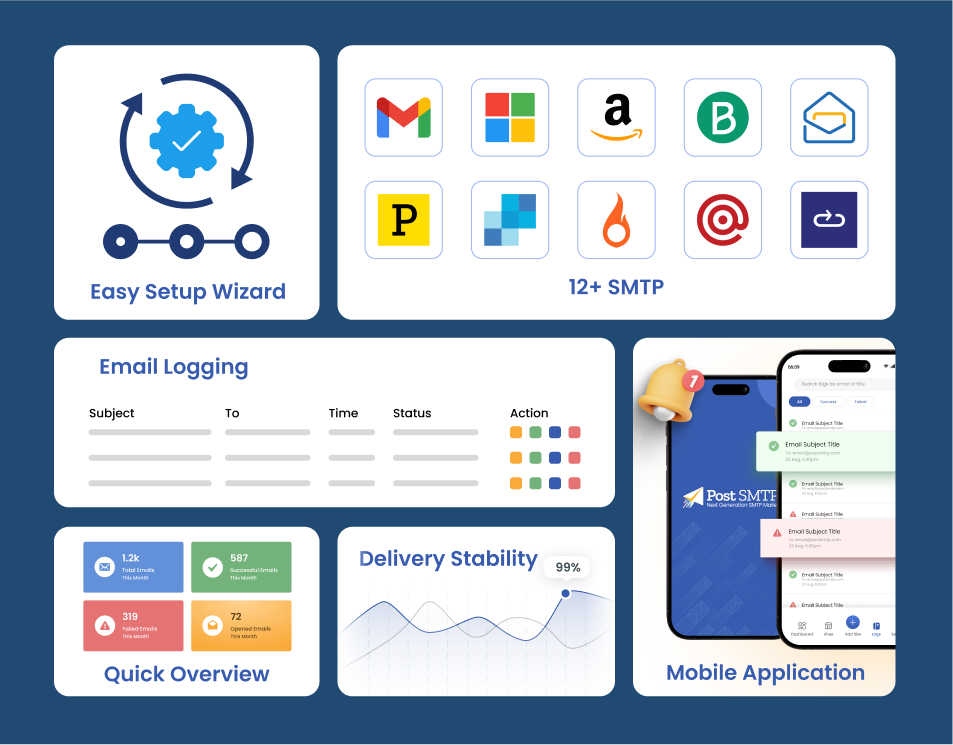
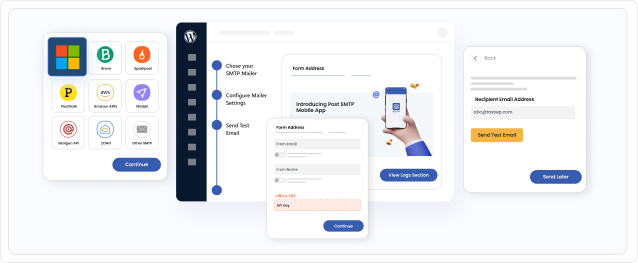
Launch the Post SMTP 3-Step Setup Wizard and connect one of the 15+ supported mail providers. You can also configure your custom SMTP server.


Send a Test Email
Use the built-in Email Test Tool to verify your configuration and ensure Elementor notifications are sending properly.
Monitor Logs Easily
Post SMTP logs every outgoing WordPress email, giving you full visibility into: Delivery status, Recipients, Error messages, Full email transcripts, etc.


Get Instant Failure Alerts
If an email fails, Post SMTP notifies you immediately via:
Email, Slack, Microsoft Teams, SMS (Twilio), Webhooks, Mobile App. So you can resolve issues before they affect.
Our Post SMTP Plugin has Featured on







Post SMTP Mobile App
Track and Manage Emails On The Go
As 68% of small businesses rely on mobile apps to stay productive, extending that control to email delivery is a smart move. Post SMTP’s mobile app gives you a real-time view of elementor forms and WordPress email activity, with the power to inspect logs, resend failures, and manage several sites from your phone.


SMTP Features Every Elementor Forms User Loves
Gain more opens and clicks on your transactional emails

15+ SMTP Mailers
Post SMTP supports popular transactional email providers including Gmail, Microsoft 365, Amazon SES, etc. You can also connect any custom SMTP server.
Email Queue & Delivery Control
Prevent server overload and spam filtering by sending emails in controlled batches instead of all at once. This protects your sender reputation and improves deliverability.

Backup Mailer
Never lose important emails. If your primary SMTP provider fails, Post SMTP automatically switches to a backup mailer to maintain delivery.

Insightful Dashboard
Monitor the metrics that drive email success. Post SMTP’s dashboard lets you track delivery confirmations, analyze comprehensive logs, identify failed messages, and review critical performance statistics—all in real time.

Detailed Email Logs
Track every email sent from Elementor Forms, including Send status, Recipient address, Subject line, Timestamp, and SMTP responses. Logs help you quickly diagnose delivery problems.

Auto Retry
Temporary network or server issues happen. Post SMTP automatically retries failed emails based on rules you configure.
MainWP for Post SMTP
Manage SMTP Across Multiple WordPress Sites
By integrating with MainWP, Post SMTP gives you multi-site email control without the complexity. Configure SMTP once and propagate settings, stay informed with instant failure alerts via email, SMS, push (Chrome extension), Microsoft Teams, or Slack, and monitor and resend failed emails from a single dashboard to guarantee smooth email delivery across all your sites.

Why Elementor Forms Users Choose Post SMTP

Reliable Form Notifications
Make sure admin alerts and user confirmations always reach inboxes.

Better Email Deliverability
Authenticated SMTP improves domain reputation, helping emails avoid spam filters.

Faster Troubleshooting
With detailed logs and alerts, you always know when an email fails and why.

Expert WordPress Support
Our specialists help diagnose email delivery issues & keep your WordPress emails running smoothly.
Don’t Just Take Our Word for It
See What Other WordPress Users Have To Say

Great Plugin. Glad I tried something New!
I have previously used the other top 2 SMTP plugins for mail, but I found support not always there, and making things work can be a pain. These guys have been great. The documentation is excellent, and when I did have a question, they answered IMMEDIATELY with a confirmation that they were on it and my issue was resolved in no time at all, which is great as my clients are typically email dependent businesses (aren’t we all).
Highly recommend this plugin.
AARU.CA

Post SMTP is very reliable and easy to use
I manage over 150 websites and I can trust Post SMTP to not only get email from the websites where it needs to go, but also send me notifications when something isn’t working. I use it in conjunction with SMTP2go.com as the server. This is a very reliable combination to deliver consistent quality.
Suzi Wilson

I have been using the plugin for many years and no Complaints
I have been using the plugin for many years on multiple websites and it has worked flawlessly. The free version has very powerful features like secure Google API integration for SMTP only access and email logging which helps greatly when troubleshooting email issues. The support is also great and timely!
Petrus4

SMTP like a boss
I discovered this plugin while looking for an alternative to Fluent SMTP, which conflicts with the checkout of a WooCommerce site I manage.
In addition to solving the problem, it opened up a world of amazing features and an unmatched level of control. The notification through an alternative channel when an email delivery fails is also gold.
Clearly the dev knows his stuff. I am considering purchasing a Pro license.
masvil

Great Customer Service
I had a very hard problem to diagnose, but Aqib Khan had the skill and tenacity to stick with it until the problem was solve. Hats off to him and the Support Team
Michael Seip

Prompt, friendly and accurate.
We have been using the Post SMTP plugin from WP Experts for some time on our website making sure our email messages and notifications get to where they are supposed to! A couple of days ago I needed to locate a copy of an invoice – Aqib’s response to my call for help was prompt, friendly and accurate. Definitely a recommendation!
outdoorsqueensland
FAQs
Still have a question? Check out our frequently asked questions on the right or contact us directly.
The Smartest WordPress SMTP Plugin
We see ourselves as a group of problem solvers. So, rather than focusing on who we are, let’s shed some light on our vision