


























B2B or wholesale buyers don’t wait around. If your quote takes a day to answer, or your pricing tiers don’t line up correctly, they move on to a supplier who gets it faster. Most WooCommerce wholesale stores lose orders this way, not on price, but on slow, inconsistent processes behind the scenes.
That’s exactly what the built-in AI Assistant in B2B Wholesale for WooCommerce solves. It handles the setup and repetitive parts of running a B2B store: quotes, buyer roles, pricing tiers, and product catalogs. From managing buyer roles to handling thousands of SKUs, AI Assistant covers every part of the process that usually slows things down.
Why B2B Wholesale Stores Need AI-Assisted Workflow in 2026?
The B2B WooCommerce market has evolved a lot in 2026 and the AI era. Now store owners search for quick fixes, not another promise or dashboard to babysit. They usually need: faster quote turnaround, specific pricing for different buyer roles, and a catalog that doesn’t confuse bulk buyers.
Here’s how AI Assistant in the best WooCommerce B2B plugin, B2B Wholesale for WooCommerce, addresses these needs.
- Cut down the hours spent manually reviewing every B2B Quote request.
- Keep Wholesale Pricing and Tiered Pricing consistent as your catalog grows.
- Set up new Buyer Roles in minutes instead of trial and error.
- Clean up a crowded Product Table without touching a single row by hand.
Top 5 Benefits of AI Assistant in B2B Wholesale for WooCommerce Plugin
1. Faster B2B Quote Handling
For stores drowning in daily quote requests, this is the feature that saves the most time. The AI Assistant reviews incoming B2B Quote requests and suggests fair pricing based on your existing rules. It also flags anything unusual for your approval before it goes out.
Why it works: Whoever replies first, with accurate pricing, usually wins the order. Cutting quote response time protects revenue you’d otherwise lose to a faster competitor.
- Reviews requests against your current pricing rules automatically
- Flags unusual quantities or discounts for a quick manual check
- Leaves the final approval decision with you, not the assistant
2. Smarter Buyer Roles Setup
Setting up Buyer Roles by hand usually means a lot of trial and error, especially once you have more than two or three tiers. With the AI Assistant, you describe what you need in simple prompts, and it configures the role structure for you.
Why it works: A “Regional Distributor” role with specific discount access gets built the first time correctly, instead of after several rounds of manual adjustment.
- Describe the role and access level you want in plain terms.
- Get a ready-to-review structure instead of a blank settings page.
- Approve or tweak it before it goes live in your store.
3. Cleaner Wholesale Pricing Rules
Wholesale Pricing only holds up when the numbers stay consistent across every product and every buyer group. The AI Assistant checks your pricing rules for gaps or conflicts, then suggests fixes before your buyers spot the inconsistency.
Why it works: Nothing damages a B2B relationship quicker than a buyer noticing they were charged differently than another same-tier account.
- Scans existing pricing rules for mismatches across buyer groups
- Suggests specific fixes instead of a generic “review your settings” alert
- Keeps every buyer role treated fairly as your catalog changes
4. Better Tiered Pricing Schemes
Tiered Pricing in WooCommerce gets complicated fast once you’re managing multiple quantity breaks across dozens of products. The AI Assistant builds out tier structures based on patterns already in your store and suggests quantity breakpoints that make sense for your catalog.
Why it works: Bulk buyers expect their discount to scale with their order size. A missing or uneven tier is often the reason they order less than they otherwise would.
- Suggests quantity breakpoints based on your existing sales patterns
- Applies changes only after your review, unless you’ve chosen Auto Apply
- Keeps tiers consistent across new products as your catalog expands
5. Organized Product Table Management
A messy Product Table slows buyers down and hurts conversions, especially for stores managing thousands of SKUs. The wholesale AI Assistant helps clean up product data, suggests better column layouts for your B2B dashboard, and keeps the catalog easy to browse.
Why it works: Bulk buyers order from a table, not individual product pages. A cleaner table means fewer abandoned carts and fewer support emails asking basic questions.
- Suggests column layouts built around how bulk buyers actually shop
- Flags messy or duplicate product data for a quick cleanup
- Keeps large catalogs easy to scan, even at thousands of SKUs
How AI Assistant Helps B2B Store Change the Buyer’s Experience
It’s easy to think of the AI Assistant as a backend tool, but the real payoff shows up on the buyer’s side of the store. They get:
- Faster quotes result in fewer deals lost to a quicker competitor.
- Consistent pricing throughout buyer roles builds long-term trust.
- A cleaner Product Table means fewer emails asking basic questions.
How to Set Up the AI Assistant Inside Your B2B WooCommerce Store
Before you start using AI prompts to manage your WooCommerce B2B store, you first need to connect and configure the AI Assistant. The setup is simple and gives admins control over how much the assistant can suggest, prepare, or apply.
- Go to your WordPress Admin Dashboard and open Wholesale > AI Assistant.
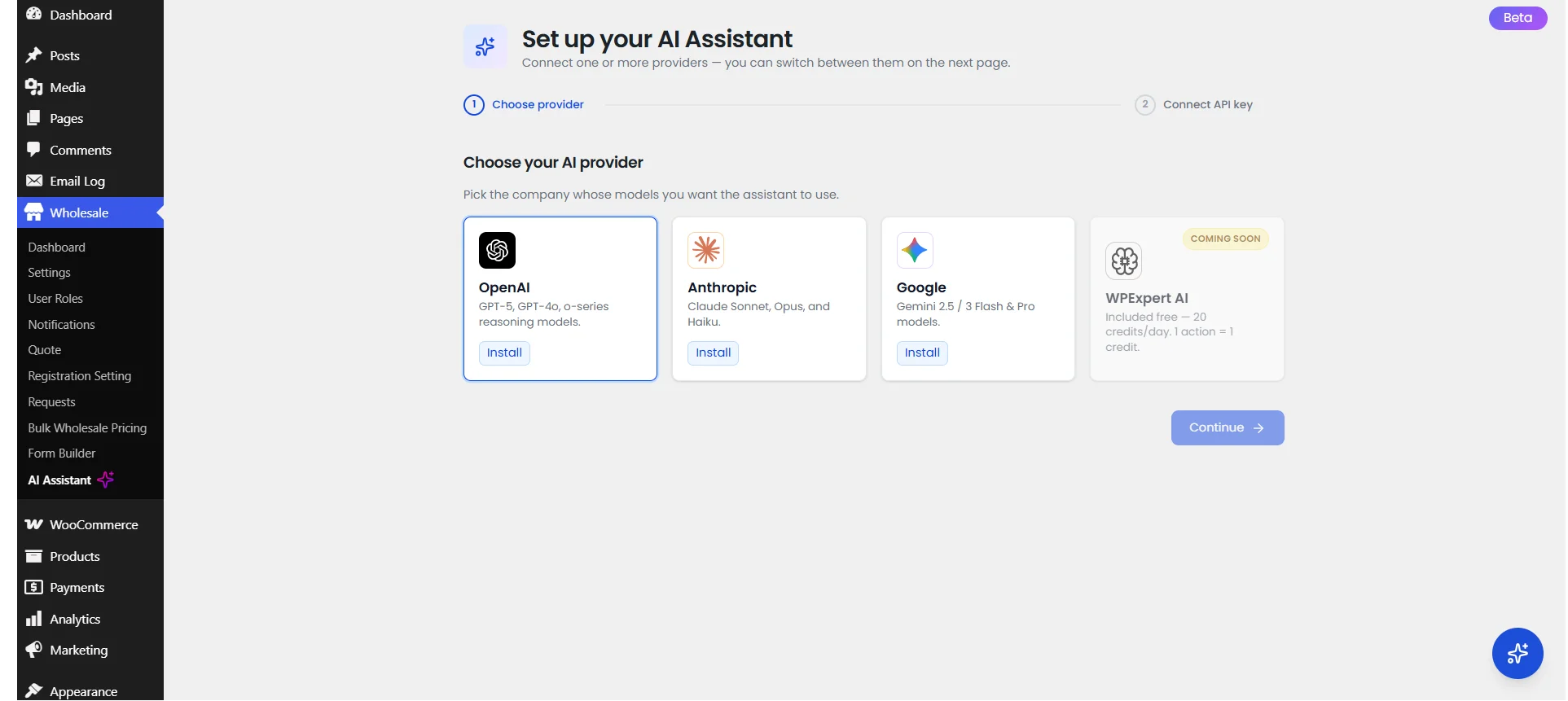
- Select your preferred AI provider and install the required provider plugin if needed
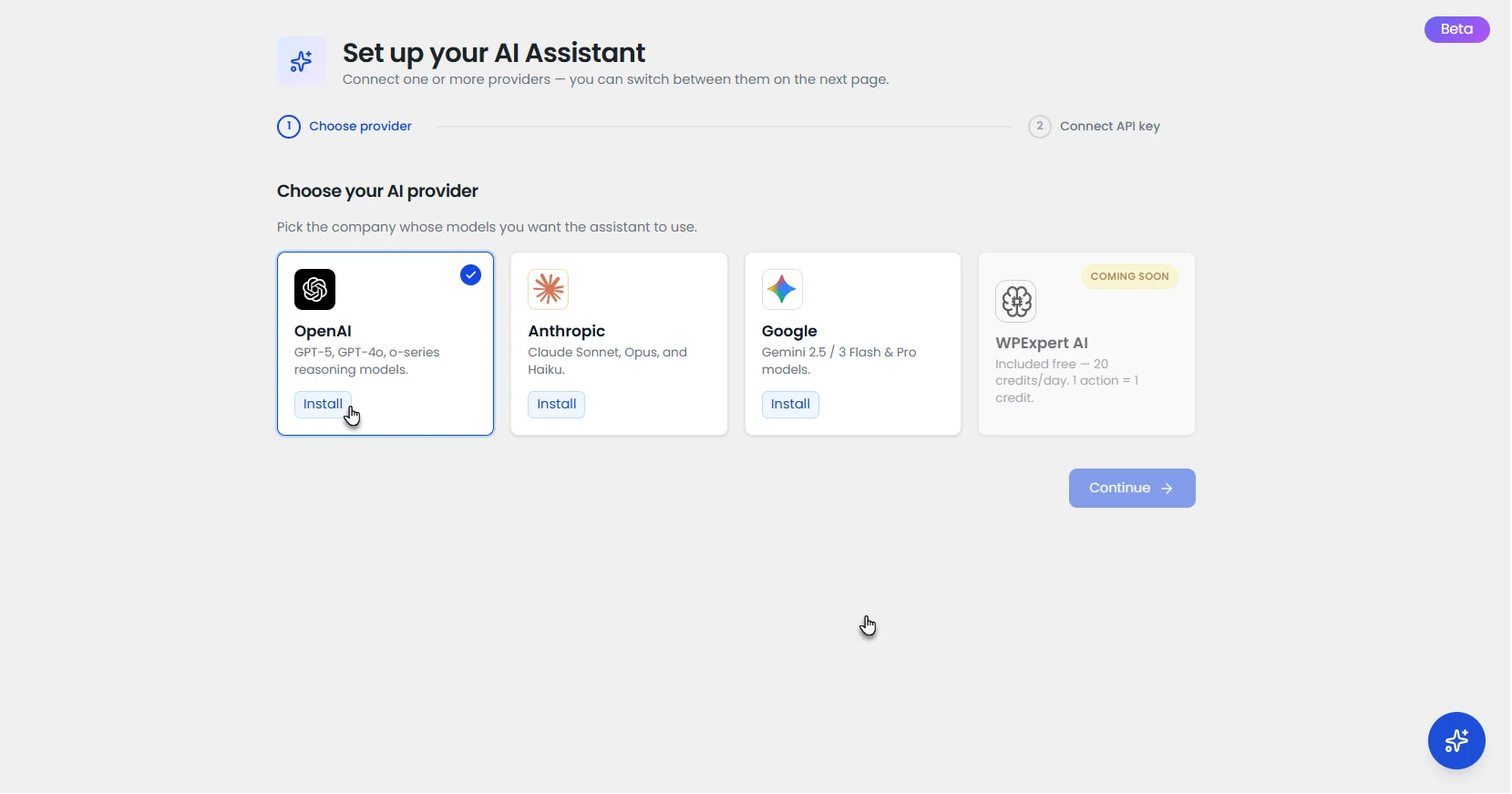
- Enter your API key and connect the assistant.
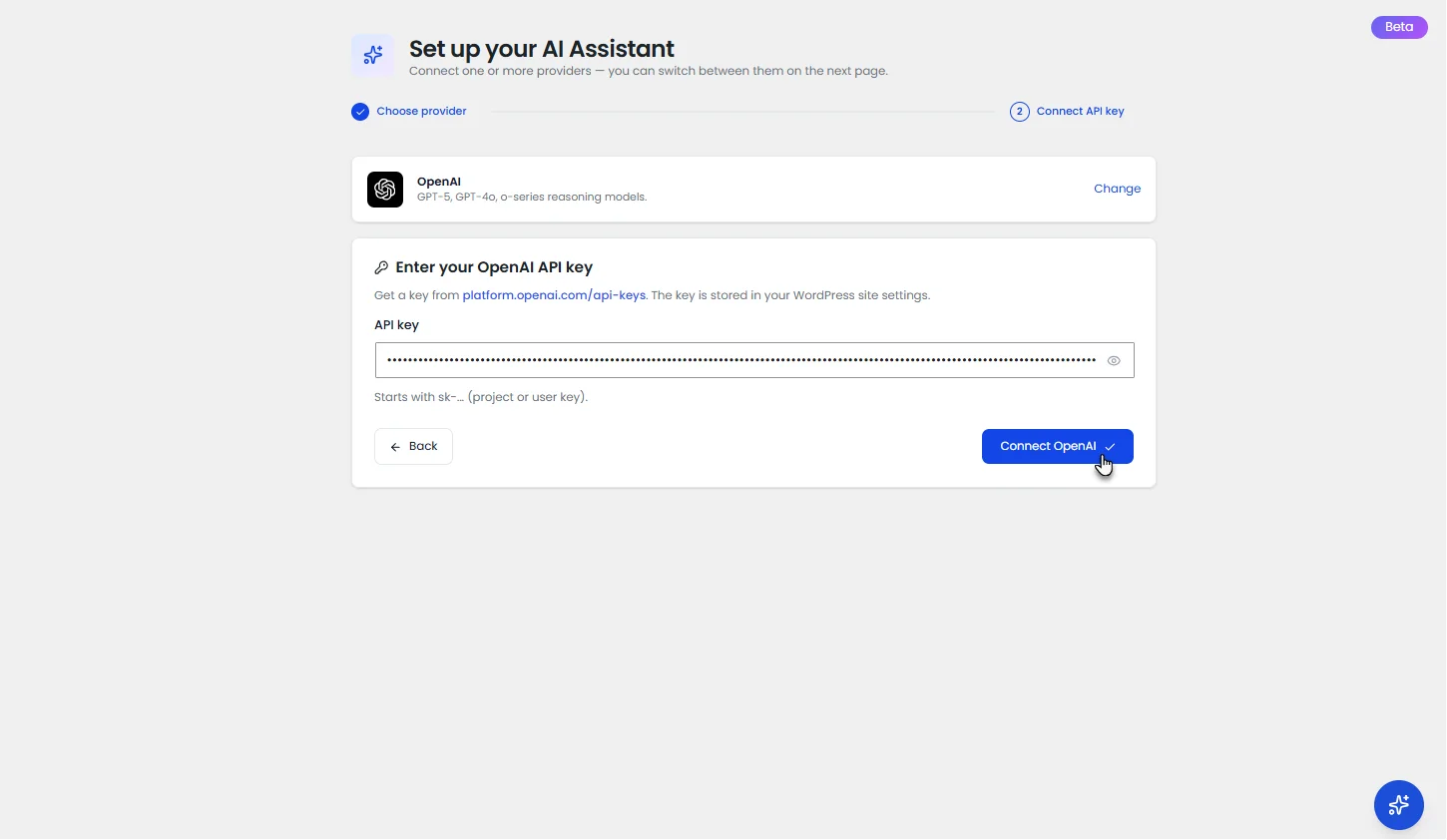
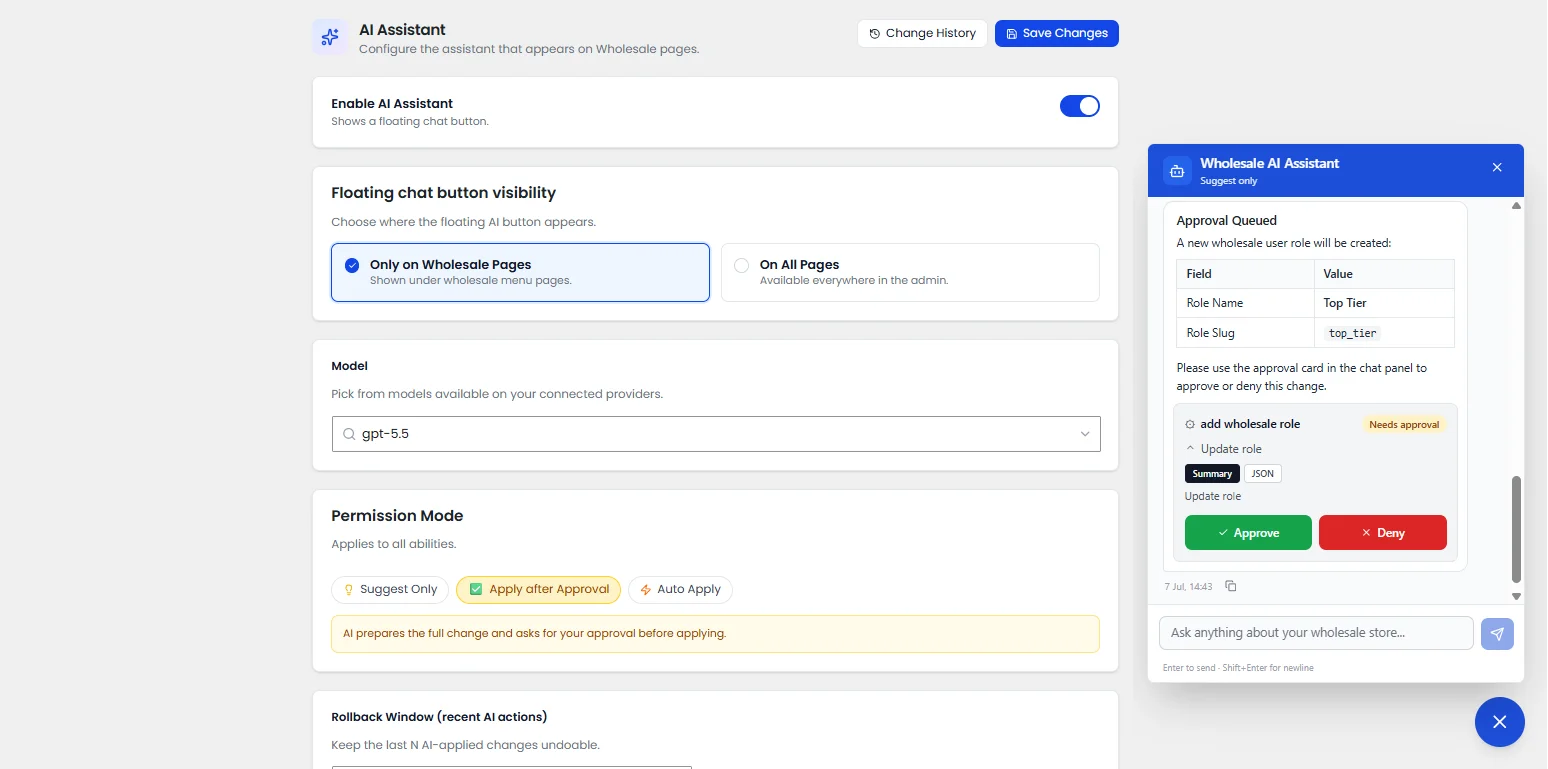
- Enable the AI Assistant and choose where the floating chat button should appear (wholesale pages only or across all WordPress admin pages)
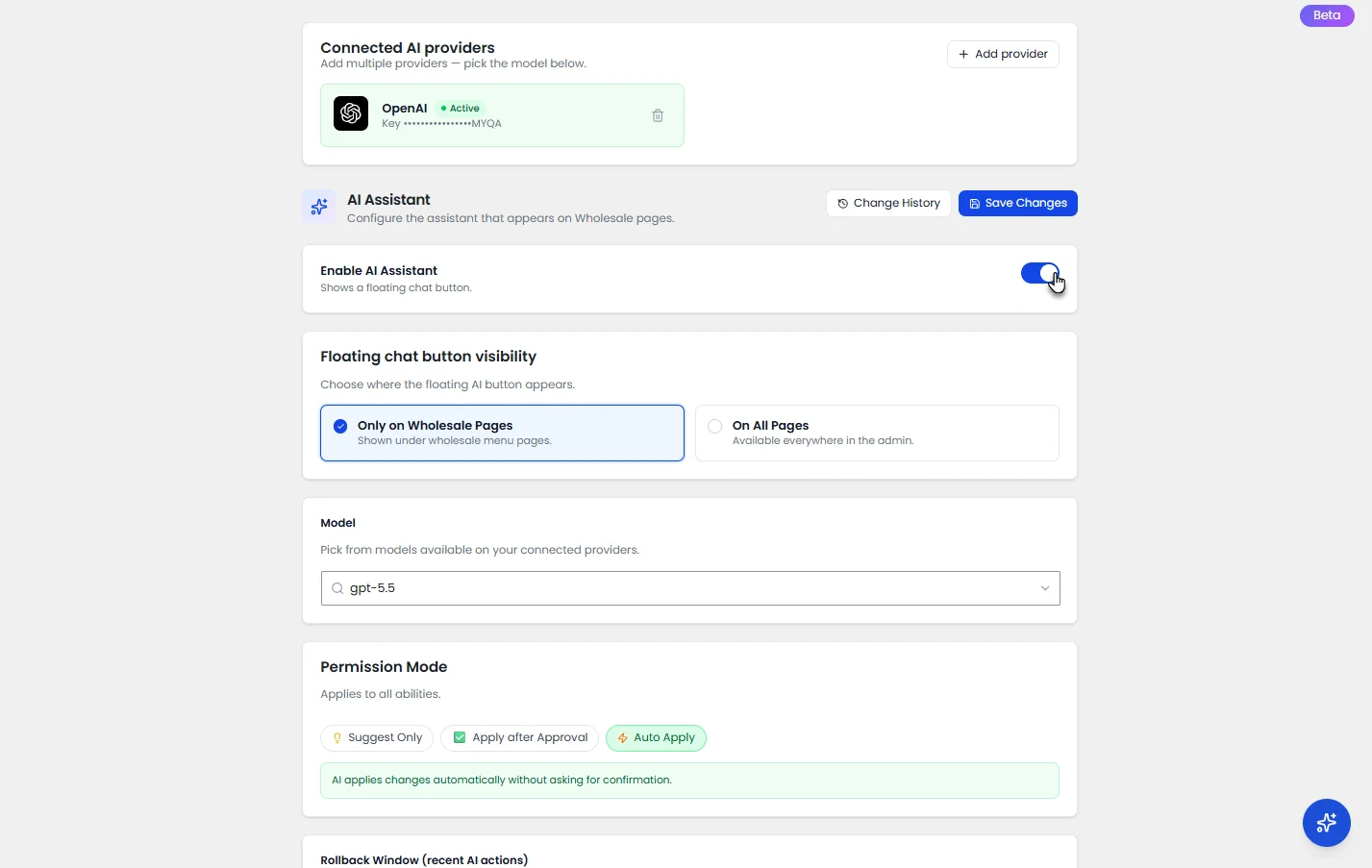
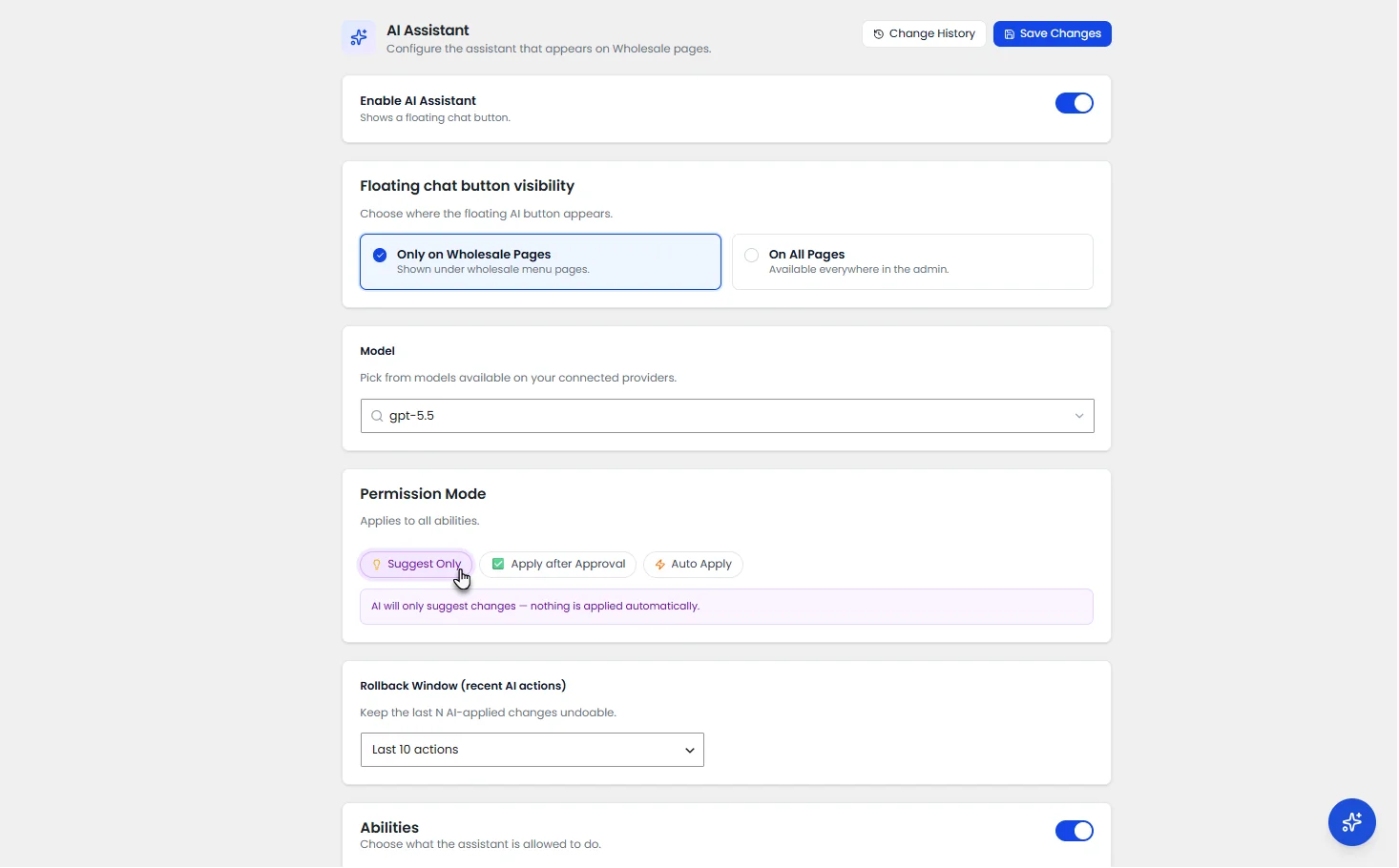
- Select your AI model and choose a permission mode: Suggest Only, Apply After Approval, or Auto Apply.
- Now, start with a prompt like:
“Add a new wholesaler named Top Tier.”
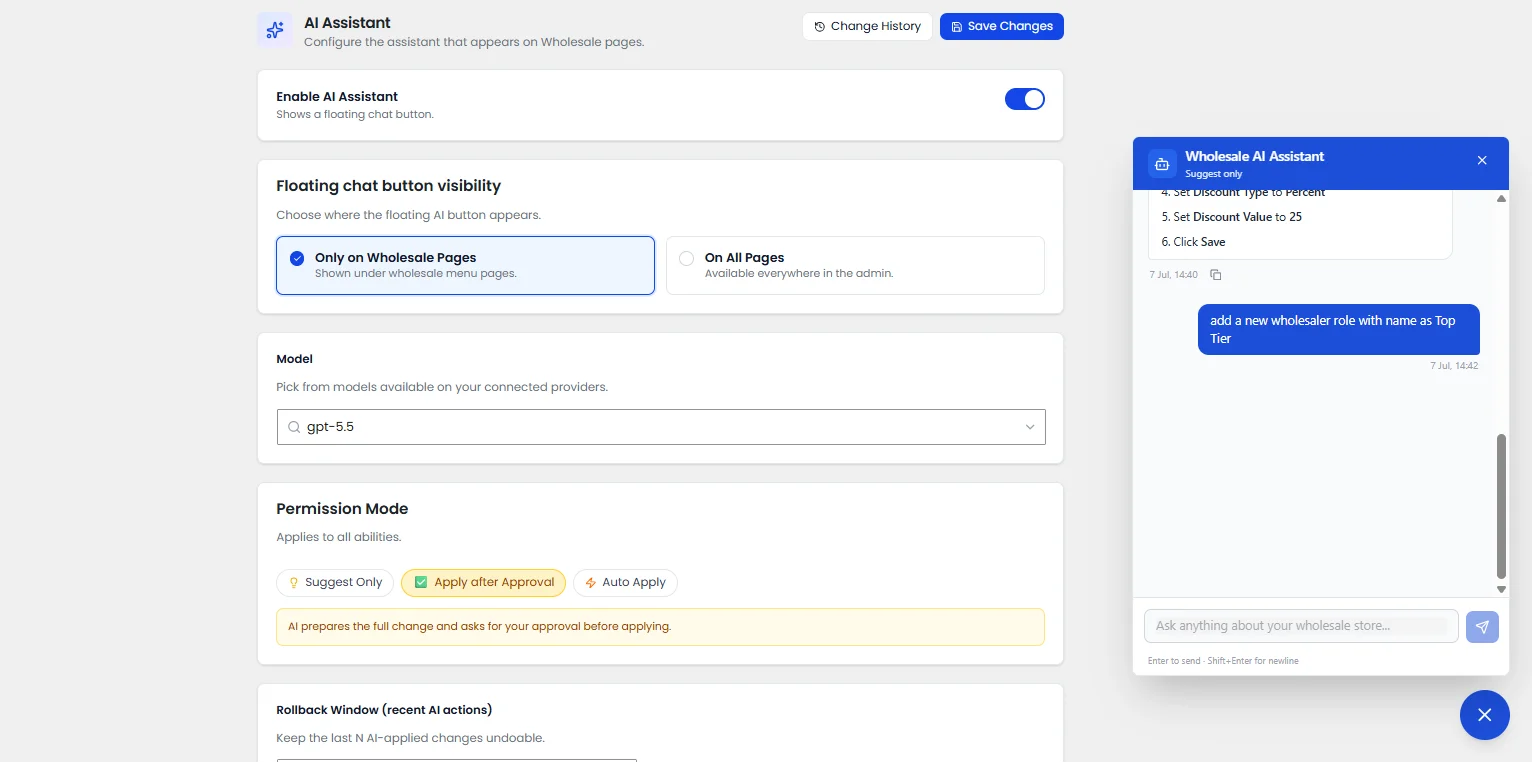
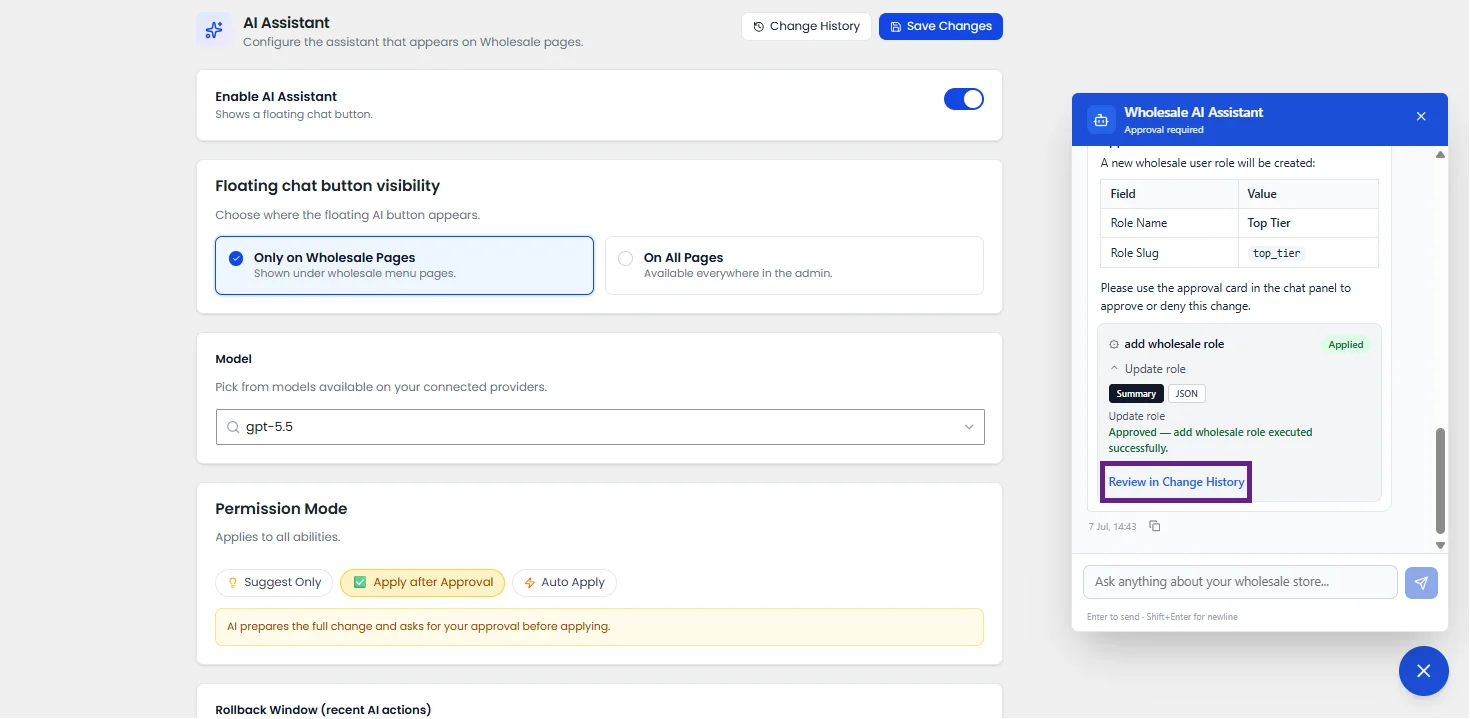
- Review the response, approve suggested actions if they’re accurate.
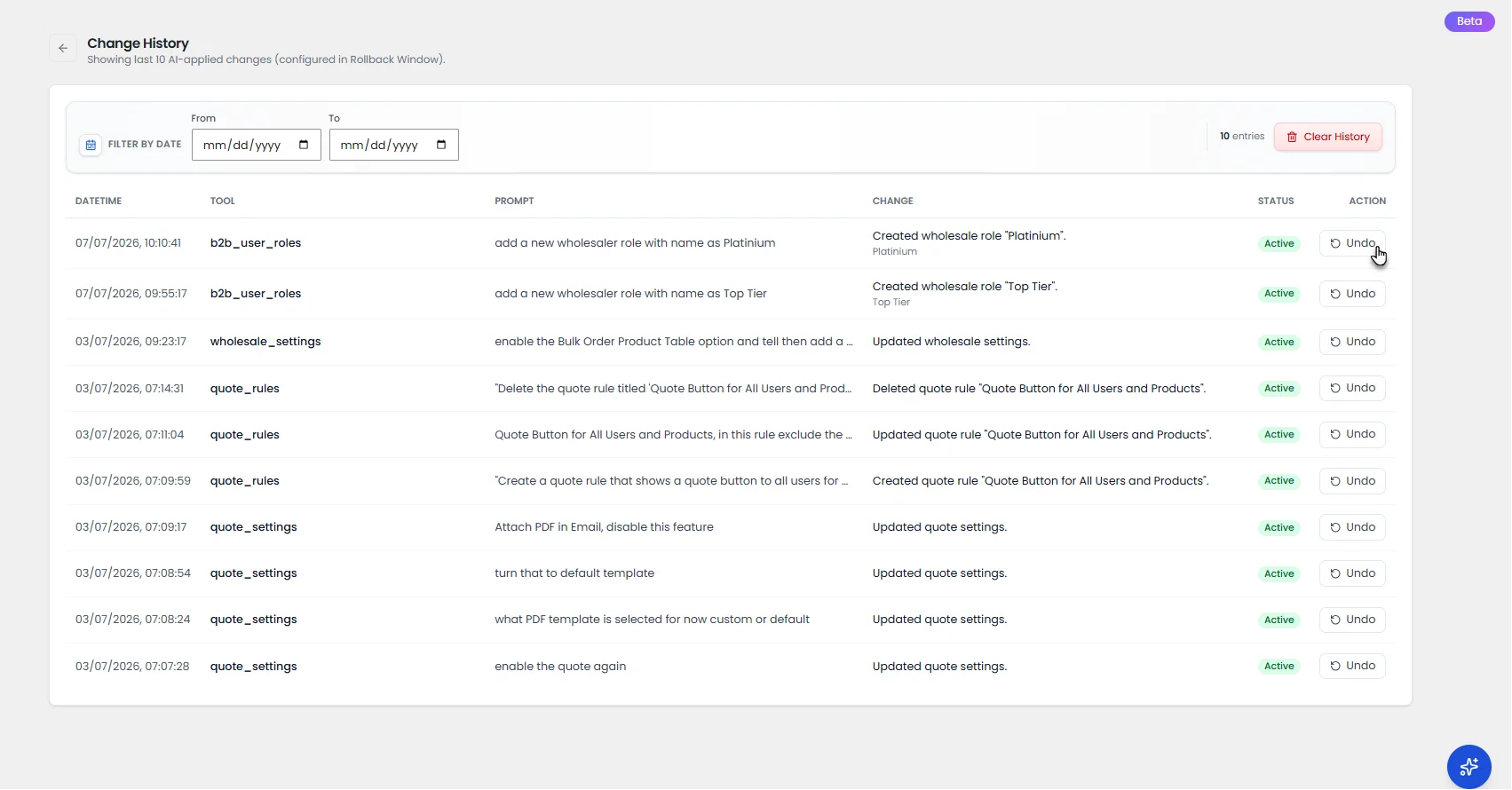
- Use change history or rollback when you need to undo a recent AI-assisted update.
We suggest you start with one workflow: quote settings, pricing rules, buyer roles, or Product Table. Then expand AI assistance across more WooCommerce B2B store tasks as your team gets comfortable.
The Must-Have Feature: Rolling Back If Anything Seems Wrong
Mistakes happen, even with careful review. The Rollback Window lets you undo any AI-applied change within a set period, so nothing feels permanent until you’re confident it’s right for your store.
Plugins That Strengthen Your AI-Powered B2B WooCommerce Stack
B2B Wholesale for WooCommerce doesn’t run in isolation. Most wholesale stores already rely on a handful of other plugins to keep the store fast, secure, and communicating clearly with buyers. Here are the plugins that pair especially well with the AI Assistant’s workflow.
1. Post SMTP: Reliable Email Delivery for Quotes and Wholesale Notifications
An AI Assistant that speeds up quote approvals doesn’t help much if the quote email never reaches the buyer’s inbox. Post SMTP fixes the most common point of failure in a WooCommerce B2B store: email deliverability.
- Ensures B2B Quote responses, wholesale registration approvals, and tiered pricing updates land in the inbox, not spam
- Gives admins a delivery log to confirm a quote email actually reached the buyer, instead of guessing why they went quiet
- Removes the deliverability question entirely, so the AI Assistant’s faster quote turnaround actually translates into faster buyer replies
Why it works: Faster quotes only matter if buyers receive them. Pairing AI-assisted quote handling with a dependable email delivery plugin closes the loop between “responded quickly” and “buyer actually saw it.”
2. Elementor: Building Custom B2B Landing Pages and Quote Forms
Most WooCommerce themes aren’t designed with wholesale buyers in mind. Elementor lets even non-technical store owners build custom landing pages and quote forms instantly, so the front-end matches the AI Assistant’s backend work.
- Build landing pages for different Buyer Roles, like a “Regional Distributor” page with its own pricing callouts
- Design a branded B2B Quote form instead of the default WooCommerce layout
- Customize how the Product Table displays to bulk buyers, beyond default styling
Why it works: The AI Assistant handles the logic; Elementor makes sure buyers see pages that feel intentional, beautiful, and converging.
3. WP Rocket: Keeping Large Product Tables Fast
A cleaned-up B2B Product Table doesn’t stay fast on its own once a catalog grows into the thousands of SKUs. WP Rocket handles the caching and page-speed side, so a well-organized table you have built using B2B Wholesale for WooCommerce also loads quickly for B2B buyers. It makes scanning hundreds of rows accessible at once.
- Speeds up page load on catalog-heavy pages the AI Assistant just cleaned up
- Reduces server strain from large product tables and tiered pricing calculations
- Keeps the buying experience quick even as buyer roles and pricing tiers multiply
Why it works: A clean Product Table that loads slowly still frustrates bulk buyers. Speed and structure need to work together.
Final Thoughts
There’s no single setting that fixes a slow, inconsistent B2B wholesale process overnight. But the right combination of AI-assisted quotes, buyer roles, pricing, and product tables absolutely will move the needle over time.
That’s how the AI Assistant inside B2B Wholesale for WooCommerce earns its place in your store. It doesn’t promise to run everything for you; it resolves the specific, repetitive problems that quietly slow your B2B stores.
FAQs
Why is manual WooCommerce B2B store management dead?
Most WooCommerce store owners configure buyer roles, wholesale pricing, and quote rules once, then never revisit them after the catalog grows. That’s how pricing gaps and outdated tiers quietly creep in. An AI Assistant that reviews these settings on an ongoing basis catches problems before a buyer ever notices them.
Does the AI Assistant make changes without my approval?
Only if you choose Auto Apply mode. Otherwise, every change waits for your evaluation under Suggest Only or Apply After Approval.
Can I undo a change the AI Assistant made?
Yes. The Rollback Window lets you reverse any AI-applied change within a set period after it goes live.
Will this work with my existing Buyer Roles and Wholesale Pricing setup?
Yes. The AI Assistant reviews your present setup first and builds suggestions around what’s already in place, rather than starting from scratch.
Is the AI Assistant only useful for large stores?
No, though it delivers the most value once you have multiple buyer roles, pricing tiers, or a large Product Table to manage. Smaller stores can still use it for quote handling and pricing checks.