

























Every time a customer completes a purchase, WooCommerce should instantly send an order confirmation email or receipt. If that email never arrives, customers may think the payment failed, open support tickets, or lose trust in your store.
But what happens when the WooCommerce receipts never reach their recipient?
Missing receipt emails frustrate customers, increase refund requests, and make your online store appear unreliable. Sadly, this often happens because of WordPress.
After helping thousands of WordPress users troubleshoot WooCommerce email issues, we’ve found that most delivery problems disappear after replacing WordPress’s default wp_mail() function with authenticated SMTP.
In this blog, we will cover the reasons for missing receipts and how to fix them so your receipts arrive on time. Getting this right is crucial for a better customer experience and for maintaining your store’s reputation.
Why WooCommerce Receipt Emails Are Important
Ensuring your WooCommerce receipts are reliably delivered is vital for your store’s success and reputation. Fixing this issue brings several key benefits:
- Builds Customer Trust: Customers expect an order confirmation email immediately after checkout. Receiving a receipt confirms that the payment succeeded and reassures customers that their order is being processed.
- Ensures Security: This rapid, professional communication reduces anxiety and helps the customer feel secure during the transaction, which is essential for first-time buyers.
- Reduces Support Tickets: Missing receipts immediately lead to frustrated customers contacting your support team to request their order details. Ensuring receipts are sent promptly minimizes the volume of “Where is my order?” tickets.
- Maintains Professionalism: Inconsistent or missing communication can make your store appear unprofessional or unreliable, damaging your brand’s reputation.
- Helps With Record Keeping and Compliance: Receipts are crucial for both the customer’s and your business’s accounting. They provide a clear, itemized record of the sale, including taxes, discounts, and payment methods.
- Smoother Returns, Exchanges, and Disputes: The order receipt is the document your customers rely on to process a return, request a refund, or handle a warranty claim. When the receipt is readily available, the process is straightforward, which contributes to a better post-sale experience.
Key Factors That Disrupt WooCommerce Transactional Email Delivery
Several technical and configuration issues can interfere with WooCommerce transactional email delivery. Below, we explore four common factors that may prevent receipt emails from being sent successfully and how to identify them.
Factor 1: WordPress Uses PHP Mail Instead of Authenticated SMTP
When an order receipt fails to reach a customer’s inbox, the problem is almost always tied to the underlying infrastructure that WordPress uses to send email. Unlike dedicated email services, your web host is rarely optimized for reliable mail delivery.
The default method WordPress uses to send transactional emails is the native PHP mail function, which relies on your web server’s local email capabilities. Since most hosting providers do not optimize their infrastructure for WooCommerce email deliverability, these emails often fail to reach customers’ inboxes.
When your server uses it, the emails are sent without proper credentials or authentication. Receiving servers are more likely to filter these unauthenticated emails into spam folders or reject them entirely. Because PHP mail doesn’t authenticate messages by default, mailbox providers cannot verify your identity. That makes your emails far more likely to land in spam or get rejected.
An email needs to be authenticated by three common protocols to prove it is legitimate:
- SPF (Sender Policy Framework): SPF tells receiving mail servers which servers are allowed to send emails for your domain. If an email originates from an unauthorized server, it fails SPF validation, which can negatively affect email deliverability depending on the recipient’s DMARC policy.
- DKIM (DomainKeys Identified Mail): DKIM adds a digital signature to every email so receiving mail servers can verify that nobody changed the message during delivery. The receiving server uses a public key (found in your DNS records) to verify this signature, ensuring the email’s content was not tampered with during transit.
- DMARC (Domain-based Message Authentication, Reporting, and Conformance): DMARC acts as the policy layer. DMARC tells receiving mail servers what to do when SPF or DKIM verification fails. It also helps protect your domain from email spoofing.
Factor 2: Transactional Emails are Flagged as Spam
Your email’s content and your sender’s reputation are critical to inbox placement.
Internet Service Providers (ISPs) like Gmail and Outlook closely examine these factors to decide if your message is legitimate or unwanted spam. If your email looks like spam, it will likely be filtered away from the main inbox.
Spam filters often analyze the words and formatting you use. Overly promotional, “salesy” language can be a major red flag. Words like “FREE,” “GUARANTEED,” or “Act Now!” are often associated with spam and can trigger filters.
Moreover, emails that are heavily image-based with very little text are often flagged because spammers use this trick to hide their content from filters.
Beyond the words, how your recipients interact with your emails is also important for a better sender reputation. ISPs use these engagement signals to determine your sender reputation and overall trustworthiness. Here’s how they assess it:
- Low Engagement: If your subscribers rarely open or click your emails, it tells ISPs that your content is not valuable or wanted. This can lead to your emails being slowly filtered into the spam folder.
- High Complaint Rate: A high spam complaint rate, meaning people are actively clicking “Mark as Spam”, is one of the most damaging factors. Industry recommendations generally suggest keeping spam complaint rates below 0.1%, although acceptable thresholds vary between email providers.
Factor 3: Incorrect or Disabled WooCommerce Settings
Sometimes the issue is not with the server but with an internal oversight in the WooCommerce setup itself.
The WooCommerce platform allows you to enable, disable, and configure specific transactional email types, such as “New Order,” “Processing Order,” and “Completed Order.” If one of these crucial email templates is accidentally disabled during a theme update or a plugin installation, the order receipt will simply not be triggered when a customer completes a purchase.
An incorrect sender email address or recipient email address can also prevent receipts from being delivered correctly, especially if it doesn’t match your authenticated sending domain.
Factor 4: Plugin or Theme Conflicts
The rich functionality of a WordPress site often depends on dozens of plugins and a specialized theme, all working together.
Unfortunately, a single conflicting piece of code can silently break the email-sending mechanism.
A checkout plugin, payment gateway plugin, or security plugin might block the outgoing mail function, or an outdated theme could interfere with the “hook” that notifies WooCommerce when an order status changes.
These conflicts don’t usually produce a visible error message, making the problem incredibly hard to find. The email just fails to be sent from WooCommerce, even though the customer’s order goes through fine.
4 Easy Fixes For WooCommerce Receipts Not Sending
Now that you understand the most common causes behind WooCommerce receipt delivery failures, let’s walk through the solutions you can implement to restore reliable email delivery.
Solution 1: Install an SMTP Plugin (Post SMTP Recommended)
As we explained earlier, WordPress sends WooCommerce emails using the default wp_mail() function, which relies on your web server’s PHP mail. Since most hosting providers don’t configure their mail servers for reliable email delivery, receipt emails often land in spam folders or fail to reach the recipient altogether.
The best way to fix this is to replace WordPress’s default email delivery method with SMTP. By sending emails through a trusted SMTP provider, you can authenticate your messages with SPF, DKIM, and DMARC, greatly improving email deliverability.
We recommend using Post SMTP, one of the most trusted WordPress SMTP plugins with over 300,000 active installations. It replaces WordPress’s default email function, supports all major SMTP providers and email APIs, provides detailed email logs, and helps improve WooCommerce email deliverability.
Once you’ve connected Post SMTP to your preferred email service, WooCommerce will send order receipts through an authenticated SMTP connection instead of the unreliable wp_mail() function.
Here’s how to set it up:
- Log in to your admin dashboard.
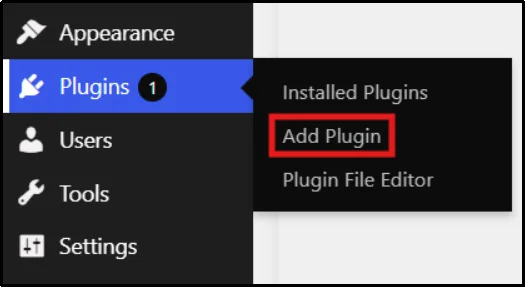
- Navigate to Plugins → Add Plugin from the menu.
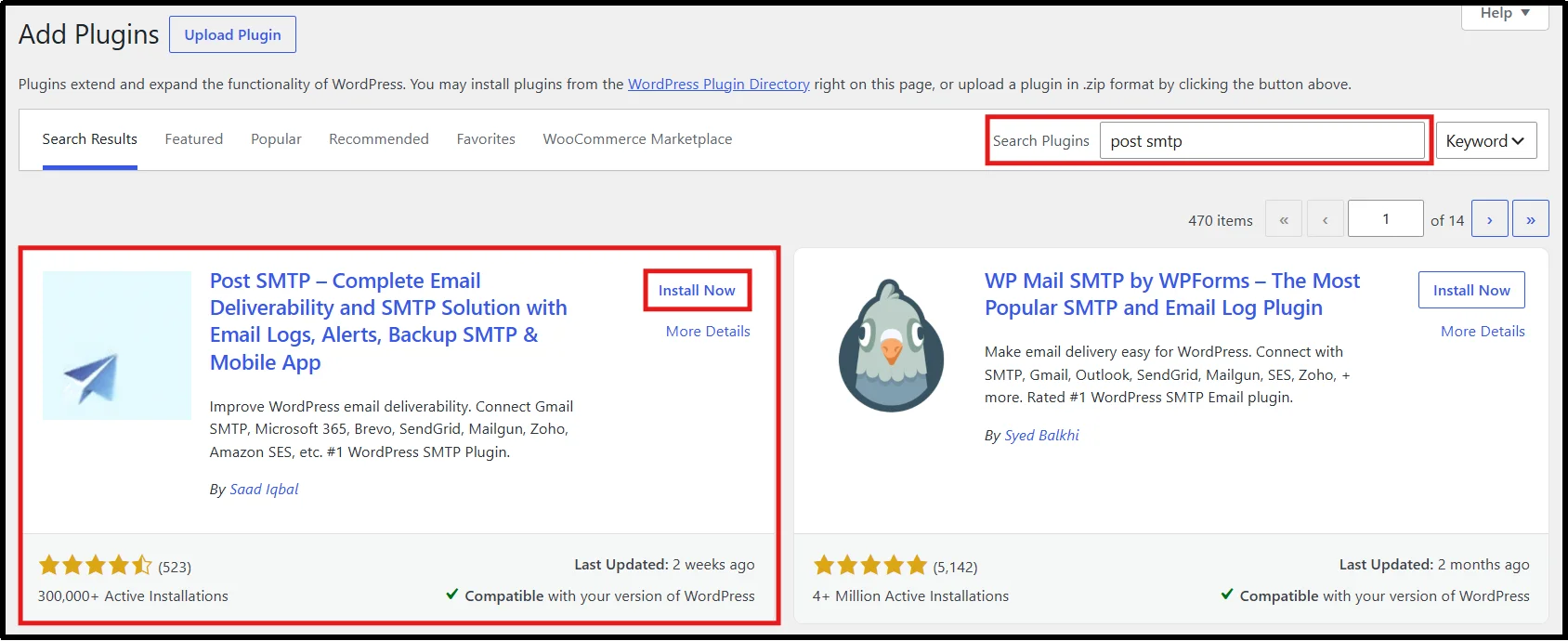
- Search for Post SMTP using the search plugin bar.
- Install the plugin and wait until the install button turns into an “Activate” button.
- Once ready, click the Activate button to complete the installation.
- After the plugin is active, go to the Post SMTP dashboard.
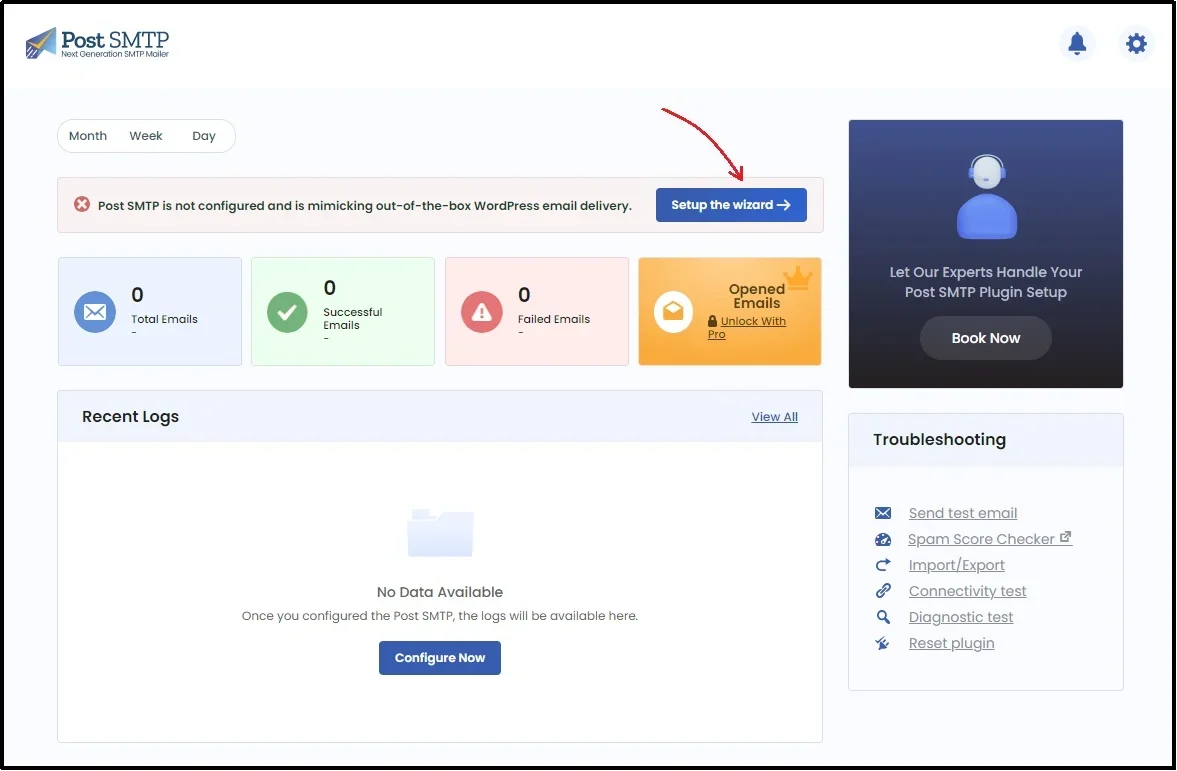
- Begin the setup by clicking the “Set up the wizard” button.
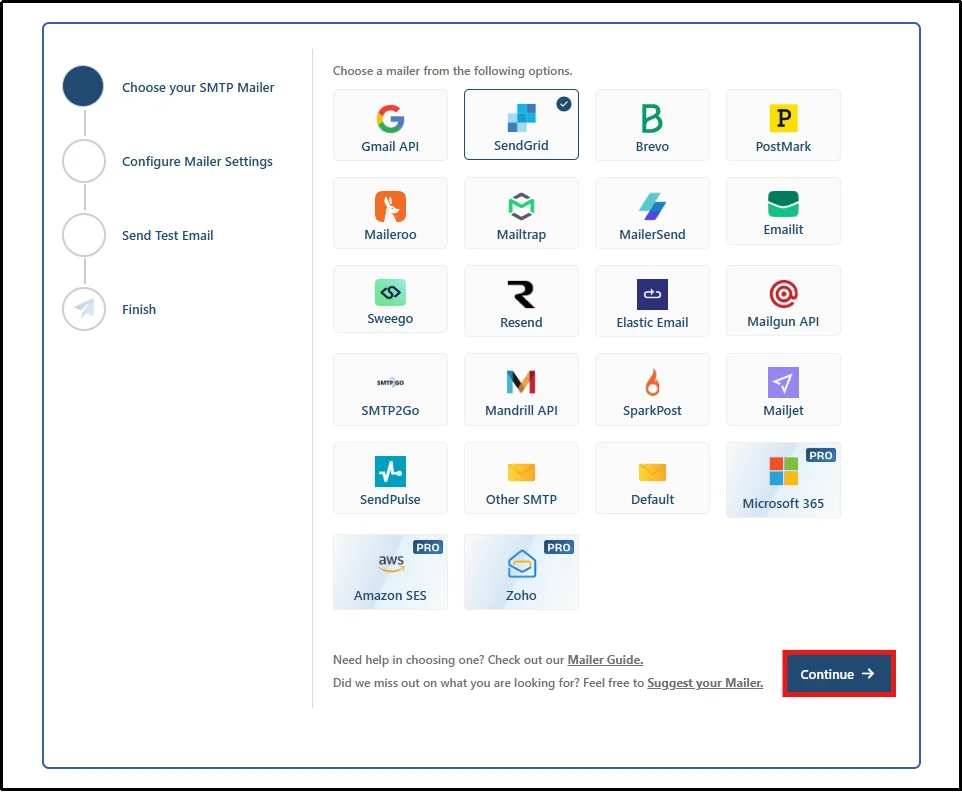
- You will see a screen like this. Select your favorite SMTP mailer and click Continue.
Post SMTP supports 15+ popular SMTP providers, including Gmail, Microsoft 365, Zoho Mail, Amazon SES, Mailgun, Brevo, SendGrid, Postmark, Sweego, and more.
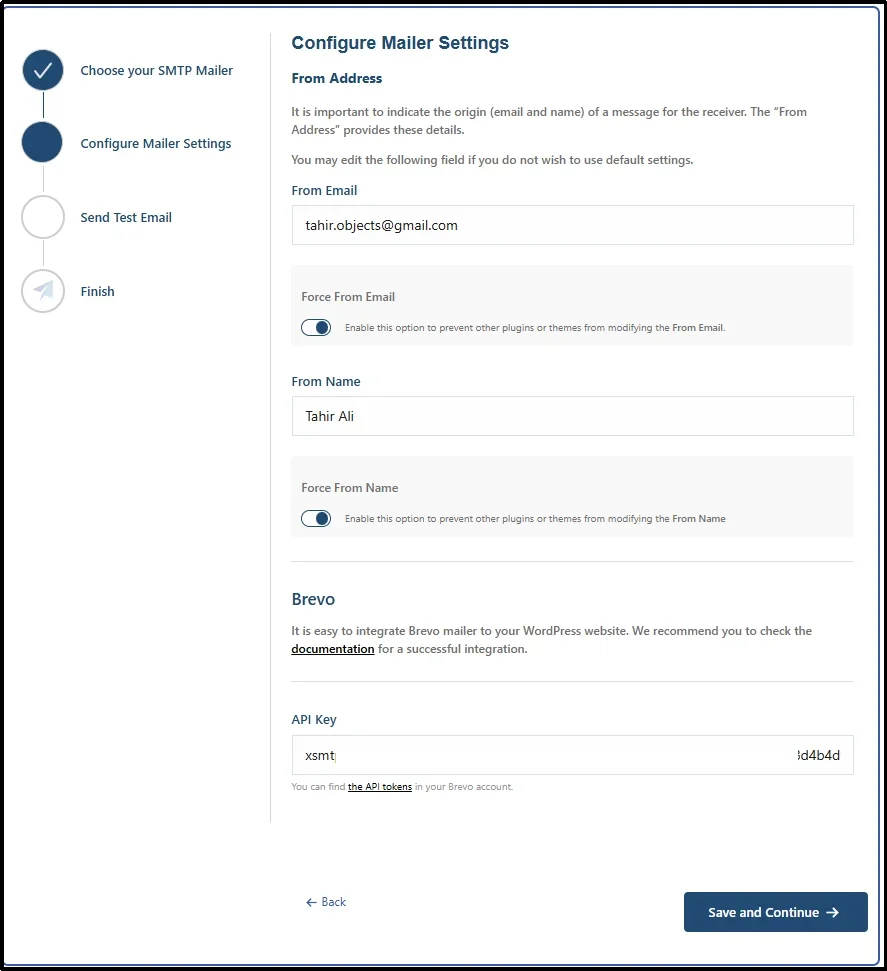
- On the next screen, enter your From Name and From Address, enable the “Prevent plugins and themes from changing this” option, then paste your API key. Once you’ve filled in the required details, click Save and Continue.
- Finally, test your WordPress SMTP configuration.
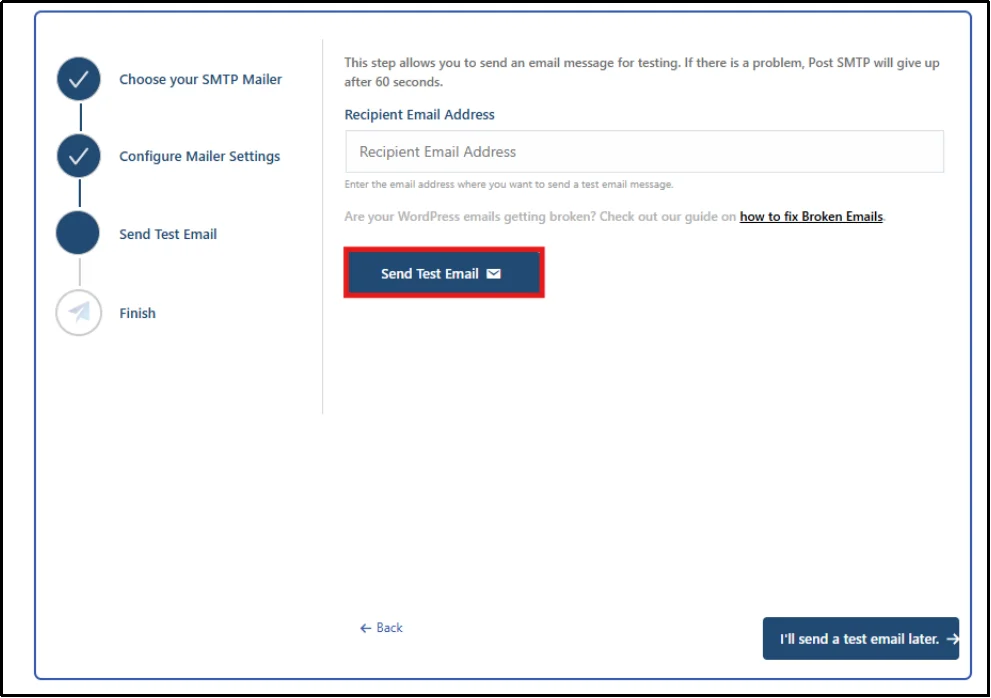
Once configured correctly, SMTP authentication significantly improves WooCommerce email deliverability and increases the likelihood that receipts reach customers’ inboxes rather than spam folders.
Solution 2: Clean Up Email Content and Enhance Sender Reputation
Mailbox providers such as Gmail, Yahoo Mail, and Outlook evaluate every incoming email based on factors such as authentication, sender reputation, and message content before deciding whether it belongs in the inbox or the spam folder. If your emails look like spam or recipients repeatedly mark them as junk, your sender reputation drops, making future emails harder to deliver.
You need to focus on two areas to fix this: content quality and engagement signals.
- Avoid Spam Trigger Words: You must remove high-risk, “salesy” words like “FREE” or “GUARANTEED” from your subject lines and body copy. While you might not be running a scam, using excessive exclamation points or ALL CAPS can still cause your emails to fail content filters. Sticking to clear, professional language will significantly reduce the chances of getting flagged.
- Balance Text and Images: Emails that are nearly all images with little text look suspicious to spam filters. You should maintain a healthy text-to-image ratio in your receipts. Crucial details like the order number and item list should always be in plain text.
- Encourage Engagement: Mailbox providers track how recipients interact with your emails. If your customers open and click on your messages, your sender reputation improves. A low Complaint Rate (below the recommended 0.1%) is also essential. Ensure the content you send is always relevant and meets the customer’s expectations.
By optimizing your content and sending relevant, professional emails, you signal to ISPs. This makes their filters trust you more, ensuring your receipts land reliably in the customer’s primary inbox.
Solution 3: Verify and Fix WooCommerce Email Settings
Sometimes, the simplest issues cause the biggest problems.
An internal setting in WooCommerce might be accidentally disabled or misspelled, preventing receipts from reaching where they need to go. You need to check the transactional email settings in your WordPress dashboard to correct this.
- Enable Transactional Emails: WooCommerce lets you turn specific email types on or off, such as “New Order” or “Completed Order.”
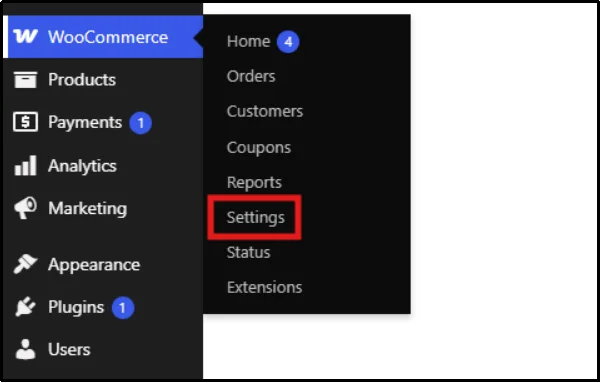
- To access these, navigate to your admin dashboard → WooCommerce → Settings.
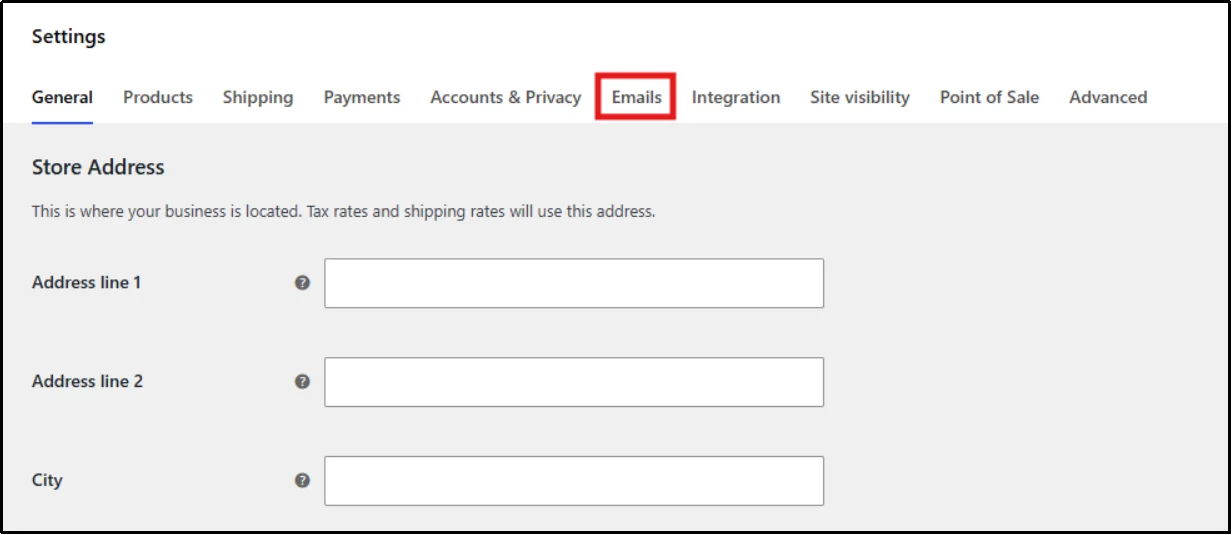
- Select Emails from the top menu.
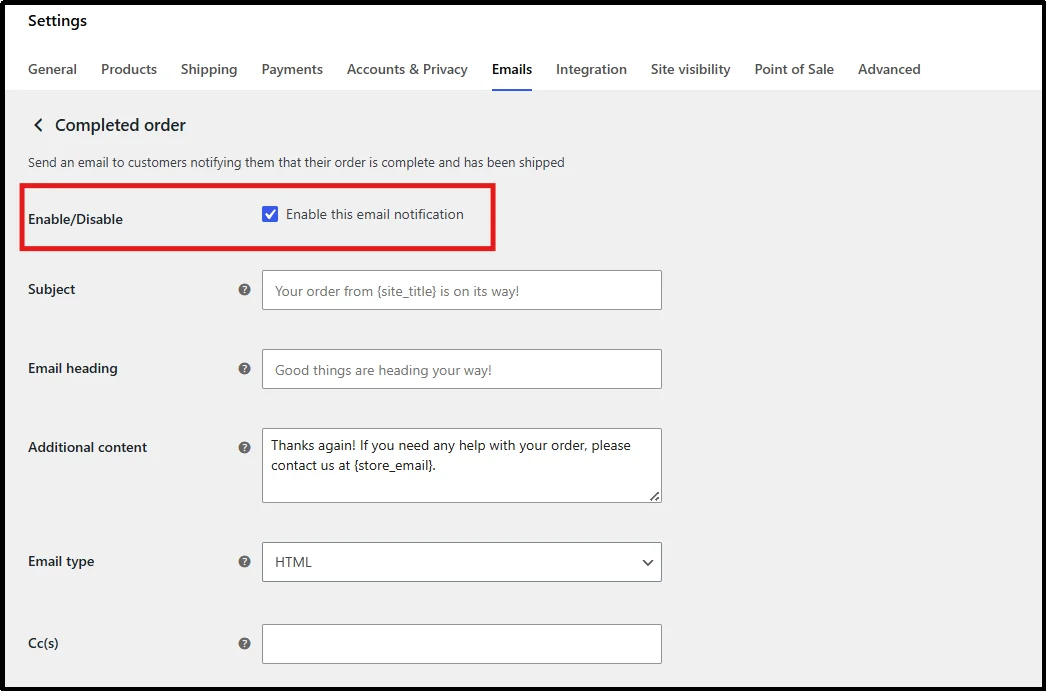
- Select Completed Order, then click on the checkbox for Enable this email notification.
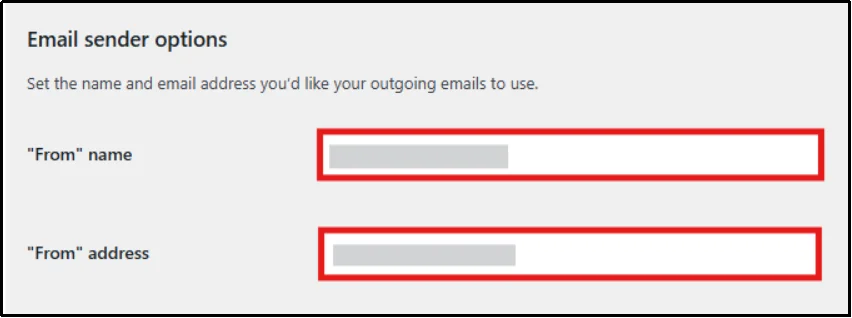
- Fix “From” Address Errors: A common mistake is a typo in the store’s “From” address or the recipient’s email field. The system cannot deliver the receipt if the sending address or destination is incorrect.
- Go to the same page as the previous one, i.e., WooCommerce → Settings → Emails tab.
- Now scroll down till you find Email Sender Options.
- Enter your desired “From Name” and “From Address”
- Customize Templates (Carefully): While this is not a fix, you can still check whether any custom email templates are working correctly. If a theme or plugin update broke a template, it might fail to load. The simplest fix is to ensure you are using the default or a properly updated template.
- Under Email Sender Options, when you scroll down, you come across “Email Template”.
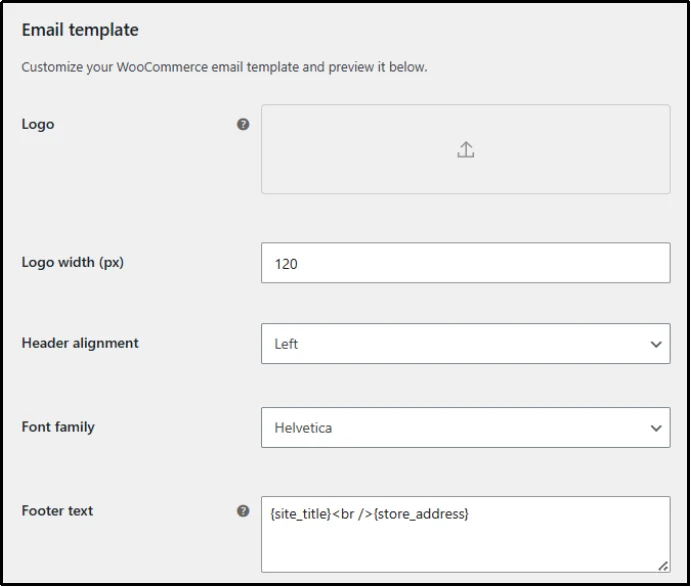
- Set any values and text as per your requirements.
- If you’ve previously set a custom email, it’s best to double-check this.
Solution 4: Disable Conflicting Themes and Plugins
A security plugin, an outdated theme, or an incompatible payment gateway can silently break the mail function. To find the source of this hidden problem, here’s what to do:
- Revert to a Basic Theme: Start by temporarily switching your store’s theme to a default WordPress theme, such as Twenty Twenty-Four.
- Go to Appearance → Themes.
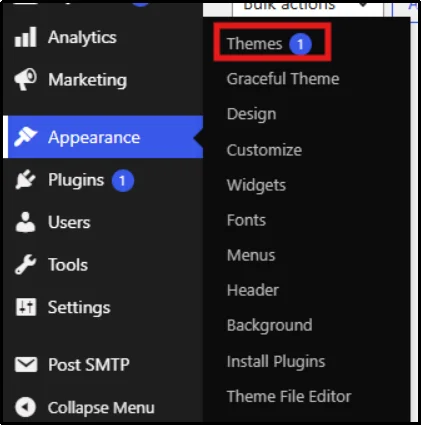
- Install and activate one of the basic WordPress themes.
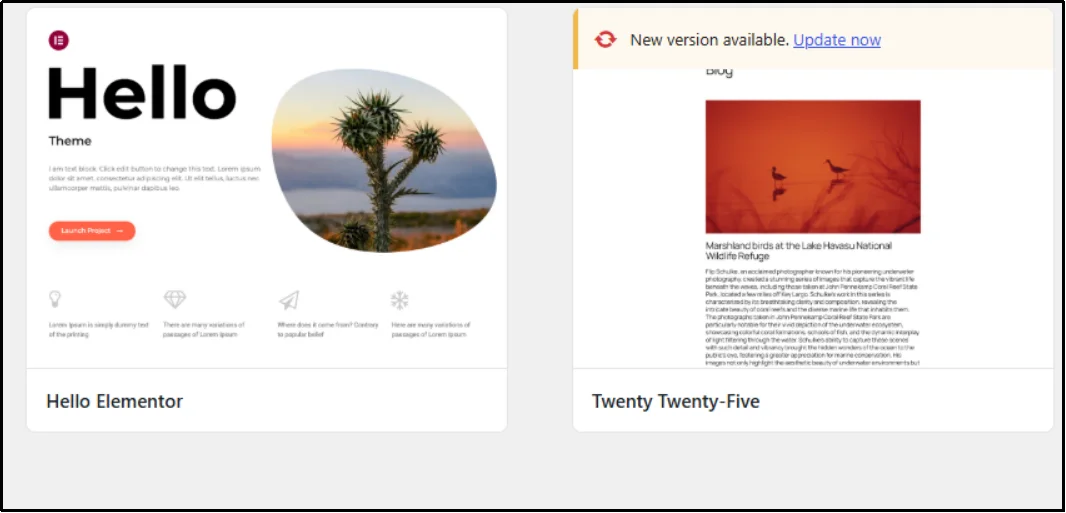
If the receipts start working immediately, the conflict is within the theme you were using. You can then contact the theme developer for a fix or consider using a different theme.
- Systematically Disable Plugins: If the issue persists, the conflict is likely with one of your plugins. You need to turn off all plugins except WooCommerce and the SMTP plugin (if you are using one). Then, re-enable them one by one, testing the receipt email after each activation.
- Head to Plugins → Installed Plugins.
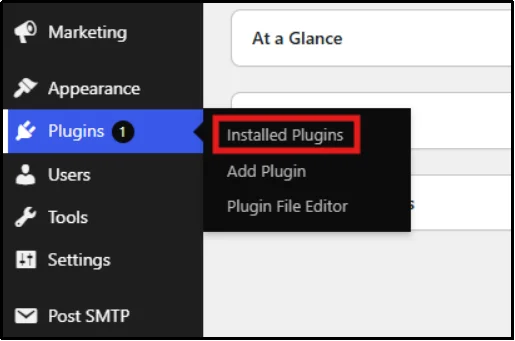
- Select all via checkbox, then on the dropdown menu, click Deactivate.
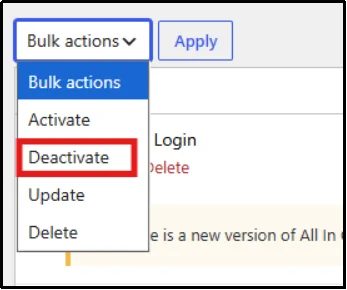
- Isolate the Culprit: The moment the email fails to send again, you have found the conflicting plugin. Once isolated, you can either replace that plugin with a similar alternative, reach out to the developer, or delete it. This careful testing ensures you eliminate the specific piece of code causing the delivery failure.
This troubleshooting method is the most reliable way to uncover hidden conflicts. Also, to determine if the problem is with the plugins or the theme.
There you go! It’s done. The issue of WooCommerce receipts not sending is no more.
Post SMTP can help fix other WooCommerce-related problems as well, such as:
- Fixing WooCommerce not sending emails.
- Setting up WooCommerce email notifications.
- Fixing WooCommerce not sending order emails.
- Testing WooCommerce emails to ensure higher deliverability.
Your Store Deserves Reliable Email Delivery
The issue of missing WooCommerce receipts can be broken down into four main problems: poor authentication, bad sender reputation, setting errors, or plugin conflicts.
Addressing each of these issues is crucial for maintaining customer trust and reducing support tickets.
However, the most immediate and effective step you can take is to upgrade your email-sending method. Relying on your host’s default PHP mail is the primary reason for low deliverability. By switching to Post SMTP, you bypass common authentication and conflict issues right away.
Over 300,000 WordPress users trust Post SMTP to solve email delivery problems. It replaces the unreliable default WordPress email function with an authenticated SMTP connection. Get Post SMTP today and start sending worry-free receipts!