























Running a WooCommerce store is exciting, but increasing sales often feels like a moving target. Competition is fierce, customer expectations are rising, and even a small flaw in your strategy can hurt conversions. To truly increase WooCommerce sales, you need more than good products.
For instance, displaying online reviews of products increased their conversion rate from 190% to 380%, highlighting the significant impact of social proof on purchasing decisions.
In this guide, we’ll share 12 proven WooCommerce sales strategies designed to boost revenue, improve conversion rates, and drive sustainable growth. These tactics will help you grow your WooCommerce store sales efficiently and effectively.
Quick Summary: How to Increase WooCommerce Sales
The fastest ways to grow WooCommerce sales include:
- Improve website speed
- Optimize product pages with keywords
- Use local SEO
- Add product schema markup
- Improve CTA visibility
- Leverage user-generated content
- Simplify checkout
- Create urgency and scarcity
- Increase average order value
- Improve email deliverability with SMTP
- Launch loyalty and referral programs
- Recover Abandoned Carts Automatically
Why Optimize WooCommerce to Increase Sales?
WooCommerce gives you everything you need to start selling online, but success depends on how well your store is optimized. Without the right setup, even the best products can struggle to attract attention or convert visitors.
Optimization helps you uncover weak spots in your store that silently reduce conversions. By fine-tuning these elements, you can improve WooCommerce conversion rates and encourage repeat purchases.
Optimization is an ongoing process and not a one-time fix. Each improvement, no matter how small, compounds over time to boost WooCommerce revenue and strengthen customer trust.
What Is a Good WooCommerce Conversion Rate?
A WooCommerce conversion rate measures the percentage of visitors who complete a desired action, such as making a purchase.
Formula:
Conversion Rate = (Orders ÷ Visitors) × 100
Most WooCommerce stores achieve conversion rates between 2% and 4%, while high-performing stores often exceed 5%.
If your conversion rate falls below industry benchmarks, improving store speed, checkout usability, product pages, and customer trust signals can help increase sales significantly.
12 Ways to Boost WooCommerce Sales
Implementing the right tactics can significantly boost your sales and long-term growth. Below are 11 effective ways to grow WooCommerce sales and turn more visitors into loyal customers.
1. Improve Your Store’s Performance For Search Engines
A slow website or one that looks broken on a phone will severely hurt your online store. Search engines like Google now prioritize user experience when ranking your store. Therefore, optimizing for speed and mobile use is essential for boosting revenue.
Prioritize Mobile-First Indexing
The vast majority of people browse the web on their smartphones. Because of this shift, Google uses the mobile version of your website as the main standard for indexing and ranking. This is called Mobile-First Indexing (MFI).
According to SCALIFY, mobile devices account for more than 64% of global web traffic, making mobile optimization essential for WooCommerce stores.
If your mobile site is slow, hard to read, or hides important content that the desktop site has, you will lose rankings. Ensure your website uses a responsive design so that the content and layout adjust seamlessly to any screen size.
Focus on Website Speed
Every second your WooCommerce store takes to load, you lose sales. Slow speeds lead to higher bounce rates and lower conversion rates, showing the clear website speed impact on conversion rates for online stores. In fact, a one-second delay in mobile load time can result in a 20% drop in conversion rates.
Other studies show that a mere 0.1-second improvement in load time can lead to an 8.4% increase in conversions for e-commerce stores. Therefore, to increase sales, you must make your pages lightning-fast. Use tools like Google’s PageSpeed Insights to see what is slowing you down.
As a general guideline, here’s what you can do to improve your WooCommerce speed right away.
- Compress Images: Large product images are a major speed killer. Compress them without losing too much quality.
- Use Caching: Implement caching to temporarily store a version of your pages so they load faster for returning visitors.
- Minimize Code: Reduce and combine your website’s CSS and JavaScript files to make them load more efficiently.
Monitor Core Web Vitals
Google uses Core Web Vitals to evaluate user experience and page performance.
Focus on:
- Largest Contentful Paint (LCP) under 2.5 seconds
- Interaction to Next Paint (INP) under 200 milliseconds
- Cumulative Layout Shift (CLS) below 0.1
Improving these metrics can help increase search visibility and reduce bounce rates.
2. Incorporate Appropriate Keywords
Keywords are the words and phrases people type into a search engine like Google or an e-commerce platform like Amazon to find your product. Using the right keywords helps search engines understand what your product is and show it to the interested shoppers.
You need to use a mix of keyword types to be successful.
- Short-Tail Keywords: These are broad, general terms, usually one or two words, like “running shoes” or “coffee maker.”
- Long-Tail Keywords: These are longer, more specific phrases, typically three or more words, like “waterproof running shoes for women” or “small single-serve coffee maker for office.”
Prioritize Buyer-Intent Keywords
Not all keywords generate sales.
Focus on transactional keywords such as:
- Buy running shoes online
- Best gaming keyboard under $100
- Affordable office chair
These keywords indicate purchase intent and often convert better than informational searches.
Where to Use Keywords?
You should place your keywords strategically across your product pages.
- Product Title (H1 Tag): This is the most important place. Your title should be descriptive, clear, and include your most valuable primary keywords.
The best practice is to keep your title under 50–60 characters so it shows up fully in search results and must include the targeted keyword, preferably at the beginning of the title.
- Product Description: Use your main keywords, synonyms, and related long-tail keywords naturally throughout the description.
NOTE: Effective product page optimization goes beyond keywords. Use high-quality images, compelling product descriptions, clear pricing, and persuasive calls to action to improve both rankings and conversions.
87% of customers feel product content is the most important factor when deciding to buy an item online. Hence, use short paragraphs and bullet points to make the description easier to scan and read.
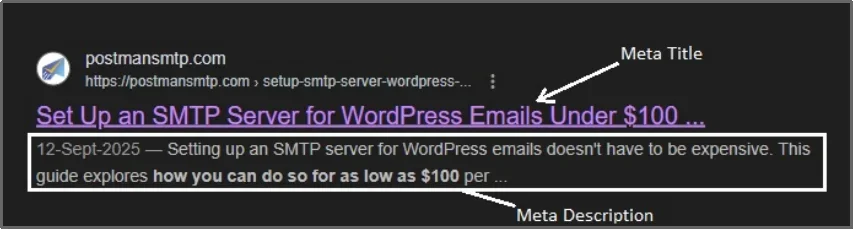
- Meta Tags: This includes the page’s SEO title and meta description. These snippets help shoppers decide whether to click on your link from the search results page.
Meta titles and meta descriptions are the title and a tiny description of the webpage you see on the Search Engine Result Pages (SERPS) of a search engine. Here’s an example:
- Image Alt Text: This is the text you add to your product images. It helps search engines understand what the image is about.
Image SEO is a significant and vital part of a successful SEO strategy. Especially when you are working on a visual-focused project, like running an eCommerce store.
You can use any SEO plugin, such as Yoast SEO, AIOSEO, RankMath, etc., to successfully add alt texts to images.
3. Optimize for Local Search Results
If your WooCommerce store has a physical shop, a pickup location, or serves a specific city, optimizing for local search is a powerful way to grow WooCommerce sales.
Even if you sell purely online, targeting local keywords, such as “gourmet coffee beans in Canada,” can draw in a highly motivated customer base. People often search for products with local intent right before buying to get faster delivery.
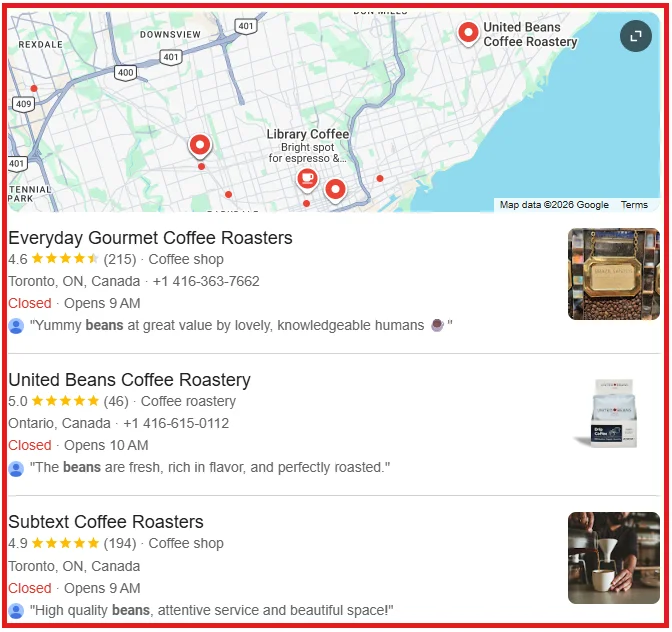
Local Search Engine Optimization (SEO) focuses on getting your business to appear in map results and local pack listings when a customer searches for a product “near me.” These are high-intent searches. For example, 46% of all Google searches have local intent, and a massive 28% of those local searches result in a purchase.
To boost WooCommerce revenue from local shoppers, begin with:
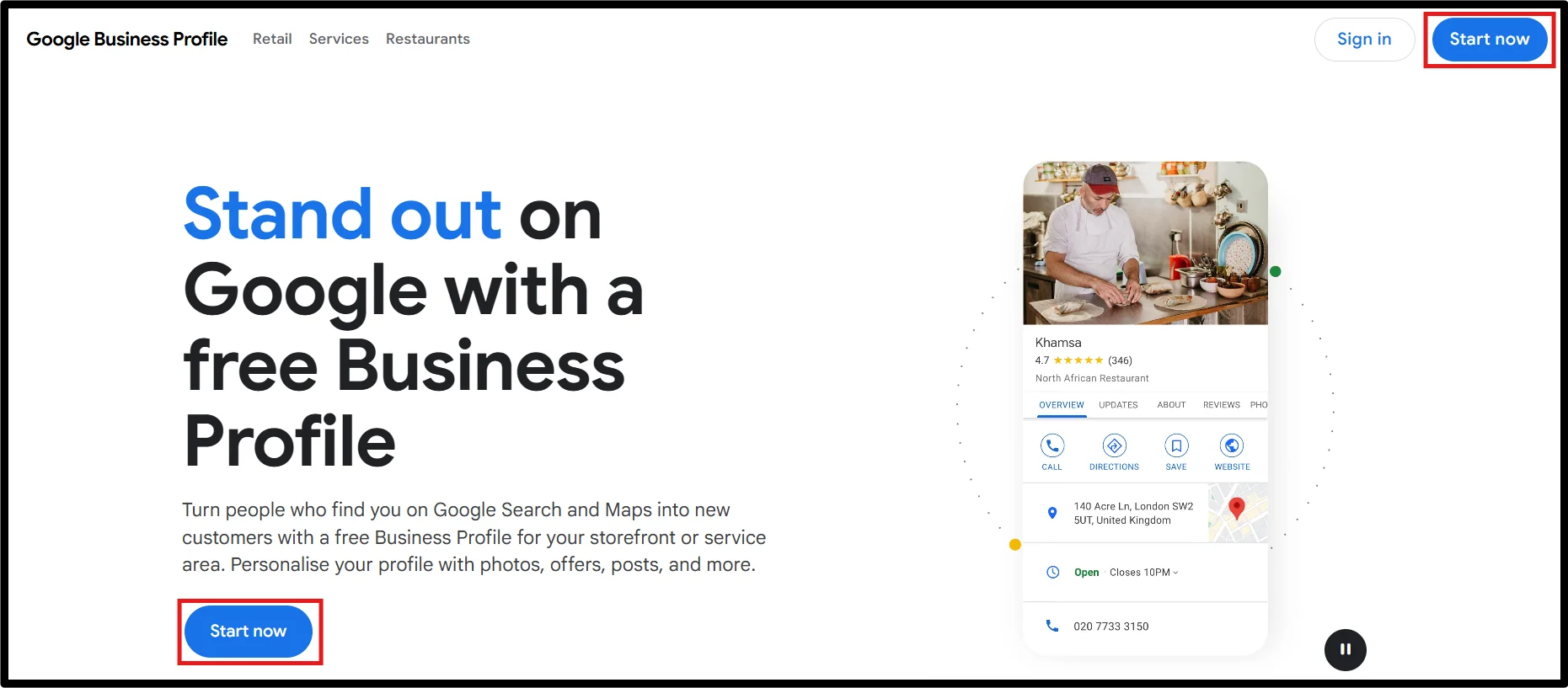
- Visit Google Business Profile page and click on Start Now.
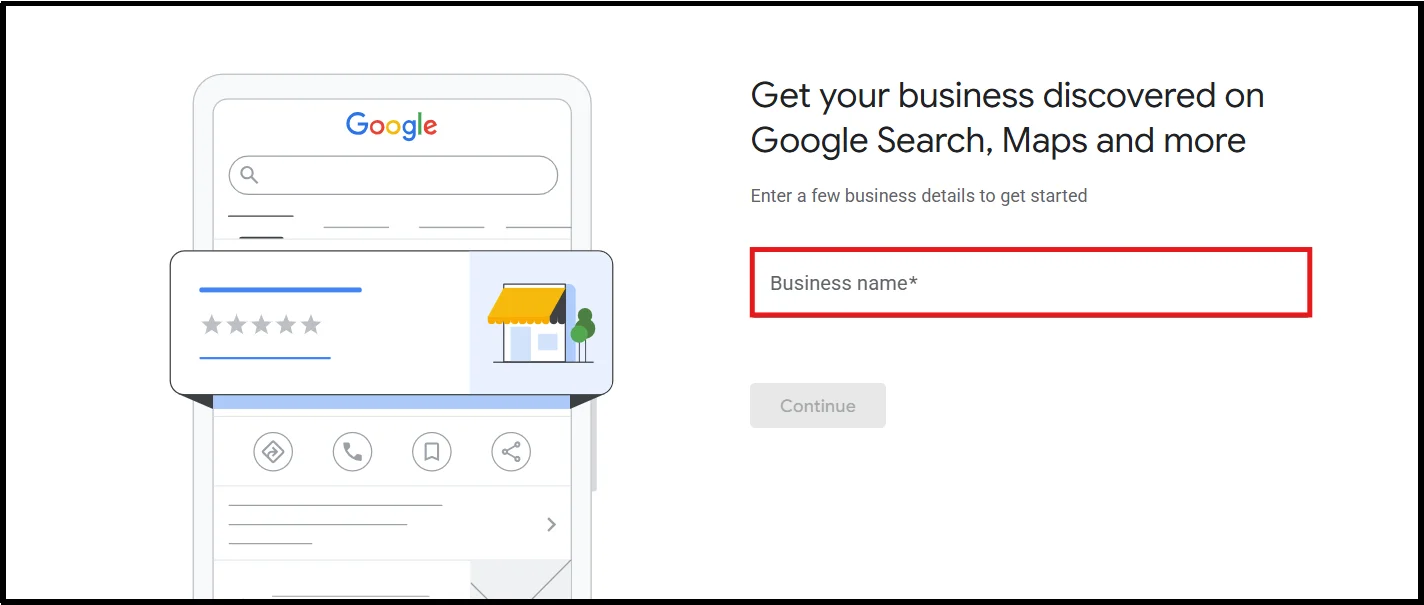
- Create your profile by adding your business information.
- Verify your business through Google’s available verification methods (mail, phone, email, or video verification).
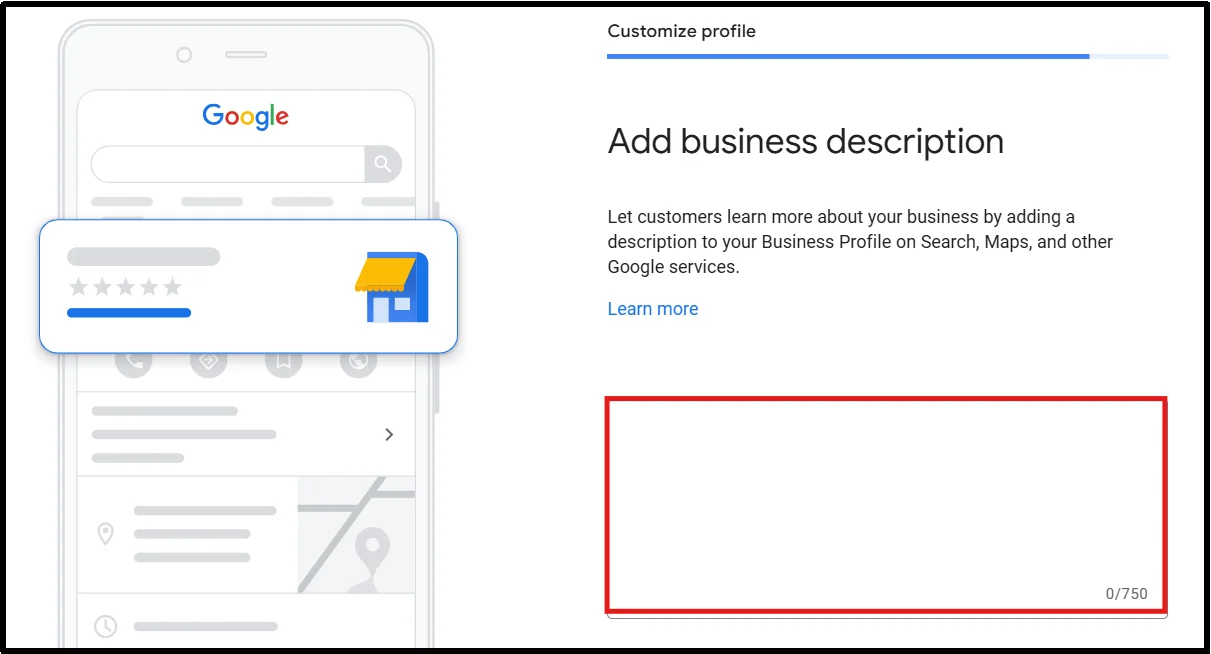
- Write a compelling business description that naturally includes relevant local keywords.
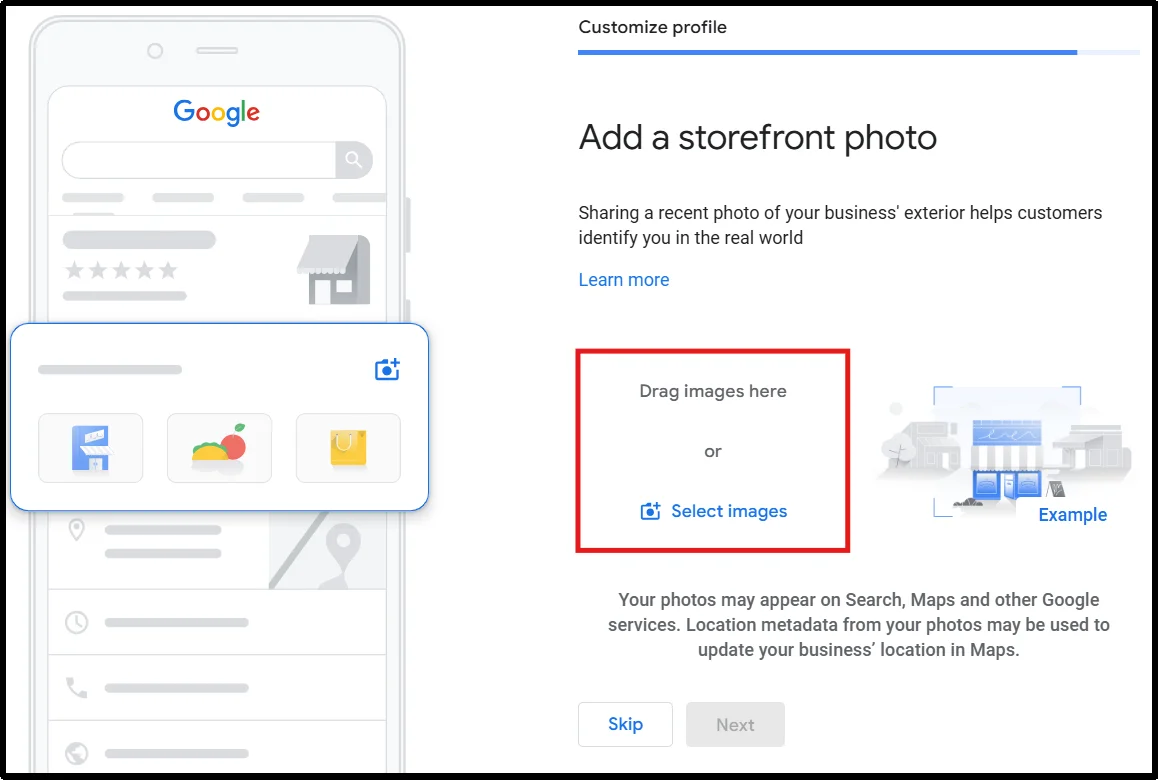
- Upload high-quality photos of your products, storefront, team, and services to build trust and engagement.
- Encourage customers to leave reviews and respond promptly to both positive and negative feedback.
- Keep your information updated, especially during holidays, promotions, or changes in operating hours.
- Use Google Posts to share updates, offers, events, and new products to keep your profile active and engaging.
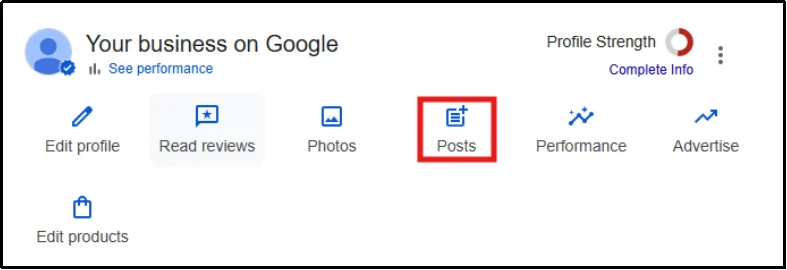
A strong local presence helps you connect with nearby customers who are ready to buy, leading to quick conversions.
4. Use Schema Markup for Products
Adding Schema Markup to your WooCommerce products is a powerful way to make your listings stand out on search engines. It directly helps improve WooCommerce conversion rates. Schema Markup is not visible on your website, but it is a special code that you add to your HTML to help search engines like Google better understand the content on your page.
When search engines read the Schema code, they can display enhanced search results called rich snippets. For product pages, these rich snippets typically include key information right on the search results page:
- Star Ratings and Reviews: Showing a product’s average rating (e.g., 4.5 out of 5 stars).
- Price: Displaying the current price.
- Availability (Stock): Shows if the item is “In Stock” or “Out of Stock.”
For instance, upon searching Pasta Recipes, we came across two results. One with star rating and time taken – rich snippets, and one without them.
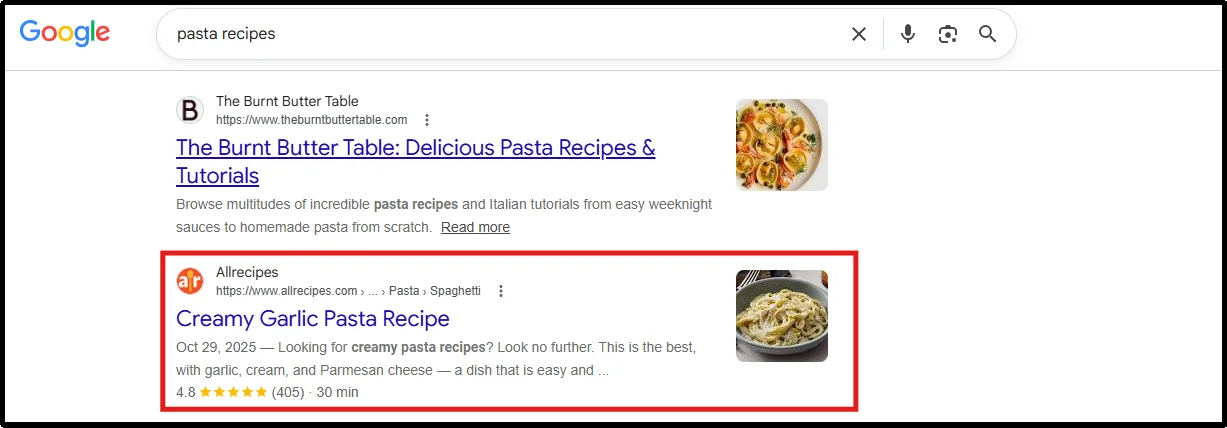
When a shopper sees the 5-star rating, they are much more likely to click. This brings highly qualified traffic to your store. These visitors are more likely to purchase or spend time, thus helping to boost WooCommerce revenue.
In fact, rich snippets can increase your search results’ Click-Through Rate (CTR) by up to 30%.
While adding raw code can be complex, many modern WooCommerce themes and SEO (Search Engine Optimization) plugins (like Yoast or Rank Math) automatically add the necessary Product Schema Markup for you. You just need to ensure all your product fields, like price, Stock Keeping Unit (SKU), and rating, are filled out correctly in your WooCommerce dashboard.
Use FAQ Schema on Important Pages
FAQ Schema helps search engines understand common customer questions and may increase search visibility.
Add FAQ Schema to:
- Product pages
- Category pages
- Buying guides
5. Improve CTA Visibility Using Color Psychology
The colors used throughout your WooCommerce store can influence how easily customers navigate your site and identify important actions. While there is no universally “best” color for increasing sales, strategic use of color can improve visual hierarchy, strengthen brand recognition, and support better user experiences.
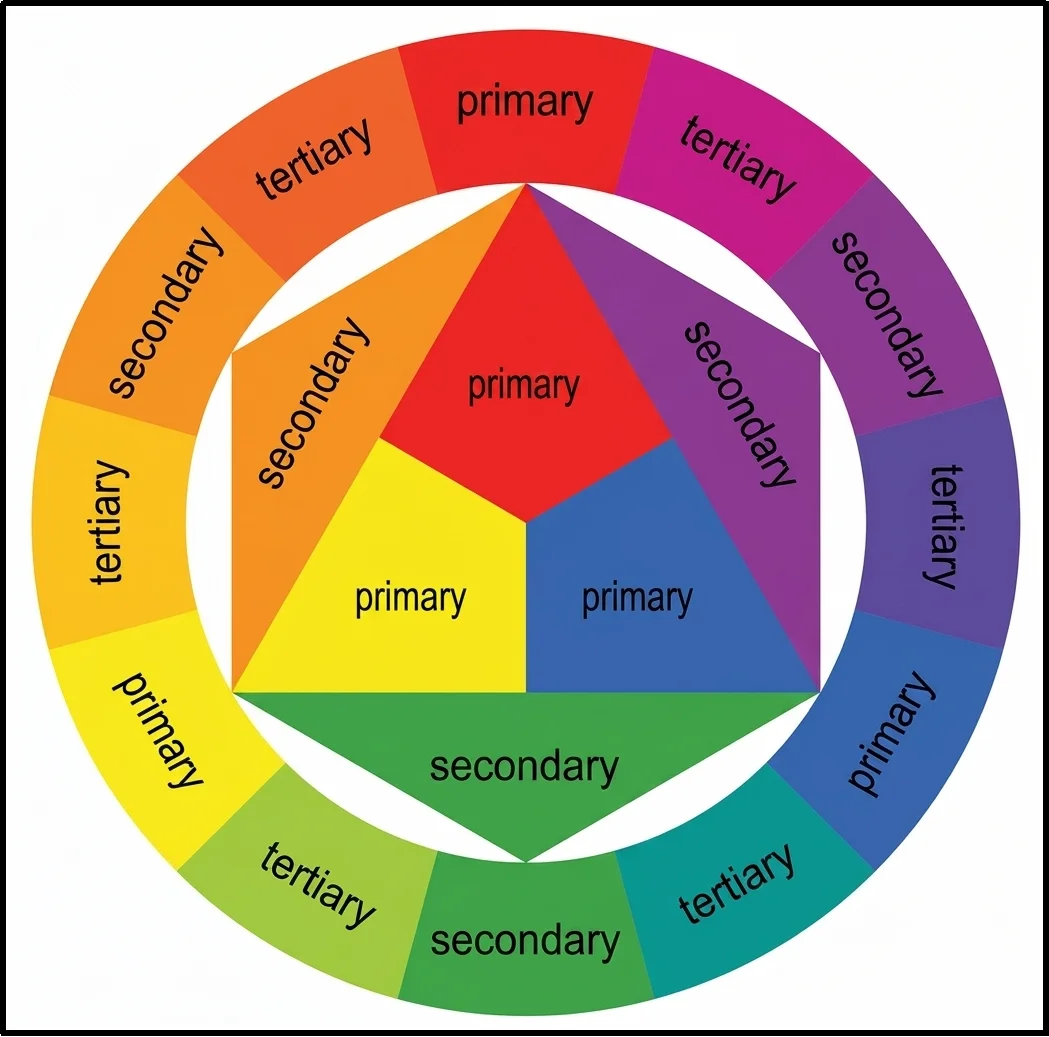
One of the most effective applications of color theory is in your call-to-action (CTA) buttons. Buttons such as “Add to Cart” and “Proceed to Checkout” should have sufficient contrast against the surrounding elements so they stand out and attract attention. This principle, often referred to as visual contrast, helps users quickly identify the next step in their buying journey.
Consistency is equally important. Use a cohesive color palette that aligns with your brand identity and maintains readability across your store. Ensure text and interactive elements meet accessibility standards, making your website easier to use for all visitors.
The best thing to do is, continuously A/B test different CTA colors, placements, and designs to understand what resonates with your audience.
For instance, RIPT Apparel ran an A/B test on its product page CTA and found that optimizing the “Add to Cart” button design led to a 6.3% increase in purchases.
Small improvements in usability and clarity can contribute to higher conversion rates and a smoother shopping experience.
6. Use the Power of User Generated Content (UGC)
One of the most effective ways to increase WooCommerce sales is to leverage user-generated content (UGC).
UGC includes product reviews, photos, videos, and social media posts from real people who have used your products. This content is highly valuable because it serves as social proof and builds trust more effectively than traditional marketing.
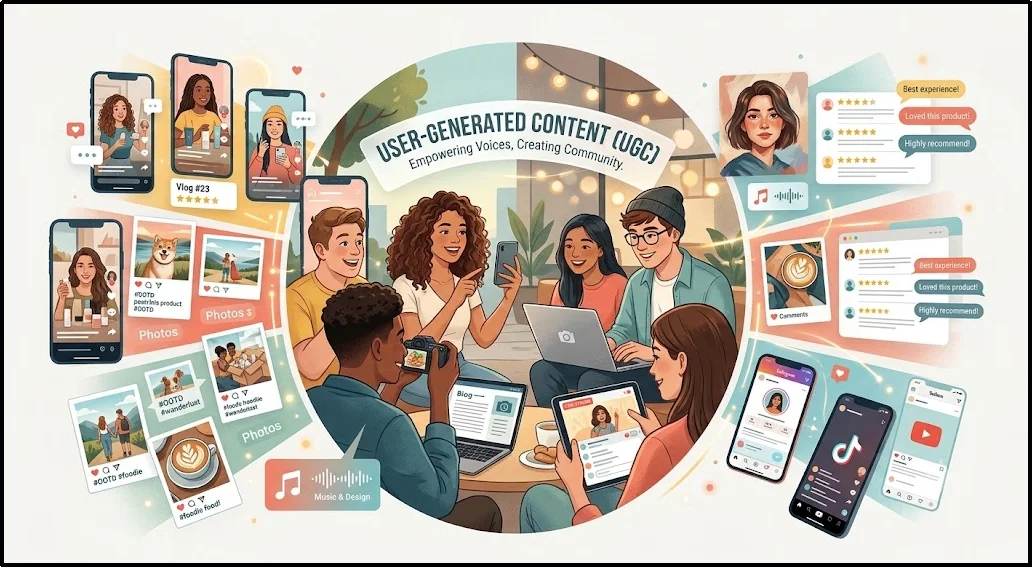
Customers trust their peers, not just brands. When potential buyers see real people enjoying a product, it removes doubt and encourages them to buy.
Consumers find UGC 9.8x more helpful than influencer marketing. And E-commerce stores that use UGC see an 18% increase in revenue.
To effectively use UGC, focus on reviews and visual content.
- Showcase customer reviews and ratings: Display authentic reviews and star ratings prominently on product pages to build trust and help shoppers make informed purchasing decisions.
- Feature customer photos and videos: Highlight user-generated visual content to provide social proof, demonstrate real-world product use, and increase buyer confidence.
Customer reviews can also improve SEO by generating fresh user-generated content on product pages. This additional content often introduces naturally occurring long-tail keywords that help products rank for more search queries.
7. Redefine the Checkout Experience
A confusing checkout process is one of the biggest reasons why you are losing sales in e-commerce. This complexity creates checkout friction, which increases shopping cart abandonment rates.
When users feel confused or frustrated, they are unlikely to complete their purchase. According to Baymard Institute research, the average cart abandonment rate across eCommerce stores is approximately 70%, making checkout optimization one of the highest-impact improvements you can make.
The main cause of this is a long and complicated checkout process. Nearly one in five (18%) US online shoppers have abandoned a purchase due to a terribly long checkout experience.
Every extra field creates a barrier, turning an eager buyer into a frustrated drop-off. For customers, a confusing checkout equals a lack of trust and an easy exit.
Display Trust Badges on Your Checkout Page
Customers hesitate when they are unsure whether a store is secure.
Add:
- SSL certificates
- Money-back guarantees
- Secure payment icons
- Verified customer reviews
Trust signals can reduce purchase anxiety and improve conversion rates.
Key Strategies to Streamline Checkout and Boost Sales
To turn more browsers into buyers, you must focus on reducing checkout friction and creating a seamless path to purchase.
- Minimize form fields: Only request essential details like name, address, and payment info to reduce friction during checkout.
- Offer guest checkout: Allow users to buy without creating an account to prevent unnecessary drop-offs.
- Provide multiple payment options: Support cards, wallets, and BNPL to match different customer preferences.
- Optimize for mobile: Ensure your checkout is fast, responsive, and easy to complete on smartphones.
- Show total costs upfront: Clearly display shipping, taxes, and fees early to avoid surprise-related cart abandonment.
- Add trust signals: Use SSL badges, secure payment icons, and reassurance messaging to build confidence.
- Enable autofill & one-click checkout: Speed up repeat purchases by reducing manual input.
8. Leverage Scarcity and Urgency Tactics
Most visitors who leave your store without buying never return. Scarcity and urgency are two behavioral psychology principles, rooted in Cialdini’s concept of loss aversion, that give browsers a concrete reason to act now rather than later.
Scarcity – Limited Quantity:
Scarcity increases a product’s perceived value by signaling limited availability. Use it honestly – fake stock warnings damage trust permanently.
- Show real-time stock alerts: “Only 4 left in stock” (WooCommerce triggers this automatically at your set threshold)
- Add social signals: “18 people viewing this right now”
- Mark limited batches clearly: “Not restocked once sold out”
Urgency – Limited Time:
Urgency removes the “I’ll come back later” exit by setting a hard deadline.
- Add countdown timers to sale pages: “Offer ends in 3h 42m”
- Use cart-level urgency: “Cart reserved for 15 minutes”
- Keep flash sales short – 4 to 12 hours, not 24+. Shorter windows create sharper pressure.
Combining both tactics at the same moment is one of the highest-ROI moves you can make without increasing ad spend.
9. Maximize Order Value with Strategic Product Offers
A highly effective way to boost WooCommerce revenue is to increase the average value of every order, known as Average Order Value (AOV). This involves making smart product recommendations at key moments when the customer is already in a buying mindset.
You can do this by showing relevant, higher-value items (upsells) or related accessories (cross-sells) on the most important pages of your store.
The Psychology of High-Intent Offers
Major retail giants, including Amazon, use this method constantly because the data proves it works.
When a customer has already committed to buying, they’re significantly more open to adding related items. This is the same principle behind checkout-counter impulse displays in physical retail, and it works just as well online.
A report suggests that product recommendations, such as upsells and cross-sells, account for an average of 10% to 30% of e-commerce site revenue.
Where to Place Offers for Maximum Impact
To truly improve WooCommerce conversion rates, these offers must be placed strategically at three high-intent locations. Here’s where to place them.
- Cart page: Suggest an upgraded version of the item already added (upsell) or a complementary accessory (cross-sell). Example: a customer adding a camera sees “Frequently bought with: 64GB memory card.”
- Checkout page: Keep it small and frictionless – a one-click add-on like gift wrapping or an extended warranty. Avoid anything that requires re-entering payment details.
- Order confirmation page: The customer is at peak satisfaction post-purchase. A limited-time discount on a related product here converts well precisely because there’s no buyer’s remorse yet.
Relevance beats volume every time. One highly relevant suggestion outperforms three generic ones. Keep recommendations tightly tied to what the customer already chose, hence increasing WooCommerce sales.
10. Set up SMTP for Reliable Email Delivery
One of the most overlooked ways to boost WooCommerce sales is ensuring your store’s emails actually reach customers. By default, WordPress sends all outgoing transactional emails, including WooCommerce emails, through the server’s built-in mail function via wp_mail() without proper email authentication. Receiving servers like Gmail and Outlook flag these as spam or drop them entirely because they lack verified SPF, DKIM, and DMARC records.
The result: order confirmations go missing, cart recovery emails never land, and customers lose trust in your store before the relationship even starts.
In situations like these, an SMTP plugin like Post SMTP can help solve the problem. It fixes this issue by routing the emails through an authenticated mailing service, namely Gmail, Microsoft 365, Amazon SES, Zoho Mail, SendGrid, Mailgun, and other trusted email providers. SMTP significantly improves email deliverability by authenticating outgoing messages and reducing the chances of emails being filtered as spam.
Pro Tip: 👉 If you don’t know how to set up SMTP for reliable WordPress email delivery, check out our guide on how to set up WordPress SMTP Settings.
What you gain immediately:
- Order confirmations and shipping updates reach customers reliably
- Cart abandonment recovery emails actually get opened
- Fewer support tickets from confused customers asking “where’s my order?”
- Stronger sender reputation over time, improving future deliverability
The main thing worth noticing is that setting SMTP up is simple, as Post SMTP makes the process beginner-friendly. Once installed, you can connect your store to a mailer of your choice, run a test email, and immediately see delivery improvements.
11. Implement Loyalty and Referral Programs
Acquiring a new customer costs 5x more than retaining an existing one. Loyalty and referral programs shift your focus toward the customers you’ve already won, who are already more profitable.
- Repeat customers spend 67% more per order than first-time buyers.
- A 5% increase in retention can grow profits by 25% to 95%.
Tips for Programs to Grow WooCommerce Store Sales
- Start a Customer Loyalty Program (CLV): Reward every purchase with redeemable points. Add tiered status levels: Silver, Gold, and VIP, to incentivize higher spending and make top customers feel recognized.
- Launch a Referral Program: Two-sided rewards work best. Give the referring customer 10% off their next order and the new customer 10% off their first. Both sides win, and your acquisition cost stays near zero.
12. Recover Abandoned Carts Automatically
Many shoppers add products to their cart but leave before completing their purchase.
Use abandoned cart recovery tools to:
- Send reminder emails
- Offer limited-time discounts
- Recover lost revenue
Research consistently shows abandoned cart emails recover a meaningful percentage of otherwise lost sales.
Grow Your WooCommerce Sales One Step at a Time
Increasing WooCommerce sales doesn’t require a complete store overhaul. In most cases, small improvements across your website can lead to significant gains in traffic, conversions, and revenue.
Focus on the areas that deliver the biggest impact:
- Improve site speed and mobile performance.
- Optimize product pages with buyer-intent keywords.
- Build trust with reviews, UGC, and trust signals.
- Simplify the checkout process to reduce cart abandonment.
- Increase average order value with upsells and cross-sells.
- Recover lost sales through abandoned cart emails.
- Reward loyal customers with referral and loyalty programs.
- Ensure every WooCommerce email reaches the inbox with a reliable SMTP solution.
Start with one or two strategies, measure the results, and continue optimizing over time. Consistent improvements are the key to sustainable WooCommerce growth and higher online sales.
Since email plays a critical role in order confirmations, abandoned cart recovery, and customer retention, reliable email delivery should be part of every WooCommerce growth strategy.
Ready to make sure every email reaches the inbox? Get Post SMTP now and set it up in minutes.