



























If you are a business owner reaching out to qualified leads via bulk emails, you should know whether they are receiving them in their Gmail inboxes.
Gmail introduced major bulk sender requirements in 2024 and has continued strengthening enforcement through 2025 and 2026. As a result, businesses that send large volumes of email must meet stricter authentication, unsubscribe, and sender reputation standards to maintain inbox placement.
Emails that don’t fulfill the updated sender guidelines are often rejected at the server level; in simpler terms, they never reach the recipient. These updated Gmail sender guidelines provide benefits such as stronger email security and improved user trust. It also means that you have to take extra steps to properly authenticate and configure the email systems.
In this article, you will learn about Gmail bulk sender guidelines in 2026, what has changed so far, and how to stay compliant.
What are Gmail Bulk Sender Guidelines?
Google introduced a set of requirements to regulate bulk emails to Gmail users. These rules are designed to improve inbox security, minimize spam, and ensure that only relevant, authenticated messages reach users.
Gmail Bulk Sender Guidelines are a set of email authentication, sender reputation, and recipient protection requirements that Google uses to evaluate bulk email senders and determine whether their messages should reach the inbox.
To better understand it, if you send a large volume of emails, such as newsletters, marketing campaigns, notifications, or similar, you have to follow strict guidelines. Why?
These guidelines typically cover authentication, sender identity, and engagement quality. They also help Gmail distinguish between transactional and promotional emails, ensuring each type receives appropriate filtering treatment.
Official Gmail Bulk Sender Requirements
According to Google, bulk senders must:
- Authenticate email using SPF or DKIM
- Publish a DMARC record
- Align sending domains properly
- Maintain low spam complaint rates
- Support one-click unsubscribe
- Process unsubscribe requests within two days
- Use valid reverse DNS records
- Send messages using TLS encryption
How does Google know you are a Bulk Sender?
Google generally considers senders that deliver approximately 5,000 or more messages per day to Gmail accounts as bulk senders and expects them to comply with bulk sender requirements.
A bulk sender can be a domain, organization, platform, or email system that sends large volumes (e.g., over 5000 per day) of messages to Gmail users. According to Google Postmaster Tools documentation, bulk senders are expected to maintain strong authentication practices and consistent sending behavior to protect inbox integrity.
Even setups labeled as a “bulk email sender without SMTP” still fall under scrutiny if they route large volumes through third-party infrastructure.
Why These Requirements Matter
Google introduced bulk sender requirements to improve email security and reduce spam, phishing, spoofing, and other forms of email abuse.
For legitimate businesses, these requirements provide several benefits:
- Better inbox placement
- Improved sender reputation
- Higher email engagement
- Reduced risk of spoofing attacks
- Increased customer trust
Businesses that properly authenticate their email infrastructure often experience more reliable email delivery and fewer deliverability issues.
Why Gmail Continues Enforcing Bulk Sender Requirements
Gmail introduced these rules primarily as part of its ongoing Gmail spam prevention strategy. As the volume of unsolicited messages, phishing attempts, and automated abuse increased, stronger enforcement became necessary to protect users.
Main areas include:
- Reducing phishing and malicious email distribution
- Strengthening authenticated email sending standards (SPF, DKIM, DMARC)
- Improving overall user trust signals within the Gmail ecosystem
By enforcing stricter controls, Gmail ensures that legitimate senders are not overshadowed by spam, allowing users to rely more confidently on the content in their inbox.
How Gmail Enforcement Has Evolved Since the Original Bulk Sender Requirements
Since Google introduced bulk sender requirements, enforcement has become increasingly strict across Gmail and other major mailbox providers. Businesses now face greater scrutiny around authentication, sender reputation, unsubscribe compliance, and overall sending behavior.
These changes represent a stronger enforcement layer that affects every bulk email sender, from small businesses to enterprise marketing strategies.
A quick overview of what has changed in 2025 and 2026:
| Date | Changes |
| May 2025 | Microsoft follows suit by enforcing similar bulk sender standards across Outlook, Hotmail, and Live platforms. |
| September 2025 | Google fully transitions to Postmaster Tools v2, retiring the previous version, while providers like La Poste introduce stricter authentication policies of their own. |
| November 2025 | Gmail reaches full enforcement mode, permanently rejecting emails that do not comply with its sender guidelines. |
| April 2026 | Microsoft implements its final enforcement phase, rejecting all non-compliant bulk emails sent to Outlook, Hotmail, and Live accounts. |
That’s the small picture. Now let’s dig into the specific changes that occurred in detail:
- Stricter Email Authentication: Tighter enforcement of SPF, DKIM, and DMARC setup across all sending domains. Gmail now enforces strict DNS configuration and full domain alignment, ensuring the ‘From’ address matches authenticated sending sources.
- Mandatory One-Click Unsubscribe: Gmail now requires bulk senders to include one-click unsubscribe headers, giving users instant opt-out options. This aligns with the compliance requirements, requiring senders to provide a simple and instant opt-out mechanism. Gmail now expects unsubscribe requests to be processed quickly often within 2 days.
- Lower Spam Complaint Thresholds: Reduced acceptable spam complaint rate thresholds, making sender behavior more sensitive to user feedback. Even small spikes in complaints can now impact sender reputation. This means Gmail is now actively monitoring engagement and adjusting deliverability to protect users from unwanted email.
- Improved Domain Reputation Monitoring: Enhanced tracking of domain reputation and IP reputation. Gmail now evaluates how consistently and responsibly you send email. Factors such as sending frequency, list quality, and engagement signals (opens, clicks, and deletions) all contribute to reputation scoring.
- AI-Powered Spam Detection Enhancements: Upgraded AI spam detection systems using advanced content quality signals and behavioral analysis. Gmail now evaluates emails based on writing patterns, formatting, engagement signals, and user interaction history. Suspicious sending patterns, such as repetitive content or irregular sending schedules, are more likely to be flagged.
- Stronger Enforcement for Forwarding and Relay Services: Stricter rules for email forwarding systems and SMTP relay configuration, especially those that lack proper authentication. Services using improper or incomplete setups are more likely to face delivery failures. The introduction of ARC headers (Authenticated Received Chain) plays a key role here, helping Gmail verify forwarded messages without breaking authentication chains.
How Gmail Detects Non-Compliant Senders
Now that we understand how Gmail’s bulk sender requirements are enforced, let’s look at how Gmail identifies non-compliant senders and determines whether emails deserve inbox placement. Gmail relies on a combination of technical signals and behavioral data to flag problematic senders.
One of the primary indicators is authentication failures.
- If your SPF, DKIM, or DMARC records are missing, misconfigured, or not properly aligned with your sending domain, Gmail treats your emails as unverified, which can lead to filtering or outright rejection.
Another major factor is high bounce rates.
- When a large percentage of your emails fail to reach valid inboxes, it signals poor list quality or outdated data, both of which are red flags for Gmail’s filtering systems.
Similarly, spam complaints play a critical role.
- If users frequently mark your emails as spam, Gmail quickly adjusts your sender reputation, reducing your chances of reaching the inbox.
Gmail also monitors suspicious sending patterns.
- If there are sudden spikes in volume, inconsistent sending frequency, or repetitive content across campaigns. These behavioral signals help Gmail determine whether a sender is trustworthy or potentially abusive.
Gmail Sender Requirements Checklist for 2026
For businesses relying on Gmail for bulk email sending, we have prepared a requirements checklist for them to follow.
1. Set Up SPF Correctly
SPF (Sender Policy Framework) allows domain owners to specify which mail servers can send email on behalf of their domain. Gmail checks SPF records during authentication to verify that incoming messages originate from authorized sources. Without a valid SPF record, your emails risk being flagged as spam.
Example SPF record: v=spf1 include:_spf.google.com ~all
Avoid common SPF mistakes such as:
- Publishing multiple SPF records.
- Forgetting to include all sending services.
- Misconfigured Gmail DNS settings.
2. Configure DKIM Authentication
DKIM (DomainKeys Identified Mail) adds a digital signature to your emails, proving they haven’t been altered in transit. Google strongly recommends DKIM authentication, and most bulk senders use it alongside SPF and DMARC to improve domain alignment and sender authentication.
- Use at least key length recommendations of 2048 bits for stronger security.
- Benefits: Higher trust, fewer spam flags, and better deliverability.
3. Enable DMARC Protection
DMARC ties SPF and DKIM together to enforce domain alignment. Gmail requires all senders to publish a DMARC policy.
DMARC policy options:
- `none` → monitor only.
- `quarantine` → send suspicious emails to spam.
- `reject` → block unauthenticated emails.
Regular reporting and monitoring help detect spoofing attempts.
4. Use a Custom Sending Domain
Using free domains for bulk campaigns hurts deliverability. Gmail now emphasizes more on branded/work domain emails.
- A custom domain builds trust, improves sender reputation, and signals professionalism.
5. Configure Reverse DNS Records
Reverse DNS (PTR) records help mailbox providers verify that a sending IP address matches the domain associated with the mail server. Missing or incorrect PTR records can reduce sender trust and negatively affect email deliverability.
6. Maintain Low Spam Complaint Rates
Google recommends keeping spam complaint rates below 0.3% in Google Postmaster Tools to maintain a healthy sender reputation.
Best Practices:
- Remove invalid addresses before executing bulk emails
- Use permission oriented email marketing to ensure consent; this would minimize the risk of being reported.
- Include One-Click Unsubscribe Headers:
Bulk senders must include an unsubscribe header, just like gmail displays a native unsubscribe button for users. This is one of the guidelines that is easily overlooked.
- Benefits: Lower complaints, smoother user experience, and stronger compliance.
8. Send to Organic and Engaged Users:
Gmail evaluates engagement signals like opens, clicks, and replies. When you continue sending to inactive users, those emails are consistently ignored, signaling low relevance and gradually damaging your sender reputation.
- Remove inactive subscribers after 6–12 months.
- Run re-engagement campaigns before pruning lists.
- Optimize email frequency to avoid overwhelming subscribers.
9. Use TLS Encryption
Google requires email transmission to use TLS whenever possible.
TLS encrypts email traffic between mail servers and helps protect sensitive information during transmission.
Most modern SMTP providers support TLS by default, but businesses should verify that encryption is enabled.
Monitor Your Reputation with Google Postmaster Tools
Google Postmaster Tools allows businesses to monitor:
- Domain reputation
- Spam rates
- Authentication status
- Delivery errors
- Feedback loop data
Reviewing these metrics regularly helps identify deliverability problems before they impact inbox placement.
How to Check Whether You Meet Gmail Bulk Sender Requirements
Once your email infrastructure is configured, the next step is verifying that everything is working as intended, not just set up. Here’s how to audit each requirement:
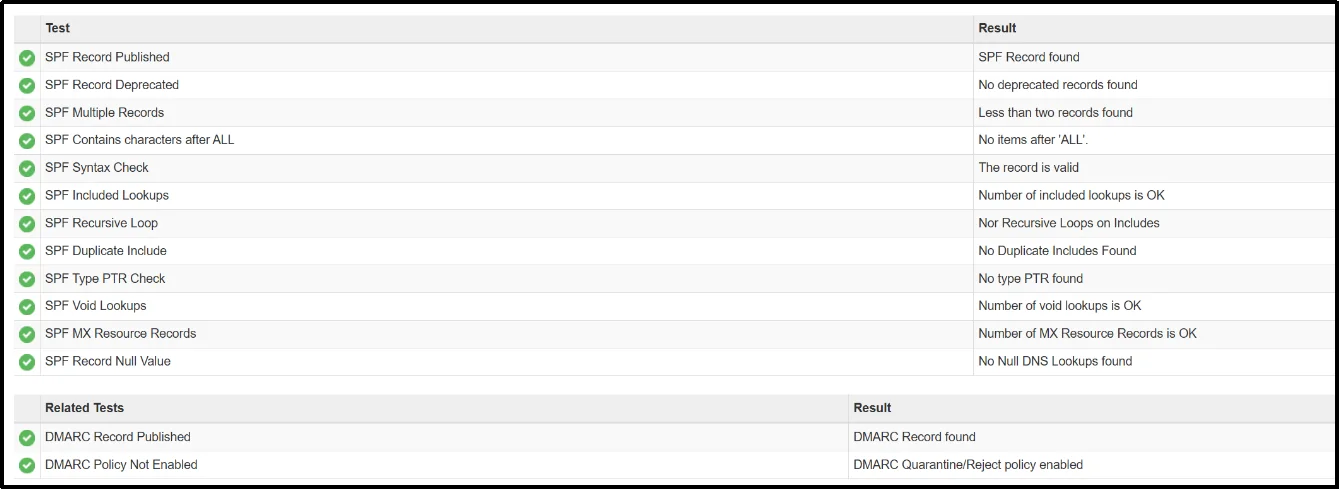
- SPF Record: Use a free tool like MXToolbox to look up your domain’s DNS records and confirm a valid SPF entry exists. Make sure it includes all services sending email on your behalf and that only one SPF record is published.
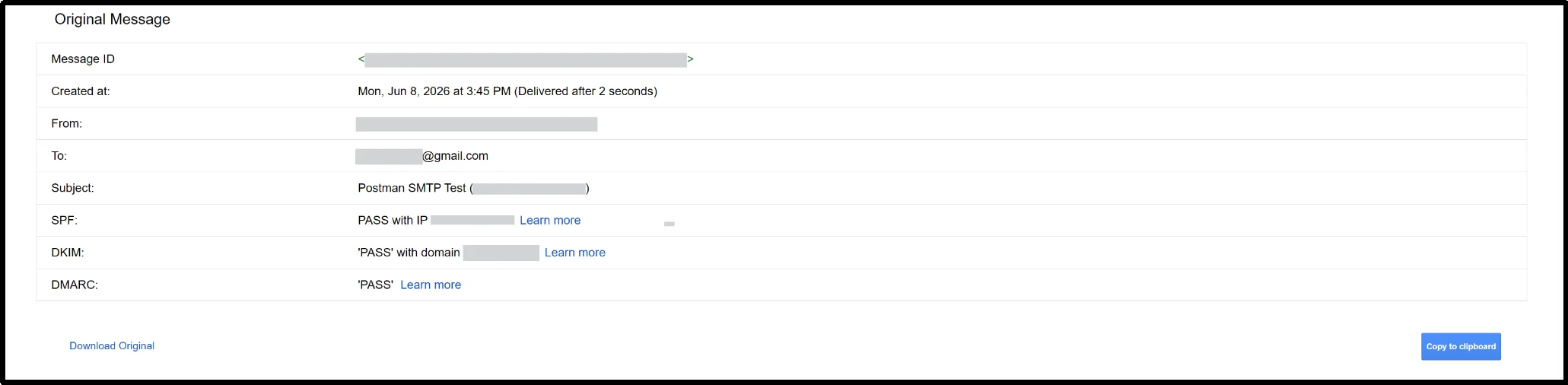
- DKIM Signature: Send a test email to a Gmail address and check the message headers (via “Show original” in Gmail). Look for a DKIM=pass result. A failing or missing signature usually points to a misconfigured DNS TXT record on your sending domain.
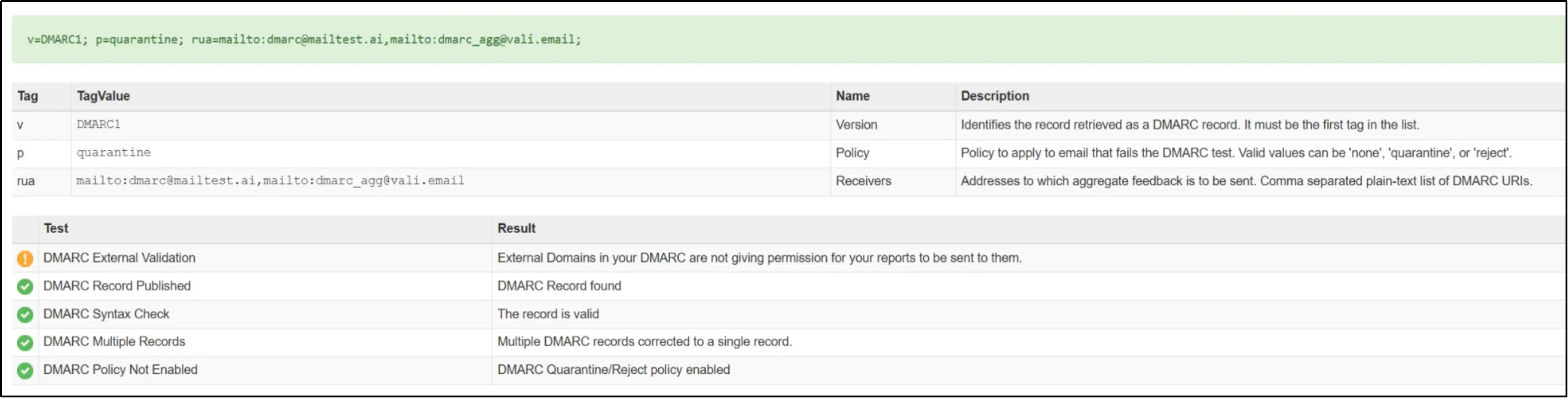
- DMARC Policy: Run your domain through MXToolbox’s DMARC lookup to confirm the record exists and is properly aligned with your SPF and DKIM setup. If you’re still on p=none, you’re only monitoring; consider moving toward quarantine or reject once your authentication is stable.
- Google Postmaster Tools: If you haven’t already, verify your sending domain in Google Postmaster Tools. This is your most direct window into how Gmail perceives your domain.
- One-Click Unsubscribe Headers: Forward one of your bulk campaign emails to a Gmail account and open it. Gmail should display an unsubscribe option near the sender name at the top of the message. If it doesn’t appear, your List-Unsubscribe and List-Unsubscribe-Post headers are likely missing or misconfigured. Here’s an example of Stanford University courses on Coursera – Promotion email.

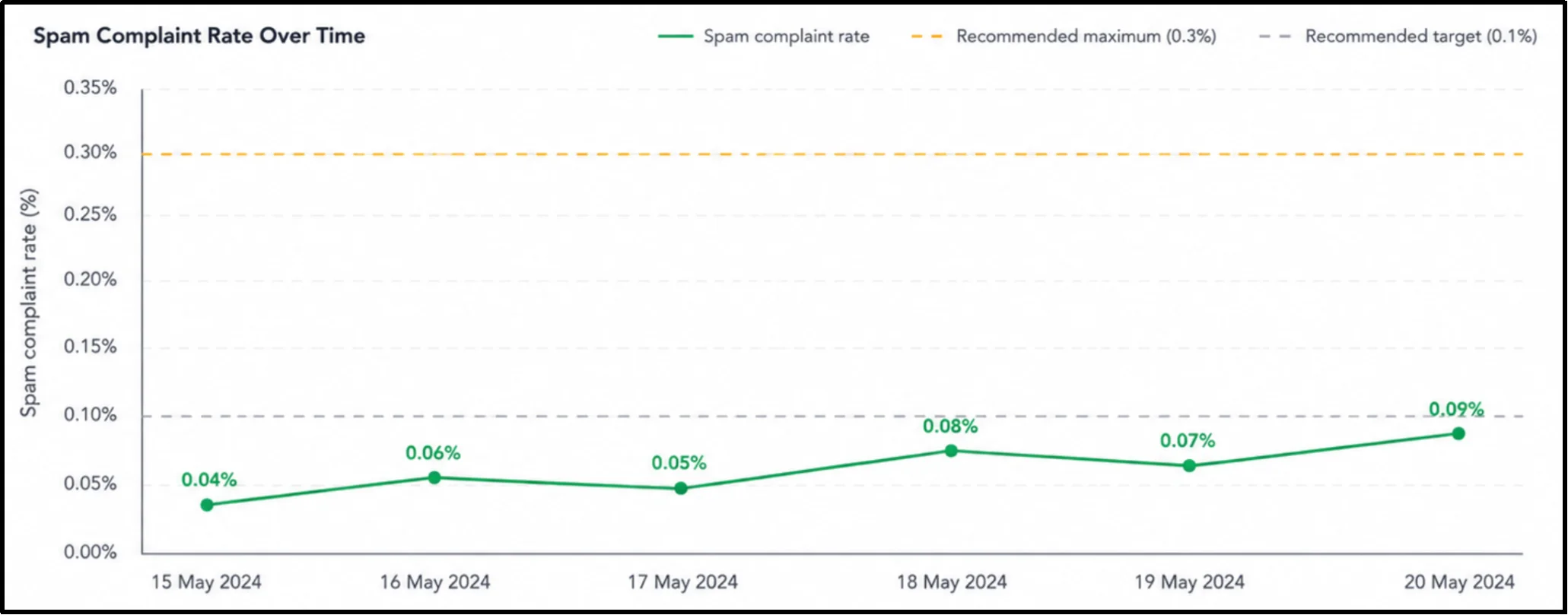
- Spam Complaint Rate: Inside Postmaster Tools, check the Spam Rate dashboard. Your complaint rate should consistently stay below 0.1%, and must not exceed 0.3%. Anything trending upward warrants an immediate review of list quality and sending frequency.
- Domain Reputation: Also within Postmaster Tools, the Domain Reputation tab will show your standing as High, Medium, Low, or Bad. A High reputation means Gmail trusts your domain. Anything below Medium should be treated as urgent. It directly affects whether your emails reach the inbox at all.
Running through this audit periodically, especially before a major campaign, helps catch compliance gaps before Gmail does.
Common Gmail Compliance Mistakes Businesses Make
Even businesses with good intentions often fail to meet Gmail’s sender requirements because of small technical oversights or outdated email practices. Under the stricter Gmail Bulk Sender Guidelines, these mistakes can quickly hurt deliverability and sender reputation.
Using Shared SMTP Servers Without Proper Reputation Control
Shared SMTP servers can hurt your deliverability because the actions of other senders on the same IP affect your reputation. Poor-quality senders may cause Gmail to distrust emails coming from shared infrastructure.
Ignoring DMARC Reports
Setting up DMARC without monitoring reports can lead to unnoticed authentication failures, spoofing risks, and delivery issues. Regular monitoring helps maintain sender trust and compliance.
Not Warming Up Domains Properly
Sending large email volumes from a new domain too quickly looks suspicious to Gmail. Gradually increasing email activity helps build a positive sender reputation.
Forgetting Mobile-Friendly Email Design
Non-responsive mobile email design lowers engagement and hurts Gmail deliverability. Responsive designs and readable layouts improve user experience and inbox performance.
How Post SMTP Helps You Stay Gmail Compliant
Configuring SPF, DKIM, DMARC, SMTP authentication, and reliable email routing can become complicated for WordPress site owners. SMTP plugins help simplify this process by replacing the default PHP mail function with authenticated email delivery methods. This is where the Post SMTP plugin becomes valuable.
The plugin helps improve WordPress email deliverability by ensuring emails are sent through authenticated and properly configured channels instead of relying on default PHP mail functions, which Gmail increasingly distrusts.
Here’s how Post SMTP helps businesses stay Gmail compliant:
- Supports Authenticated Email Delivery: Post SMTP helps send WordPress emails through authenticated SMTP and API-based mailers. It also helps verify whether SPF, DKIM, and DMARC records are configured correctly, making it easier to identify authentication issues that could affect email deliverability.
- Works With Trusted Email APIs and SMTP Providers: Easily connect with reliable mailers like Gmail API, Microsoft 365, SendGrid, Mailgun, and Amazon SES for more secure email delivery.
- Monitors Failed Emails in Real Time: Instant email failure alerts help businesses quickly identify and fix delivery issues before they impact customers or campaigns.
- Provides Detailed Email Logs & Reports: Track sent emails, delivery status, errors, and authentication issues directly inside WordPress for better troubleshooting and compliance monitoring.
- Includes Spam Score Checking: Analyze outgoing emails for potential spam triggers to improve inbox placement and reduce Gmail filtering risks.
With Gmail enforcing stricter authentication and reputation standards, using a reliable SMTP solution like Post SMTP helps businesses maintain secure, authenticated, and reliable email delivery without any issues.
Best Practices for Gmail Deliverability in 2026
You must stay compliant and follow the best practices for Gmail deliverability to keep your business safe from any bulk sending flags. Here’s our thoroughly tested best practices:
- Warm up domains gradually to build sender trust and avoid sudden spam filtering.
- Segment email lists to send more relevant and targeted messages.
- Use double opt-in to ensure only verified and interested subscribers are added.
- Monitor performance using Google Postmaster Tools to track reputation and spam rates.
- Maintain proper SPF, DKIM, and DMARC setup for strong email authentication.
- Keep spam complaints low by sending only to opted-in and engaged users.
- Optimize emails for mobile devices to improve readability and engagement.
- Send emails consistently instead of irregular or sudden volume spikes.
- Regularly clean email lists by removing inactive or invalid addresses.
- Include one-click unsubscribe options to reduce spam complaints.
- Focus on engagement metrics like opens, clicks, and replies to build a reputation.
- Avoid spam-trigger content and use clear, relevant messaging.
Gmail Bulk Sender Compliance Checklist
- SPF record published
- DKIM authentication enabled
- DMARC record published
- Domain alignment verified
- TLS enabled
- Reverse DNS configured
- One-click unsubscribe implemented
- Spam complaint rate below 0.3%
- Domain reputation monitored
- Google Postmaster Tools configured
Get Fully Compliant With Gmail Bulk Sender Guidelines Now
Gmail’s continued enforcement of bulk sender requirements throughout 2025 and 2026 has significantly changed how businesses approach email deliverability. Authentication, sender reputation, unsubscribe compliance, and user engagement now play a direct role in whether emails reach the inbox.
For businesses, this means email marketing and other means that require bulk emails need to be handled carefully.
Following a proper compliance checklist that includes SPF, DKIM, DMARC, one-click unsubscribe functionality, domain warm-up, engagement monitoring, and list hygiene is essential for maintaining inbox visibility.
Businesses that adapt early will benefit from:
- Better sender reputation
- Higher inbox placement
- Lower spam complaints
- Improved customer trust
- More future-proof deliverability
As Gmail, Microsoft, and other providers continue strengthening sender requirements, businesses that prioritize authenticated email infrastructure and responsible sending practices will have a significant long-term advantage.
Set Up Post SMTP to Keep Your Emails Compliant.
FAQs
What qualifies as a bulk sender in Gmail?
A bulk sender Gmail classification generally applies to domains or systems sending more than 5,000 emails per day to Gmail users. Once this threshold is reached, Gmail expects full compliance with authentication and sender reputation requirements.
Is DMARC mandatory in 2026?
Yes. Under the updated Gmail sender policies, DMARC mandatory 2026 enforcement applies to all bulk senders. Gmail now expects properly configured SPF, DKIM, and DMARC records with aligned authentication.
What happens if spam complaints increase?
High spam complaints negatively affect domain reputation and inbox placement. Gmail actively tracks user feedback signals, and even small increases in complaint rates can reduce deliverability.
Keeping complaint rates below 0.3% is strongly recommended
Are transactional emails affected by Gmail’s guidelines?
Yes. Transactional emails affected by Gmail policies include:
1. Password reset emails
2. Order confirmations
3. Account notifications
4. WooCommerce emails
5. Automated alerts
Even though transactional emails are different from promotional campaigns, Gmail still expects proper authentication and trustworthy sending behavior.
Can Post SMTP improve deliverability?
Yes. Post SMTP improves Post SMTP deliverability by enabling authenticated email sending through secure SMTP and API integrations. This helps WordPress websites comply with Gmail’s authentication requirements and improves inbox placement reliability.
Does Gmail reject non-compliant emails completely?
In many cases, yes. Gmail now rejects many unauthenticated or non-compliant emails at the server level instead of simply placing them in spam folders.
This means emails may never reach recipients unless sender requirements are properly configured.