























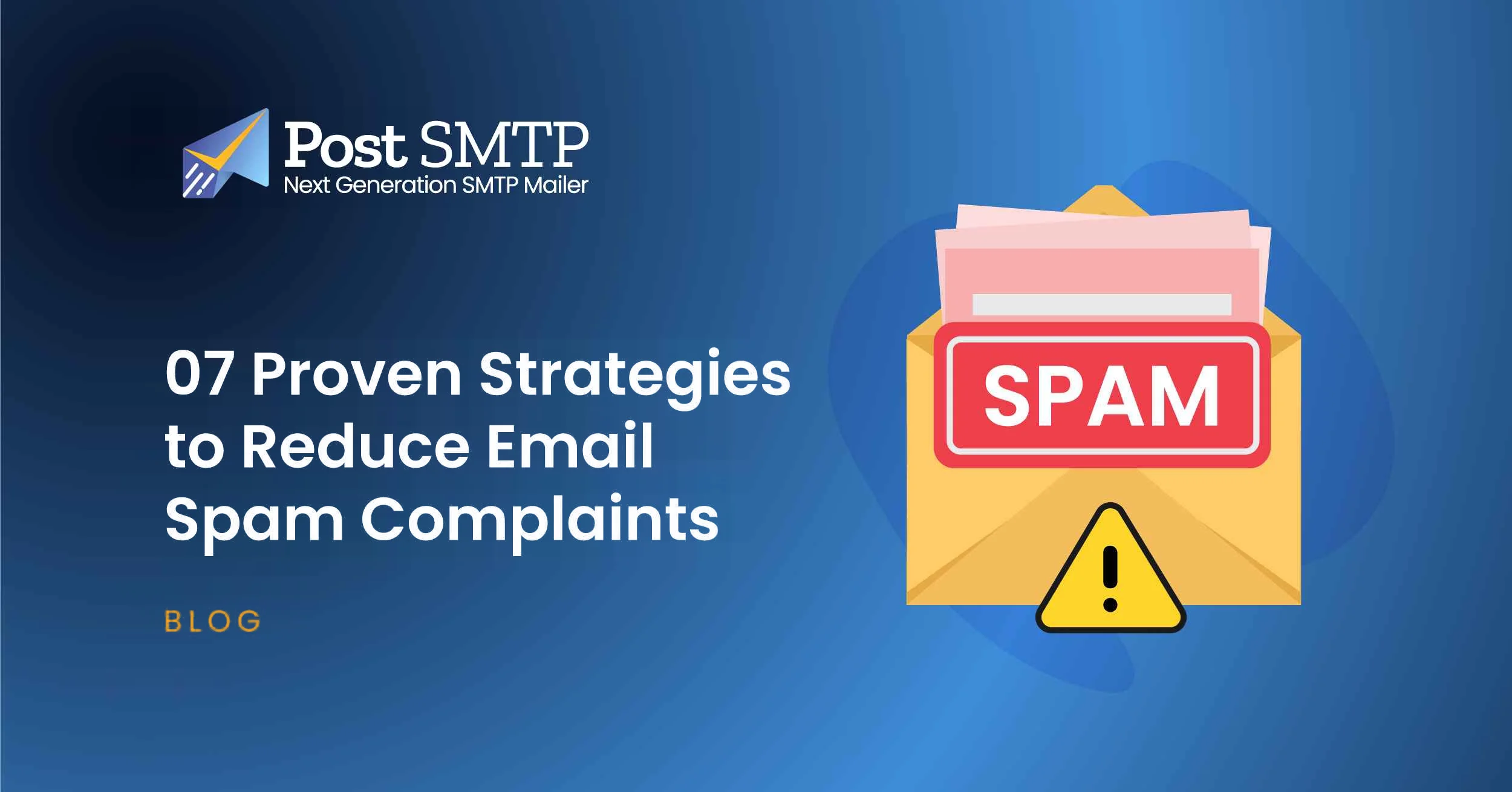


Email spam complaints can hurt your sender reputation and reduce inbox placement. Even useful emails can generate complaints when recipients don’t recognize the sender, didn’t expect the message, receive irrelevant content, or can’t easily unsubscribe.
The fix rarely comes from one setting.
You need to look at the whole email journey. That starts when someone enters an email address on your website. It continues through consent, list management, content, sending frequency, authentication, and unsubscribe handling.
This guide covers 15 practical ways to reduce spam complaints, explains how to investigate a sudden increase, and shows how WordPress site owners can improve their email sending setup with SMTP and email delivery tools.
Gmail sender requirements change over time. Google currently requires senders who send 5,000 or more messages per day to personal Gmail accounts to meet additional authentication, spam, and unsubscribe requirements. Google also says senders should keep their user-reported spam rate below 0.10% and avoid reaching 0.30% or higher. Check Google’s current sender guidance before making compliance decisions.
What Is an Email Spam Complaint?
An email spam complaint occurs when a recipient marks a message as spam or junk through their mailbox provider.
Your spam complaint rate measures how often recipients report your messages as spam. A high rate can signal that people don’t recognize your sender identity, didn’t expect your emails, don’t find the content relevant, or can’t easily leave your mailing list.
For example, if 1,000 delivered emails generate one spam complaint, the complaint rate equals 0.1%.
Different email providers and reporting systems can calculate complaint rates differently. So don’t assume that the percentage in your email service provider’s dashboard uses the same data or calculation method as Gmail Postmaster Tools.
What Is a Good Spam Complaint Rate?
For Gmail, Google recommends keeping the user-reported spam rate in Postmaster Tools below 0.10% and avoiding a rate of 0.30% or higher. Google calculates this data daily, and rates above 0.10% can already hurt inbox delivery for bulk senders. Rates of 0.30% or higher have an even greater negative impact and can make bulk senders ineligible for certain delivery mitigations.
Treat 0.10% as an operational target. Don’t wait until your rate approaches 0.30%.
Keep in mind that Gmail’s spam-rate metric does not represent every email provider. Postmaster Tools also focuses on user-reported spam for Gmail traffic, so your email service provider may show a different number.
How to Calculate Your Email Spam Complaint Rate
You can calculate your spam complaint rate with a simple formula:
Spam complaint rate = Spam complaints ÷ Delivered emails × 100
For example, 5 complaints from 10,000 delivered emails produce a spam complaint rate of 0.05%.
Use the reporting system that matches the mailbox provider you’re investigating. For Gmail traffic, check Google Postmaster Tools rather than assuming your email service provider uses the same denominator or reporting window.
Spam Complaints vs. Spam Folder Placement
Spam complaints and spam-folder placement connect to each other, but they describe different things.
- Spam complaint: A recipient actively reports your email as spam.
- Spam-folder placement: A mailbox provider filters your message into the spam folder.
- Bounce: The receiving server rejects the message or cannot deliver it.
- Unsubscribe: A recipient asks you to stop sending messages.
- Block: A mailbox provider or receiving server rejects messages from your sender or infrastructure.
A low complaint rate doesn’t automatically mean your emails reach the inbox. Gmail, for example, tracks spam reports separately from domain reputation, IP reputation, authentication, delivery errors, and other signals.
That distinction matters.
You can have a low reported spam rate because Gmail already sends many of your messages to spam. In that situation, fewer recipients see the messages in their inboxes, and fewer can report them as spam. Google specifically warns that this can make the displayed spam rate look unusually low.
15 Strategies to Reduce Email Spam Complaints
Reducing spam complaints starts with recipient expectations.
People should know why they receive your emails, what kind of content you’ll send, and how they can leave your list. From there, good list hygiene, relevant content, reasonable frequency, proper authentication, and useful monitoring can reduce unwanted-email reports.
These practices can also support broader email marketing goals, including:
- Better inbox placement
- Higher engagement
- More relevant communication
- Healthier subscriber lists
- Stronger sender reputation
- Fewer unwanted-email complaints
The core principle is simple: send relevant messages to people who knowingly chose to receive them.
Let’s look at the practical steps.
1. Collect Clear and Explicit Consent
Send marketing emails only to people who clearly understand what they’re signing up for.
Your signup form should explain:
- What types of emails subscribers will receive
- How often you plan to send them
- Why you collect their email address
- Whether you’ll send promotional content
- How they can unsubscribe
Don’t add someone to a marketing list simply because they submitted their email address for another purpose, such as creating an account, requesting support, or completing a purchase.
Clear expectations matter.
If someone signs up for WordPress tutorials, they shouldn’t suddenly receive unrelated sales messages without a clear reason. The same principle applies to newsletters, product updates, promotions, and other subscription-based email.
Google recommends sending subscription messages only to recipients who want them and confirming each recipient’s email address before subscribing them.
2. Use Double Opt-In When It Fits Your Signup Process
Double opt-in adds a confirmation step after someone submits a subscription form.
The subscriber receives a confirmation email and must confirm the address before you add it to the active mailing list.
This approach can help you:
- Confirm that the subscriber controls the email address
- Reduce accidental subscriptions
- Reduce some invalid or mistyped addresses
- Confirm genuine interest
- Build a more engaged list
Google refers to this confirmation process as double consent in its current subscription guidance.
Double opt-in adds friction.
Some people won’t complete the confirmation step. That can reduce your initial subscriber growth. On the other hand, people who complete the process have taken an additional step to confirm that they want your messages.
Choose the process that fits your audience, legal requirements, and email program.
3. Keep Your Email List Clean
An outdated mailing list can increase bounces, reduce engagement, and create delivery problems.
Regularly review your subscribers and consider suppressing:
- Hard-bounced addresses
- Invalid addresses
- Addresses with repeated delivery problems
- Long-term inactive subscribers
- Subscribers who remain inactive after a re-engagement campaign
Don’t treat list cleaning as a race to remove everyone who hasn’t opened your latest email.
Instead, look at a meaningful period of inactivity. Then run a re-engagement campaign when appropriate. If someone remains inactive, suppress the address according to your list-management policy.
Google also recommends periodically checking whether recipients still want your messages and considering unsubscribing people who don’t open or read them.
Avoid casually adding “known spam traps” to your routine cleanup process. Senders usually cannot reliably identify every spam trap, and poor list-cleaning practices can create their own problems.
4. Segment Your Email Audience
Not every subscriber wants the same content.
Segment your audience using relevant first-party data and engagement signals, such as:
- Interests
- Purchase history
- Location
- Signup source
- Product usage
- Engagement
- Content preferences
- Subscription type
Suppose you run a WordPress plugin business.
A customer who already purchased your Pro plan doesn’t need the same promotional email as someone who downloaded the free version. A developer may want technical updates. A casual site owner may prefer product tips.
Relevant messages create better experiences.
Start with a few useful segments rather than building dozens of complicated groups. The goal isn’t complexity. It’s relevant.
5. Send Emails at an Expected Frequency
Sending too many emails can cause subscriber fatigue.
Sending too few can create another problem. People may forget that they subscribed and wonder why they suddenly received your message after months of silence.
Set expectations during signup and follow a reasonably consistent schedule.
You can also let subscribers choose their preferred frequency or content type, such as:
- Daily updates
- Weekly newsletters
- Monthly newsletters
- Product announcements
- Educational content
- Promotional emails
Monitor complaints, unsubscribes, clicks, conversions, and other useful engagement signals to determine whether your frequency fits your audience.
Google also recommends sending messages at a frequency recipients consider reasonable and setting expectations around email frequency and content.
6. Match Your Content to Subscriber Expectations
Your subscribers should receive the type of content they expected when they signed up.
For example, someone who subscribes to WordPress tutorials may not expect a series of unrelated promotional emails. That mismatch can create confusion and increase the chance of a spam complaint.
Before you send a campaign, ask one simple question:
Did this recipient expect this email?
If the answer feels uncertain, revisit your audience selection.
Consistent expectations build trust.
They also give recipients a clear reason to keep your emails instead of reporting them as unwanted.
7. Use Clear and Honest Subject Lines
Your subject line should tell recipients what they will find inside the email.
Avoid subject lines that:
- Promise something the email doesn’t contain
- Create false urgency
- Misrepresent discounts
- Pretend a promotional message is personal
- Use deceptive claims to generate opens
- Hide the real purpose of the message
For example, if your subject says “Your 20% discount expires tonight,” the email should actually explain the discount and its expiration.
Don’t overthink it.
A clear subject line helps the right person understand why you contacted them.
8. Make Unsubscribing Easy
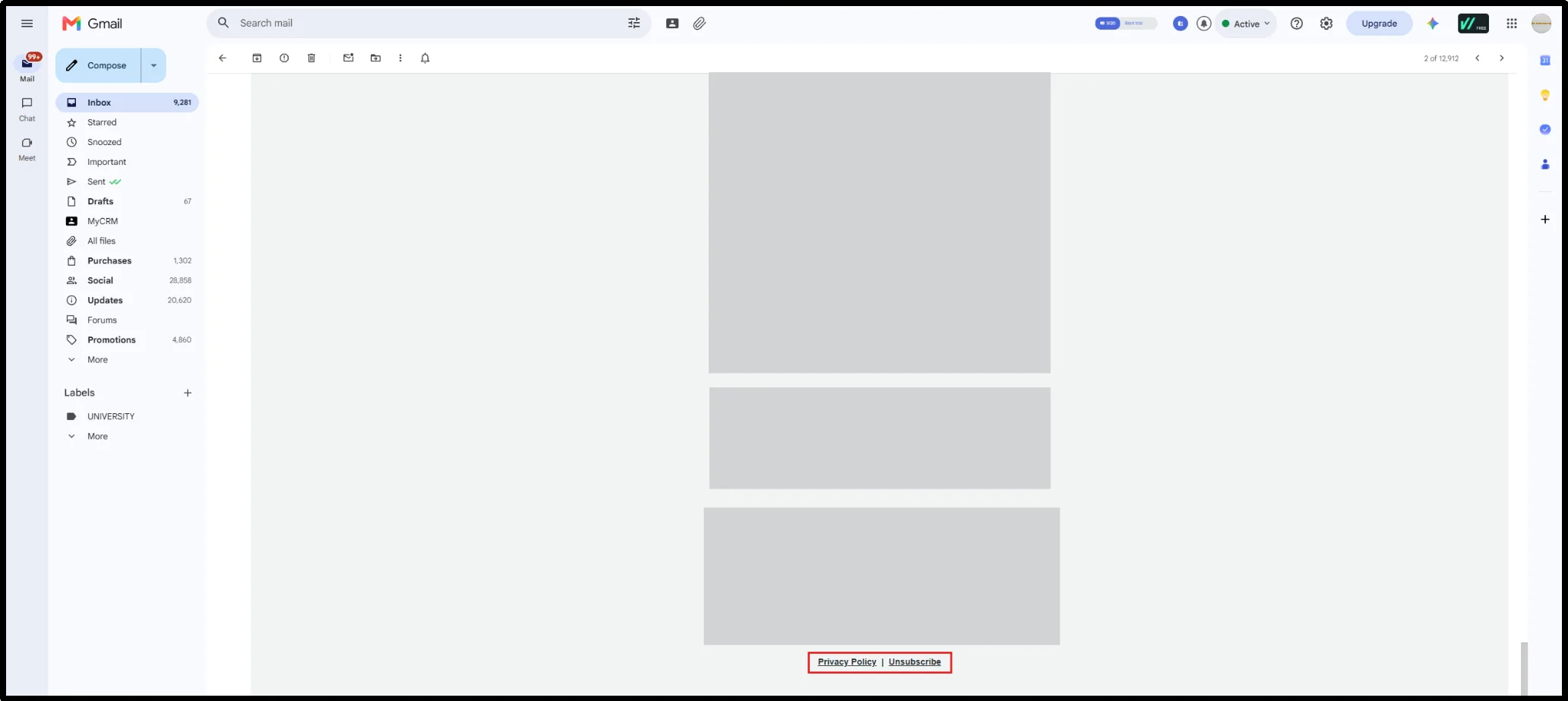
When people no longer want your marketing emails, give them an obvious way to leave.
Don’t hide the unsubscribe link. Don’t require users to log in just to leave a mailing list. Don’t force them through unnecessary screens.
A difficult unsubscribe process can frustrate recipients and make them more likely to report unwanted messages as spam.
Your unsubscribe experience should be:
- Easy to find
- Easy to understand
- Quick to complete
- Accessible without unnecessary login requirements
You can also offer a preference center that lets subscribers change email frequency or choose different content types.
But don’t use a preference center as an excuse to make unsubscribing difficult.
The exit should remain clear.
9. Implement One-Click Unsubscribe
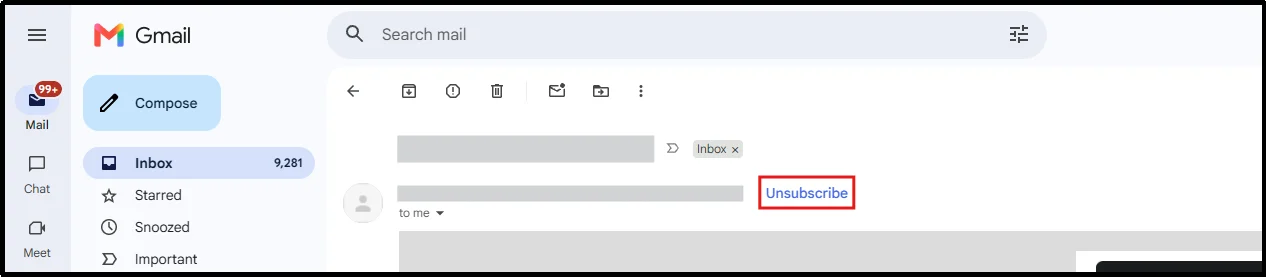
For Gmail bulk senders, Google requires one-click unsubscribe for marketing and promotional messages. Transactional messages such as password resets and form confirmations don’t fall under this particular requirement.
One-click unsubscribe uses the List-Unsubscribe headers defined by RFC 8058. Gmail expects the appropriate headers for applicable promotional messages. A normal unsubscribe link in the email body does not replace the required one-click mechanism.
The distinction matters.
A visible unsubscribe link helps recipients manage their subscription from the message. The List-Unsubscribe mechanism gives mailbox providers the information they need to offer a supported unsubscribe control near the message.
Google also recommends processing and honoring unsubscribe requests within 48 hours.
If you use an email service provider, check whether it automatically adds the required List-Unsubscribe headers and supports RFC 8058 one-click unsubscribe.
10. Authenticate Your Email With SPF, DKIM, and DMARC
Email authentication helps mailbox providers verify that your messages come from an authorized source.
The three core protocols are:
SPF
Sender Policy Framework (SPF) identifies the servers and services authorized to send email for your domain.
DKIM
DomainKeys Identified Mail (DKIM) adds a cryptographic signature to outgoing messages. Receiving servers can use that signature to verify the sending domain and check whether someone altered signed message content.
DMARC
Domain-based Message Authentication, Reporting, and Conformance (DMARC) tells receiving providers what to do when messages fail SPF or DKIM authentication and provides reporting capabilities.
DMARC also introduces alignment. The authenticated domain needs to align with the domain shown in the visible From address according to the applicable DMARC alignment rules.
Proper email authentication includes SPF records, DKIM signing, DMARC policies, and DMARC alignment between the authenticated identity and the visible From domain.
For Gmail bulk senders, Google requires authentication with SPF and DKIM and requires a DMARC record with at least a p=none policy. Gmail also checks other requirements, including alignment, valid DNS, TLS, and message formatting.
Authentication doesn’t guarantee inbox placement.
It gives your sending domain a technical foundation that mailbox providers can use when evaluating your messages.
11. Monitor Your Sender Reputation
Mailbox providers evaluate signals associated with your sending domain, IP reputation, authentication, recipient behavior, and sending patterns when deciding how to handle your messages.
Your reputation can reflect factors such as:
- Spam complaints
- Bounce patterns
- Sending behavior
- Recipient engagement
- Authentication
- Sending volume
- Domain reputation
- IP reputation
- Spam-trap activity
Google Postmaster Tools provides dashboards for spam rate, IP reputation, domain reputation, authentication, encryption, delivery errors, and Feedback Loop data.
Use it when you send enough traffic to Gmail personal accounts to generate useful data.
Then look at the wider picture.
A high spam rate with good reputation tells a different story from a low spam rate combined with poor reputation. Gmail specifically notes that spam rates can appear low when the provider already sends a large share of your messages to spam.
12. Avoid Sudden Sending Volume Spikes
A sudden increase in email volume can create delivery problems, especially when your audience hasn’t received messages from you regularly.
This matters when you introduce:
- A new sending domain
- A new IP address
- A new mailer
- A new email service provider
- A much larger mailing list
- A major increase in campaign frequency
Increase volume gradually.
Then watch the results.
Track complaint rates, bounce rates, delivery errors, reputation, and engagement rather than looking at volume alone. Google also advises senders to ramp up slowly because sudden increases can cause delivery issues.
13. Monitor Which Messages Generate Complaints
Your overall complaint rate tells you that a problem exists.
Campaign-level data can help you understand why.
Where your email platform supports complaint or Feedback Loop data, look for patterns such as:
- A specific campaign generating more complaints
- One audience segment reporting more messages
- Promotional emails generating more complaints than newsletters
- Complaints increasing after a frequency change
- Problems appearing after a sender identity change
- Complaint rates rising after a domain or mailer change
Gmail’s Feedback Loop dashboard can show spam rates for email campaigns that include a Feedback Loop identifier. You can use a Feedback-ID header to group messages by campaign or other identifiers and investigate which message types generate more spam reports.
Use campaign-level complaint data to identify whether a specific mailing list, message type, promotion, or sending pattern contributes disproportionately to spam reports.
Then fix the source.
Don’t treat your entire audience as the problem when one campaign caused the spike.
14. Protect Signup Forms From Bots and Abusive Signups
Not every address that enters your signup form belongs to a genuine subscriber.
Automated bots and abusive signups can contaminate your mailing list with invalid or unwanted addresses. That creates problems later.
Depending on your website and risk level, consider using:
- CAPTCHA or bot protection
- Email verification
- Double opt-in
- Rate limiting
- Signup validation
- Abuse monitoring
Pay attention to unusual signup spikes.
If hundreds or thousands of addresses suddenly enter your list from an unexpected source, investigate before adding them to your normal campaigns.
A sudden signup surge can point to bot activity, a compromised form, an integration problem, or another source of unwanted addresses.
15. Separate Transactional and Marketing Email
Transactional and marketing emails serve different purposes.
Transactional messages include:
- Password resets
- Order confirmations
- Payment receipts
- Account notifications
- One-time passwords
- Form confirmations
Marketing messages include:
- Newsletters
- Promotions
- Product announcements
- Sales campaigns
- Promotional offers
Don’t treat every email your website sends as marketing.
You can use the same domain or infrastructure for different message types, but manage their recipient expectations, sending practices, and monitoring separately.
Google recommends sending subscription messages and non-subscription messages from different email addresses. It also recommends identifying each subscription list with a unique List-ID or a unique From address.
Separating these streams can also make troubleshooting easier. If a promotional campaign generates complaints, you can investigate that traffic without confusing it with password resets or order receipts.
How to Reduce Spam Complaints for WordPress Emails
WordPress websites can generate email from many different plugins and processes, including:
- Contact forms
- WooCommerce orders
- Password resets
- User registrations
- Membership systems
- Learning management systems
- Security notifications
- Website administrators
WordPress uses wp_mail() to hand messages to its configured mail transport. However, wp_mail() itself doesn’t guarantee successful delivery or inbox placement.
If your WordPress site relies on a server’s default mail configuration, messages may lack proper authentication, encounter sending errors, or face delivery problems at the receiving provider.
An authenticated SMTP or API-based mailer can give your WordPress site a more reliable sending path through an email service provider that supports authentication, delivery reporting, and other email infrastructure features.
But SMTP isn’t a spam shield.
It helps solve the technical sending layer. It doesn’t decide whether recipients want your emails.
You still need good consent, list management, content, frequency, authentication, and unsubscribe practices.
How Post SMTP Helps Improve WordPress Email Deliverability
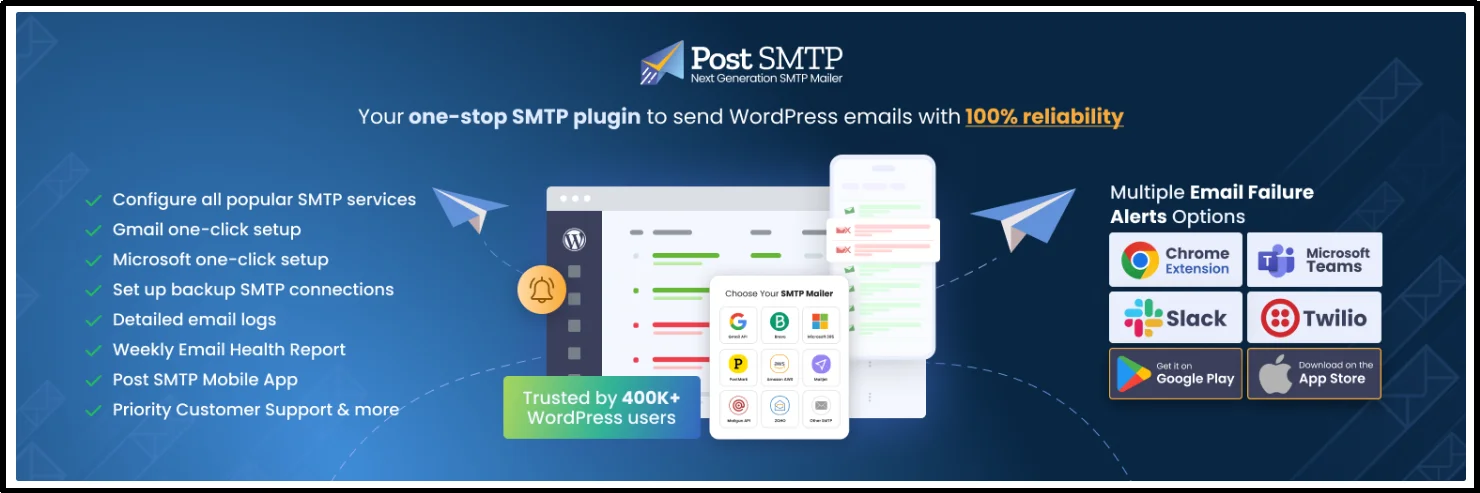
If your website runs on WordPress, Post SMTP can help you build a more reliable email-sending setup and troubleshoot WordPress email problems.
Post SMTP supports 20+ SMTP service providers and offers email logging, failure notifications, fallback connections, and other email delivery tools.
Depending on your Post SMTP configuration, plan, and installed extensions, you can:
- View WordPress email logs and inspect delivery status
- Connect 20+ supported SMTP mailers through available authentication methods
- Configure a fallback mailer
- Retry failed emails
- Receive email failure alerts
- Generate email health reports
- Monitor email activity through the Post SMTP mobile app
- Resend failed emails from supported interfaces
- Receive browser notifications through the Chrome Extension
- Use the Report & Tracking extension to review email performance and open data
- And much more. Check out the complete feature list here.
These tools can help you determine whether a WordPress email problem originates from your site’s configuration, mailer connection, SMTP response, or another stage of the sending workflow.
They can’t tell a recipient what to think.
Post SMTP cannot control whether someone reports an email as spam. You still need to follow good permission, list-management, content, frequency, authentication, and unsubscribe practices.
If you’re troubleshooting WordPress email delivery, see our guide on How to Configure SMTP for WordPress to Send Emails.
How to Calculate and Monitor Your Complaint Rate
A single number rarely tells the whole story.
When you monitor spam complaints, compare the rate with other signals.
Look at:
- Spam complaint rate
- Bounce rate
- Delivery errors
- Domain reputation
- IP reputation
- SPF authentication
- DKIM authentication
- DMARC authentication
- Sending volume
- Engagement
- Unsubscribe activity
- Campaign-level complaint data
Google Postmaster Tools separates these signals into dedicated dashboards, including Spam Rate, IP Reputation, Domain Reputation, Authentication, Encryption, Delivery Errors, and Feedback Loop.
That makes diagnosis easier.
For example, a sudden complaint increase after a new promotional campaign points you toward the campaign, audience, content, or frequency. A delivery problem that appears immediately after a mailer change points toward your sending infrastructure.
Start with the timeline.
Then work backward.
What to Do If Your Spam Complaint Rate Is Too High
If your complaint rate suddenly increases, don’t keep sending the same campaigns at the same volume while hoping the problem disappears.
Pause or reduce non-essential campaigns while you investigate the cause.
Use this process.
1. Identify When Complaints Increased
Find the date or campaign where the trend changed.
Compare it with:
- A new campaign
- A change in frequency
- A new audience segment
- A new sender address
- A new domain
- A new mailer
- A sudden volume increase
- A change in signup sources
The timeline often reveals the first useful clue.
2. Check Your Authentication
Verify your:
- SPF record
- DKIM configuration
- DMARC record
- DMARC alignment
- DNS records
- TLS configuration
For Gmail traffic, use the Authentication and Compliance dashboards in Postmaster Tools where available. Google provides authentication data for SPF, DKIM, and DMARC.
3. Review Your Recent Campaigns
Look for changes in:
- Content
- Subject lines
- Frequency
- Audience
- Sender identity
- Promotional intensity
- Signup source
- Email design
- Unsubscribe experience
Ask what changed immediately before complaints increased.
That question often proves more useful than looking for a generic list of “spam trigger words.”
4. Suppress Recipients Who No Longer Engage
Run a re-engagement process for long-term inactive subscribers.
If they remain inactive, suppress them according to your list-management policy.
Don’t remove someone just because they skipped one newsletter.
Look for a meaningful pattern.
5. Make Unsubscribing Easier
Check both:
- Your visible unsubscribe link
- Your List-Unsubscribe headers
For applicable Gmail bulk-sender traffic, verify that your one-click unsubscribe implementation follows Google’s requirements and RFC 8058.
Also process unsubscribe requests promptly. Google recommends honoring these requests within 48 hours.
6. Reduce Unnecessary Sending
Focus on recipients who actively want your messages.
Don’t keep sending to disengaged audiences simply to maintain a particular email volume.
More emails don’t automatically create more value.
Sometimes they create more complaints.
7. Monitor Reputation and Complaint Data
Continue checking your spam rate, reputation, authentication, delivery errors, and campaign-level data.
Don’t expect the numbers to change instantly.
Google notes that improvements in spam rates can take time to influence spam classification.
Make changes based on the evidence you collect.
Then monitor the result.
Email Spam Complaint Prevention Checklist
Use this checklist before you send your next large campaign:
- Get clear subscriber consent.
- Tell subscribers what they will receive.
- Set clear frequency expectations.
- Confirm email addresses where appropriate.
- Segment subscribers based on relevant data.
- Send content that matches subscriber expectations.
- Maintain a healthy mailing list.
- Suppress hard bounces and invalid addresses.
- Run re-engagement campaigns for long-term inactive subscribers.
- Use honest subject lines.
- Make your unsubscribe link easy to find.
- Implement one-click unsubscribe for applicable Gmail bulk-sender traffic.
- Honor unsubscribe requests promptly.
- Publish and maintain SPF records.
- Configure DKIM signing.
- Publish a DMARC record.
- Check DMARC alignment.
- Use TLS for email transmission.
- Monitor Gmail Postmaster Tools.
- Watch domain and IP reputation.
- Track complaints and bounce trends.
- Avoid sudden sending-volume increases.
- Investigate unusual signup spikes.
- Separate marketing and transactional email workflows.
- Review campaign-level complaint data when available.
Why Are People Marking My Emails as Spam?
Recipients may mark your emails as spam when they don’t remember subscribing, don’t recognize your sender name, receive content they didn’t expect, get messages too frequently, or can’t find an easy unsubscribe option.
Poorly sourced email lists can create the same problem.
So can a sudden change in sending behavior.
A complaint spike may follow a new promotional campaign, a change in audience, a new sender identity, a higher sending frequency, or a major increase in volume.
Look for the change that happened before the complaints increased.
Don’t assume the problem comes from the SMTP server.
Spam Complaint vs. Unsubscribe
An unsubscribe means the recipient actively chooses to stop receiving messages.
A spam complaint means the recipient reports the message as unwanted through their mailbox provider.
Those actions differ.
Both signals matter, but they tell you different things about the recipient experience.
A clear unsubscribe process gives people a direct way to leave your mailing list instead of using the spam button. For Gmail, Google also requires one-click unsubscribe for applicable marketing and promotional messages sent by bulk senders.
Make the exit easy.
That’s good email hygiene.
Reduce Spam Complaints and Improve Email Deliverability
Reducing spam complaints starts with respecting recipient expectations.
Collect clear consent. Send relevant content. Keep a healthy subscriber list. Use a reasonable sending frequency. Make unsubscribing easy. Authenticate your sending domain.
For Gmail senders, monitor the user-reported spam rate in Postmaster Tools and aim to keep it below 0.10%. Don’t let the rate reach 0.30% or higher. Google also provides reputation, authentication, delivery-error, and Feedback Loop dashboards that can help you investigate delivery problems.
For WordPress sites, a properly configured SMTP or API-based mailer can help you troubleshoot sending failures and monitor email activity.
But technical configuration alone cannot prevent spam complaints.
Recipients make that decision.
If you run WordPress and need better visibility into email sending failures, logs, authentication, and delivery workflows, explore Post SMTP.
Frequently Asked Questions
How do I lower my email spam complaint rate?
Start by sending messages only to recipients who expect them. Use clear consent, confirm email addresses where appropriate, maintain a healthy list, segment your audience, control sending frequency, use honest subject lines, provide an easy unsubscribe option, authenticate your domain, and monitor complaint and reputation signals.
For Gmail, keep the user-reported spam rate below 0.10% and avoid reaching 0.30% or higher.
What is a good email spam complaint rate?
For Gmail, Google recommends keeping the user-reported spam rate below 0.10% and avoiding a rate of 0.30% or higher. Use Google Postmaster Tools to monitor Gmail-specific spam-rate data. Other mailbox providers may use different metrics and thresholds.
Why are people marking my emails as spam?
Recipients may report emails because they didn’t clearly consent to receive them, don’t recognize the sender, receive irrelevant or overly frequent messages, can’t easily unsubscribe, or no longer want the content.
A sudden change in sending frequency, audience, sender identity, or campaign content can also increase complaints.
Does SPF prevent emails from going to spam?
No.
SPF helps receiving providers verify authorized sending sources, but passing SPF doesn’t guarantee inbox placement. Mailbox providers can consider DKIM, DMARC, domain reputation, IP reputation, recipient behavior, complaints, message content, and sending patterns.
Does DKIM prevent spam complaints?
No.
DKIM helps receiving servers verify the authenticity and integrity of signed messages. It doesn’t stop recipients from reporting unwanted email.
Does DMARC prevent spam complaints?
No.
DMARC helps mailbox providers evaluate whether a message passes authentication and whether the authenticated domain aligns with the domain in the From address. It can also provide reporting data.
DMARC doesn’t make recipients want an email.
Does SMTP prevent spam complaints?
No.
SMTP can improve WordPress email delivery reliability and help you send through an authenticated mailer, but it doesn’t determine whether recipients want your messages.
Reduce complaints through clear consent, relevant content, healthy list management, reasonable sending frequency, proper authentication, and easy unsubscribe options.
Can images in emails cause spam complaints?
Images alone don’t automatically cause spam complaints.
However, emails that rely heavily on images, provide little useful text, contain misleading content, or create a poor user experience can contribute to filtering or recipient dissatisfaction.
Focus on relevant content, a healthy sender reputation, proper authentication, and clear subscription controls instead of relying on outdated lists of “spam trigger words.”
What is the difference between a spam complaint and a bounce?
A spam complaint occurs when a recipient reports your message as unwanted.
A bounce occurs when the receiving system cannot accept or deliver the message.
They require different responses.
A complaint usually points toward recipient expectations, content, frequency, consent, or unsubscribe problems. A bounce often points toward an invalid address,
recipient-server issue, sending configuration problem, or another delivery error.
Can Post SMTP reduce spam complaints?
Post SMTP can help WordPress site owners improve the technical side of email delivery by connecting WordPress to supported SMTP or API-based mailers, logging email activity, monitoring failures, and providing delivery-related troubleshooting tools.
It cannot control recipient behavior.
You still need to manage consent, content, list hygiene, sending frequency, authentication, and unsubscribe requests.
How does Google Postmaster Tools help reduce spam complaints?
Google Postmaster Tools provides Gmail-specific information about spam rates, domain reputation, IP reputation, authentication, encryption, delivery errors, and Feedback Loop data. These dashboards can help you identify changes in sending performance and investigate potential causes.
The data doesn’t replace your email service provider’s reporting. Use both when investigating a deliverability problem.
How quickly should I honor an unsubscribe request?
Google recommends processing and honoring unsubscribe requests within 48 hours. For Gmail bulk senders, applicable marketing and promotional messages must also support one-click unsubscribe through the appropriate List-Unsubscribe implementation.