


























If you are searching for the best WP Mail SMTP alternative, then there is no better choice than the Post SMTP WordPress plugin.
Besides replacing the WordPress’ default mail function with the SMTP (Simple Mail Transfer Protocol) the Post SMTP plugin offers so many features that help you improve your website’s email deliverability. We will explore all these features later in the article.
If you want a free, secure, and efficient way to send WordPress emails without hassle, Post SMTP is your best option.
Let’s explore why it stands out as the top WP Mail SMTP alternative.
How Post SMTP Fixes WordPress Not Sending Emails Issue
By default, WordPress sends emails using the PHP Mail (wp_mail) )function, which often fails to deliver emails because it doesn’t authenticate emails. The good news is that Post SMTP solves this problem by replacing the unreliable PHP mail() function with an industry-standard protocol for sending emails known as SMTP.
Let’s explore how this plugin resolves WordPress email-related issues in three ways.
#1: Easy SMTP Integration for Reliable Email Delivery
As of now, you know that to fix the WordPress not sending emails issue first you need to configure an SMTP server with your WordPress site. To make this process easy for you, Post SMTP allows you to connect all top SMTP services like Gmail, Microsoft 365, Amazon SES, Zoho Mail, SendGrid, Mailgun, Postmark, Brevo (formerly Sendinblue), SMTP2GO, and more.

You can activate additional SMTP servers by navigating Post SMTP → Extensions.

The best thing is that setting up an SMTP connection using Post SMTP is straightforward. The plugin provides a 3-step setup wizard that guides you through the process, making it easy to integrate your preferred email service without requiring any technical expertise.
#2: Advanced Security with OAuth 2.0 Authentication
Unlike many SMTP plugins that require storing passwords in your WordPress database, Post SMTP puts users’ security first by implementing OAuth 2.0 authentication. This modern authentication method eliminates the need to store sensitive credentials, reducing the risk of phishing attacks and unauthorized access.
With OAuth 2.0, you can securely authenticate your SMTP service provider’s account via API and prevent hackers from exploiting stored credentials.
As you can see, the Gmail API option in the following screenshot:

#3: Comprehensive Email Monitoring & Management Tools
Post SMTP provides powerful tools to monitor and manage your WordPress emails efficiently. The following features help you track email performance and fix issues proactively:
- New Dashboard for Better Accessibility
The new Post SMTP dashboard simplifies email management with five key sections:
- Email Delivery Overview – Track total sent, successful, failed and opened emails.
- Recent Logs – View subject, recipient, delivery time, and status of emails.
- Quick Access to Guides – Get step-by-step instructions for configuring SMTP settings.
- Troubleshooting Tools – Run diagnostics, send test emails, and reset settings.
- Mobile App QR Code – Quickly connect the Post SMTP mobile app for instant alerts.

- Real-Time Failure Alerts with Webhooks
Never miss a failed email notification again! Post SMTP allows you to set up Webhook Alerts, which allows you to receive real-time failure notifications via your preferred app.
With the Webhook Alerts option, you can:
- Get instant alerts when an email fails to be sent.
- Integrate with other apps for automated responses.
- Set up multiple webhook URLs to receive notifications across different platforms.

- Chrome Extension & Mobile App for Instant Notifications
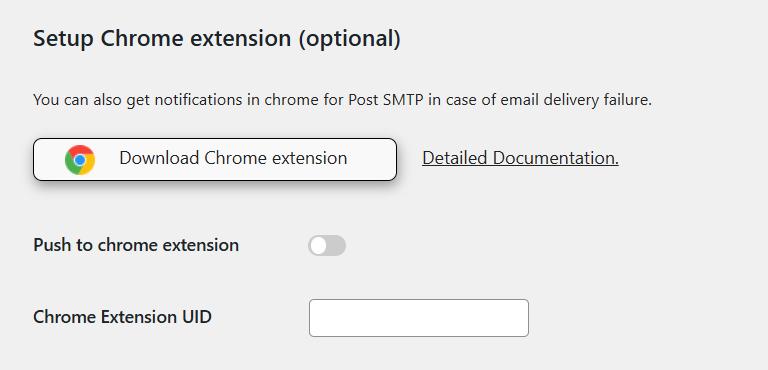
With the Post SMTP Chrome Extension and Mobile App, you can monitor email activity on the go. These tools send instant alerts for failed emails so you can take action immediately and maintain smooth communication.
Post SMTP Chrome Extension:
Post SMTP Mobile App:

We will discuss the Post SMTP mobile app in more detail in the following section.
10 Key Features That Make Post SMTP The Best WP Mail SMTP Alternative
When it comes to WordPress email deliverability, Post SMTP is the best WordPress SMTP plugin that provides a comprehensive solution that enhances reliability, security, and monitoring. Below are 10 key features that make Post SMTP the best WP Mail SMTP alternative for your WordPress site.
#1: Secure OAuth 2.0 Authentication for SMTP Integration
Many SMTP plugins require storing email credentials in your WordPress database, which puts your credentials at risk of being stolen.
Fortunately, Post SMTP eliminates this vulnerability by integrating OAuth 2.0 authentication, which connects your SMTP server without storing sensitive information. Instead of using static passwords, OAuth 2.0 generates a temporary token (API Key), making unauthorized access nearly impossible.
With native support for all major SMTP service providers, this SMTP plugin provides an extra layer of protection while simplifying email configuration.
#2: Detailed Email Logs for Better Tracking
Keeping track of sent emails is crucial for diagnosing issues and monitoring email performance. Post SMTP includes an advanced email log screen that provides a clear overview of every email sent from your WordPress website. You can access essential details such as:
- Subject – Displays the subject line of each email.
- Recipient – Shows the email addresses of recipients.
- Delivery Time – Logs the exact timestamp when the email was sent.
- Status – Indicates whether the email was delivered successfully or failed.
- Error Messages – Displays specific error messages for failed emails.
- Actions – You can resend or delete emails directly from the log screen.
Additionally, Post SMTP enables filtering logs by date and keyword search, exporting logs for record-keeping, and clearing unwanted logs to maintain database efficiency.
#3: Backup SMTP for Continuous Email Delivery
A single SMTP failure can disrupt email communication, but Post SMTP prevents this with its Fallback Mailing feature. This function lets you set up a backup SMTP server that automatically takes over if the primary SMTP service experiences downtime.
Common reasons SMTP servers fail include:
- Server overload due to high email traffic.
- Connectivity issues that interrupt email transmission.
- Technical glitches that prevent email processing.
- Security policies that block outgoing emails.
With Post SMTP, you can configure a secondary SMTP provider to maintain email continuity. To set it up, navigate to Post SMTP → Settings → Fallback and enter your backup SMTP details.
#4: Real-Time Email Failure Alerts
Detecting failed email deliveries in real-time is crucial for website owners and administrators. Post SMTP offers multiple notification methods to alert you when an email fails to send. You can receive failure alerts via:
- Admin Email – Get an email notification when an email fails.
- Slack Integration – Receive alerts directly in your Slack workspace.
- Twilio SMS – Get SMS notifications for immediate action.
- Webhook Integration – Send failure alerts to external applications.
These instant notifications allow you to resolve email delivery issues quickly, preventing missed communications with users and customers.
#5: Free Chrome Extension for Email Monitoring
Post SMTP provides a Chrome Extension that notifies you of email failures directly in your browser. Instead of logging into WordPress to check email status, you receive instant alerts within Chrome, making it easier to manage email performance.
This lightweight extension helps you:
- Track email activity without accessing the WordPress dashboard.
- Receive failure notifications in real time.
- Quickly troubleshoot and resolve email issues.
You can enable this extension from the Notifications tab within the Post SMTP settings.
#6: Post SMTP Mobile App for On-the-Go Email Tracking
Managing email notifications while away from your desk is essential for website administrators. The Post SMTP Mobile App allows you to track WordPress email activity anytime, anywhere.
With this app, you can:
- Monitor sent and failed emails in real time.
- Receive instant push notifications for email failures.
- Resend failed emails directly from your mobile device.
- Manage multiple WordPress sites from a single app.
- Quickly diagnose errors with detailed failure messages.
- Contact Post SMTP support directly through the app.
#7: Premium Extensions for Enhanced Functionality
While Post SMTP provides powerful email solutions in its free version, premium extensions add even more capabilities, including:
- Twilio Notification Extension – Get SMS alerts for failed emails.
- Office 365 Extension – Connect Post SMTP with Office 365 using OAuth 2.0.
- Amazon SES Extension – Integrate Amazon SES for high-volume email delivery.
- Zoho Mail Extension – Easily set up Zoho Mail’s SMTP server.
- Email Log Attachment – View, download, and resend email attachments.
- Advanced Email Delivery & Logs – Optimize email sending with backend delivery, auto-retries, and log management.
- Email Tracking & Reporting – Monitor email opens, failures, and campaign performance.
These extensions allow businesses to customize Post SMTP based on their unique email delivery needs.
#8: MainWP Extension for Centralized Email Management
Post SMTP offers a MainWP Extension that allows centralized SMTP configuration for website owners managing multiple WordPress sites. With this integration, you can:
- Set up SMTP configurations for multiple websites from a single dashboard.
- Monitor email logs and troubleshoot delivery issues efficiently.
- Receive instant notifications for failed emails across all connected sites.
This extension is 100% free and helps streamline email management for agencies and developers handling multiple WordPress installations.
#9: New Post SMTP Dashboard for Easy Email Management
The latest Post SMTP update introduces a modern, user-friendly dashboard that simplifies email management. The redesigned dashboard includes:
- Email Delivery Overview – Get a visual summary of sent, failed, and successful emails.
- Recent Email Logs – View the latest emails with subject, recipient, and status details.
- Quick Access to Guides – Find step-by-step instructions for configuring SMTP settings.
- Troubleshooting Tools – Run diagnostics, send test emails, and reset settings.
- Mobile App QR Code – Quickly scan and connect the Post SMTP mobile app for instant notifications.
This new dashboard enhances usability and makes monitoring your website’s email activity more efficient.
#10: Email Health Report
Have you ever wondered whether your emails reach inboxes or get lost in the spam? That’s exactly what the Email Health Report helps you with. It gives you a clear view of your email deliverability, helping you quickly detect and fix potential issues.
Key Benefits of the Email Health Report
✅ Monitor Email Performance – Get insights into delivery rates, failures, and potential issues.
✅ Fix Issues Quickly – Identify bounced or undelivered emails and take action.
✅ Optimize Your Strategy – Adjust email settings based on performance data to improve inbox placement.
How to Enable It?
- Go to Post SMTP → Settings → Email Reporting in your WordPress dashboard.
- Click Enable to activate the feature.
- Choose how often you want reports (daily, weekly, or monthly).
- Click Save Changes to apply your settings.
With Post SMTP’s Email Health Report, you no longer have to guess whether your emails are being delivered. This feature helps you proactively manage email performance, improve engagement, and prevent email failures from affecting your business.
Final Verdict: The Best WP Mail SMTP Alternative is Post SMTP
Post SMTP stands out as the ultimate WP Mail SMTP alternative by providing a secure, reliable, and feature-rich solution for WordPress email deliverability. Whether you need seamless SMTP integration, advanced email monitoring, or real-time failure alerts, this plugin has everything to keep your emails on track.
Why Choose Post SMTP?
✅ Secure OAuth 2.0 Authentication – No need to store SMTP passwords in your database.
✅ Comprehensive Email Logs – Track sent, failed, and pending emails easily.
✅ Real-Time Failure Alerts – Get instant notifications via email, Slack, Twilio, or webhooks.
✅ Backup SMTP Support – Ensure email continuity with a fallback SMTP server.
✅ User-Friendly Dashboard – Manage email performance effortlessly from a modern interface.
Post SMTP is easy to install and configure. You can download it from the WordPress plugin repository or the Post SMTP website. Follow our step-by-step guide on how to set up Post SMTP on your website and take control of your WordPress emails today! 🚀